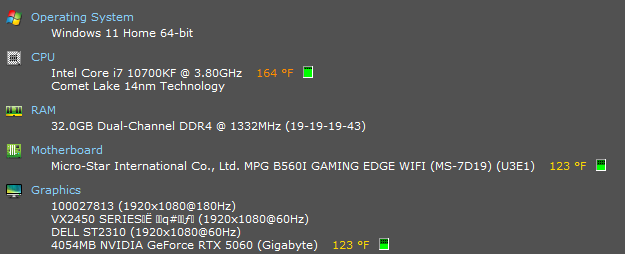
did the new gdevelop update change how ambient occlusion works?
my monitor runs at 180 fps, and my game was running fine with ambient occlusion. but now, after the 5.6.286 update, it seems to cap my game to a weirdly steady 60fps. it runs normally when i disable it.
theres also a side effect where 2d sprites on the same layer appear to be bleached, but thats not a problem for my project, im nervous that may be a problem for other users though.
My testing shows there is no 60fps cap when the Ambient Occlusion is active in 5.6.286
But yeah, in the recent update they fixed that Ambient Occlusion was sampling depth information before anti aliasing applied, which it was causing jagged dark edges on the 3D objects.
I see. there might be a new bug that maybe sampling done in all layers instead of single layer. because it is very serious performance drop. Because, my test was on a simple project with just one extra 2D layer.
Interesting issue! Ambient occlusion can sometimes have a noticeable impact on performance, depending on the rendering settings and hardware.
Have you checked whether the 60 FPS limit is caused by the ambient occlusion effect itself or by another setting, such as VSync or the display frame-rate limit?
It would also be helpful to know your hardware specifications and whether the FPS drops only when ambient occlusion is enabled.
Hopefully you can find a solution without having to compromise too much on visual quality!