I have several instances of an object. Let’s say 4 weapons, for example.
I want to allow the player to drag one of the 4 instances of the weapon object to a drop zone I define. If there is already a weapon in that drop zone I want the weapon they just dropped to replace it and for the weapon that is already in the drop zone to move to a different location.
I also need to update some variables based on which weapon is currently dropped into the drop zone. So when a weapon is replaced, I have to modify the variable (remove the effect of the previous weapon and add the effect of the newly dropped weapon).
I’ve tried a bunch of different approaches in events, but I can’t seem to get this to work.
Any ideas?
I think the easiest thing would be to give them an id number and also have a number variable for the weapon called ‘carried’
0 - default - not being carried and not in dropzone
1 - being carried - attached to player
2 - in dropzone
3 - out of action
arrive in dropzone with a new weapon.
pick all weapon - carried=2 - change pos of weapon to -10,000,-10,000 and change carried to 3
pick all weapon - carried=1 - change pos of weapon to dropzone.X(), dropzone.Y() and change carried to 2
2 Likes
That makes sense, the problem I’m having is in using the instance ID variable to grab ahold of the weapon instance. I have 4 weapons and I don’t know how to specifically have the weapon already dropped be moved away vs the weapon that has just been dropped, which needs to be placed in the drop zone.
I read yesterday about how unique instance IDs are anti-pattern to GDevelop and how to work around that (or from a GDevelop perspective, how to work WITH the pattern of GDevelop). But I’m still stumped. 
I spent the first half of yesterday cracking out functionality left and right then the afternoon totally stuck on this, which seems very basic.
I’ll try making a simpler prototype of just this and posting a screenshot of my event logic here.
I suspect there is something about the way GDevelop reads events (not in order, but rather 60 FPS), and the way it handles variables that I am missing, that once revealed will seem obvious.
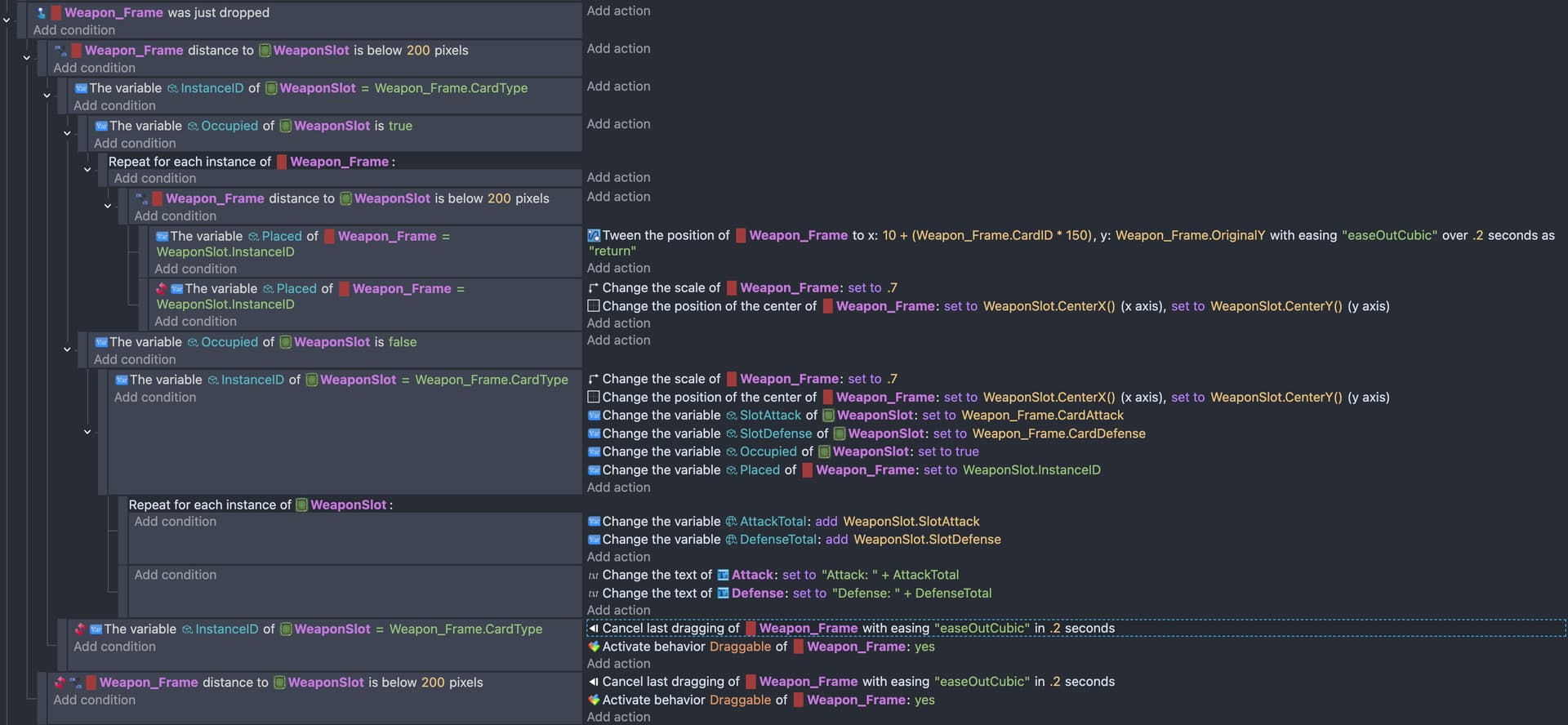
Here is the section of my events related to this. Everything is working well, except I can’t grab ahold of the weapon that was previously dropped and kick it back to it’s original position, when a new weapon is dropped.
Specifically, this section doesn’t work:

How do I tell the event to move the weapon that had been previously dropped there? I tried using a “Placed” variable set to the WeaponSlot. But I must not be referencing it right.
My guess is that I’m in a section referencing the weapon that has just been dropped and it can’t reference the weapon that was previously dropped, but I don’t know how to get outside of the weapon drop to refer to that other weapon, since this has to execute upon a new weapon drop.
This is something fundamental about GDevelop that I’m just not getting yet. How to nest conditions to execute something like this. My instinct is to tag the previously dropped weapon with a variable and then move it using that tag. Then apply that tag to the newly dropped weapon.
I seem to run into simultaneity issues or I can’t reference a different instance of an object when I’m in the middle of a condition about this instance of the object.
Any help greatly appreciated!
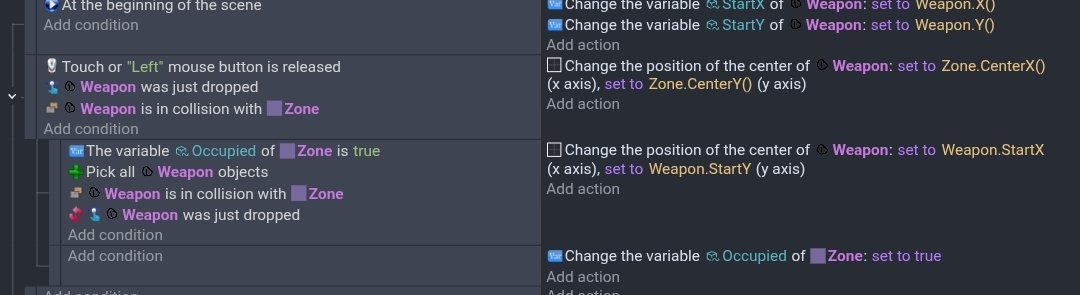
A picture of the scene might help. This is how I tested your concept but I’m unclear of your need so it might not help.
Part of your issue might be that the was dropped condition picks just 1 object so the for each instance only has that object in the pick list. A pick all condition or action might be needed before the for each instance.
1 Like
Thanks, Keith.
“Pick All” did help. “Was dropped” was selecting only the one instance of the object that had just been dropped.
I’m still having other issues. I’ll keep working on it and post a new screenshot when I get further.
1 Like
Hi @ChellaP -Did you see the comment that I left yesterday on the other ‘drag and drop with objects replacement’ thread
This is how i normally solve the not referring to itself problem - save the x and y and id - move it off scene - use the saved x and y to reference the other instances, and then use the saved id to bring the original one back again… Pick all with id conditions is the key to success in long threads referring to multiple instances of the same thing.
You might need to add the instance id to the tween name to help when referring to it
Thanks, Dave. That is helpful.
How do I Pick All with ID? I tried Pick All today and got that to help some, but I don’t know how to add an object instance ID to Pick All. What does that look like in an event?
If you look at my comment on the 'drag and drop with objects replacement’ thread …I meant to tag you in. Just refer to the variable under pick all