Yes, the thing is, the same problem would happen if you used lots of 1-5mb models as well. The size of individual model doesnt seem to matter much, only how many mb’s of models gets loaded into memory. So it menas if you have a really big 3d game, with like 30 levels, even if all your models are 1-5mb, you will eventually hit this problem as well.
It is clear to me it is some limittaion with the engine, yeah. There is just a hard memory limit of what can be loaded, and the engine does not do a good job cleaning its resources between scene loads. It seems like something that could be fixed, I dont know. I hope someone that works on engine will look into it at some point. I know they have reworked memory management a few times now.
from my point of view it could be you’ve reached the maximum polygons limit of GD…
even some dedicated software (…like blender) struggle at loading bigger model with lots of polygons…and ofc it doesn’t means that it leaks memory…
bigger in terms of polygons doesn’t necessarily means bigger in terms of Bytes size…
various factors have to be taken into count:…textures…efficient UV mapping…and better normal maps can reduce polygon count without sacrificing visual quality…
anyway… imo it could be that you’re pushing GD polygons and texs capacity to its limits…indipendently from the bytes size of your models…
and if you ask me…many times i had in mind (for example) to turm my player character into a 3D object …but knowing the power of the engine…i’ve never been confident at doing it…
edit:and about using model or not into the scene imo doesn’t mean they’re not stored anyway to be reused…
eg even blender have a scene manager …but even if you don’t use or hide your model between scenes…the overall size doesn’t change …
and i’m not totally sure but i guess the same happens in other engines like unity…and unreal for example…
…they’re just more fitted for 3D projects…for various reasons…
…and “animate” polygons require a huge quantity of horsepower
I’ve been working on a new 3D game, this one with many scenes takes place in a big mansion. And of course I ran into this SAME issue. As you load enough scenes back to back, and your project gets large enough, you WILL run into this issue. I guess this game is dead now too. Please tell me how I can fix this!! It makes the engine unusable for anything beyond sprite phone games with 10 minutes of gameplay…
I tried this option, but it doesnt seem to work very well.
When you change scenes, it kind of tries to release some memory, it frees up like 10%, but then as you keep changing scenes, it keeps climbing and climbing and never goes down. It just still seems like a memory leak.
I mean look at this. If I keep loading the samee two scenes back and forth, the memory infinitely climbs up. Then at some point it just stops loading and freezes. Is this not proof of an obivous memory leak? Second game I’ve made with this problem. What am I supposed to do? The game is dead until I can fix it.
It’s almost certainly has nothing to do with events because the last game with this problem even after I disabled ALL events it still happened…
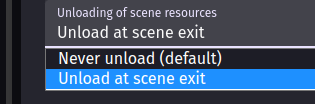
This clip is using “Unload at scene exit”
As I need to free memory between scenes or else the game will freeze once enough memory is consumed. (Not my system memory, I have plenty to spare, there seems to be some limit in Gdevelop)
Problem:
My game freezes during scene transitions after switching scenes multiple times. Each scene works fine when loaded directly, but memory usage climbs steadily when moving back and forth between scenes until the game freezes on the loading bar. Console shows Array buffer allocation failed and GLTF loader errors.
What I Tested (and Ruled Out)
1. Events & Logic
Disabling all events does not stop the memory climb.
Disabling all extensions does not stop it.
Explicitly deleting all objects on scene end does not stop it.
Unloading audio does not stop it.
Adding delays between scene changes does not stop it.
→ This strongly suggests it is not event logic–related.
2. Scene Settings
Tried resource loading modes:
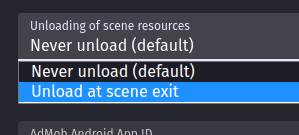
Unload at scene exit
Stop paused scenes
These sometimes delay the issue but do not prevent it.
Setting occasionally resets to default on restart (possible bug).
→ Scene lifecycle cleanup appears incomplete.
3. Reproducibility With Empty Scenes
Two empty scenes → no memory climb.
Scene A empty + Scene B with objects → memory climbs.
→ Confirms the issue is tied to scene contents, not transitions themselves.
4. Isolating Objects
Removing all instances from a problematic scene stops the memory climb.
Multiple smaller GLBs totaling ~19 MB → no memory climb
→ This rules out a simple “MB size threshold.”
6. Model Compression
Models compressed with Babylon GLB compressor (default settings).
Compressing known-good models does not introduce leaks.
Compressing problematic models does not fix the leak.
→ Compression alone is not the root cause.
7. Babylon.js Sandbox Test
Loading/reloading the same problematic GLB repeatedly in Babylon Sandbox does not cause memory growth.
→ Strong evidence the GLB itself is valid and Babylon can free it correctly.
8. Linux Memory Monitoring
Verified memory growth using KDE System Monitor and RES values.
Memory steadily increases when switching scenes repeatedly.
Memory stabilizes immediately if problematic GLBs are removed.
→ Confirms a real memory leak, not Linux cache behavior.
Key Conclusion
This appears to be a GDevelop-side memory leak related to 3D / GLB scene cleanup, triggered by specific model structures, not:
Events
Extensions
File size
Compression
Babylon itself
GDevelop does not fully release memory for certain GLB resources when scenes are changed, causing cumulative RAM usage until the engine freezes.
I will provide another repro project with problematic .glb files which show the problem.
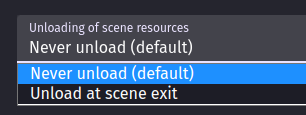
Never unload:
Memory stays consumed, you can go back and forth between loaded scenes, but every scene stays in memory. This means if you load a lot of scenes, or a few heavy scenes, at some point the game will freeze on trying to load the next scene. There seems to be some hard limit of memory consumed where the engine just crashes and will not load anymore.
Unload at scene exit: expected to free memory, but in my case memory only drops slightly (or not enough) and can still accumulate, especially when certain 3D .glb models are involved.
I can reproduce memory growth by switching scenes repeatedly; with no 3D models it stays flat; with some specific .glb models it grows steadily.
I also encountered a situation where the game froze due to excessive use of the Physics3D Behaviors on unnecessary objects while troubleshooting memory issues related to 3D models. For instance, there’s no need to apply it to objects the player can’t interact with. Watching the video, I think applying the Physics3D Behaviors only to important objects like desks or shelves might help alleviate the memory problem a bit!
I think that could make the problem worse, yes, because it adds memory. The problem is basically the engine freezes once it consumes enough memory, and it never frees memory sufficiently across scenes. But in my case even if I remove ALL behaviours/extensions/events - IT STILL HAPPENS. Simply because I use lots of glb models and my game is big, so across scenes it just rapidly consumes memory and never frees it. Leading to the game to quickly just FREEZE upon scene changes. Its very saddening, I just spent a lot of effort building up this new game , and now it feels pointless because its freezing and I have no recourse.
Heres a brand new project template (using the 3D one) , with a single model on scene A (coin_room.glb).
Scene B has just the floor
I press G to change between scenes
The memory infinitely climbs as the scenes change.
Sure it grows slowly, and I have to spam scene changes, but this problem just exponentially gets way worse as the game grows.
It seems to only happen with some models, I don’t know.
Model size doesn’t seem to be the main factor, it happens with this 10mb model , but it doesnt happen with another 20mb model.
At some point after it leaks so much, the game just freezes on scene change.
Btw If i wait like 60 seconds after spamming scene changes it does not go back down. & the same test with no/different 3d models = no increasing memory on scene changes.
Same thing happens regardless of if I use babylon compression, doesnt seem to be the cause.
Happens in exported game, my last game had the same issue, it would freeze if you loaded too many scenes. Because the memory doesnt release enough across scenes, it builds up.
And its like when the engine consumes enough memory it no longer loads
It seems like theres some unique property about some glb models that gdevelop doesnt release properly across scenes. Its like it only leaks on some models and not others. Maybe its something about how some models do textures, idk.
I need to figure out what it is and fix it asap because I can no longer work on my game!
Anyone else with a decently developed 3d game, can you swap between two scenes back and forth and see if the memory keeps rising?
Set it to “Unload at scene exit” for your testing.
Never unload: Doesnt free memory, lets you quickly swap between scenes, but if you load too many scenes, at some point it consumes too much memoy and freezes
Unload at scene exit: Seems like it would fix the problem, but it barely unloads, and infact when you reload between scenes, memory accumulates until eventual freeze.
Another model with the same problem
Scene A:
floor_stairs.glb
Scene B:
Empty
It seems like at least half the models I use have this problem though, many of them cause this memory climb, others don’t.
Heres an example of a model that WORKS and does not memory climb.
double_door.glb
This is the expected behaivour, this is what should be happening! The memory properly stays around the same amounts when flipping between scenes, it unloads correctly - no infinite climb.
Removed layer effects doesn’t affect it. No, the model doesnt have animations. It happens on like, 50% of the models I use. Its not just coin_room.glb.
At first I thought it just had to do with some models being too large filesize, but the memory climb sometimes happens on smaller models and sometimes doesnt happen on bigger models. I’m trying to dig through blender now to see what it could be.