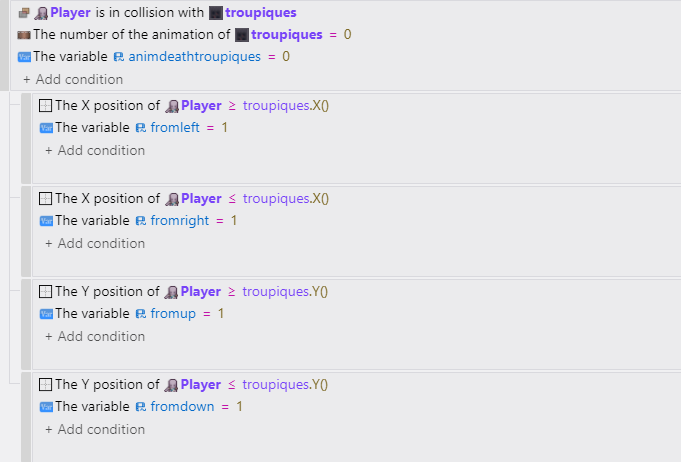
How to detect a fully overlapping collision between my main character and specific tiles with effects?
Right now, I am adding conditions, checking where my character is coming from (Up, Down, Left, Right) and which part of the tile it goes past.
For example, if my character is coming from the top position relative to the tile, I check that it goes >= tile.Y().
Is there a more convenient way (extension, built-in event, …) that could help me deal with this more easily (since I need to repeat those conditions for every different kind of effect tile I’ll have…)?
If you think about it you can unify it but it still will not be one check
If both objects have origin point in top left
Then you can simply check if X position of player is equal or greater to X position of of tile
But equal or less than Tile.BoundingBoxRight() - Player.Width()
That would tell you if horizontally whole player width is in tile or not
And now you do the same for Y
And technically you cold not check it at all but store distance to
Between player X and tile X if Player X is equal or grater than tile X
When they collide
And And now you would learn that if your player width is for example 8
And your tile 20
Then distance cane be either 0 or 12 for player to be inside tile horizontally
So you could just have condition that check if distance between playerX and tileX is equal or greather than 0
And equal or less than 12
You could do that math automatically by making Variable call it TempWidth
And set it to abs(Player.Width() - Tile.Width()
And now you would go with
And now your condition is
Player.X is equal or greater than Tile.X() + TempWidth
Player.X is equal or les than Tile.X() + TempWidth
And now you only need to do the same for Y position and height
If tiles are same size af player you just check if their X and Y match
If there are going to be multiple objects then you could put them in a group and use for each object if there could be multiple collisions. Or use pick nearest if you only want 1 object at a time.
If you player is moving faster than check can register its position of course you gonna skip the check
Imagine it like this you are checking if you move object with SOME speed
And check if its X position = 674
If speed is slow you most likely will be able to trigger that event
BUT after some speed your object will move so fast that on frame on which it will check position of object
That object will be already beyond that position
FOR EXAMPLE
Object is at X 620
Now next frame drops and object is at X 650 cause that fast you move it
So on next frame object will be at X 680 and that check for 674 will never catch object at that position
And your question is related to how exactly you move your object
And how often you check
So these are deciding factors in your case on will it work for you or not