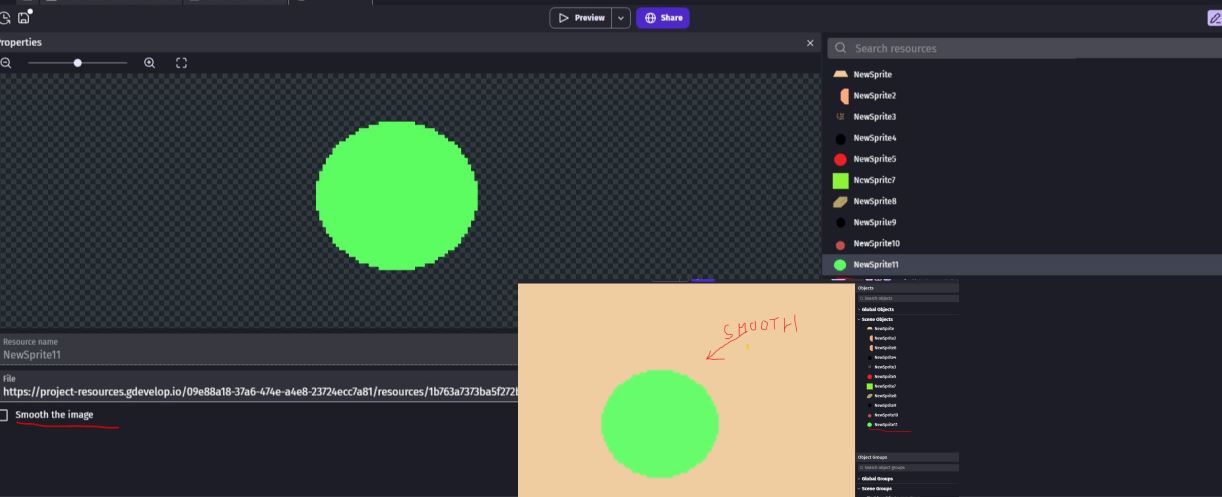
Describe the bug
The “smooth effect” doesn’t update in real time. Even when I try to turn it off, it won’t disable—and it’s impossible to turn it back on, either. To get it working, I have to close the entire project and reopen it.
Because of this bug every new asset/items smooth when we put into the editor. (The assets made with Piskel.)
Steps to reproduce
- Open a 2D Gdevelop project.
- Make a Scene Object.
- Make a Sprite - in edit sprite -create with Piskel.
- When you created this newsprite pull it into the editor/scene.
- By default, the object is smooth in this state.
- Go to the “Resources”.
- Remove the checkmark next to the “Smooth the image.”
- go back to the scene.
The object smoothing effect persists, making it very difficult to position objects in the scene with pixel-perfect precision.
It only returns to normal if you save the project, close it, and then reopen it.
Share a very simple GDevelop project showing the bug