I am not sure what is causing this problem.
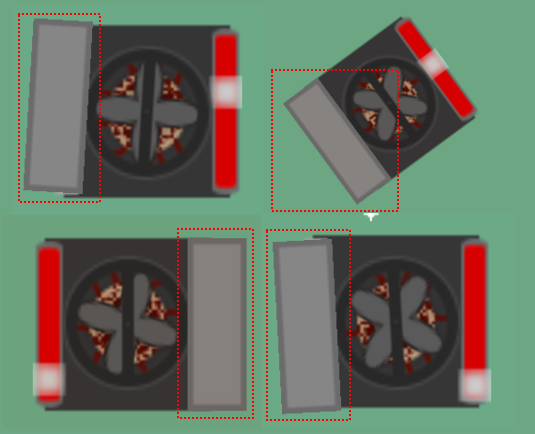
The sticker function works perfect except in one direction. This is the same direction as it is created and being stick to the object.
So in all angles it does what it should do except in this direction —>
But the amount that is off differs.
What I tried:
Changing origin points, doesnt matter
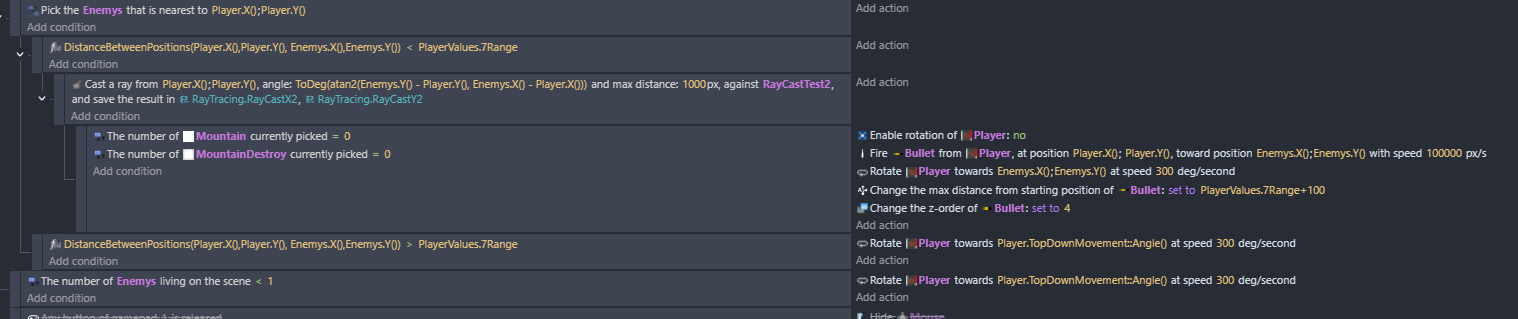
Doing it through events, now it is correct but there is a delay so no good
Top left and bottom right you can see the issue on the picture.
The grey rectangle is the object that is stuck to the “robot”
The grey rectangle has no events except the one so it gets stuck to the “robot”
I have read the post several times but still I don’t get exactly what is going on.
Here is how I understand your description: you have a grey box which is attached with the sticker-extension to the fan-like sprite (robot). You are rotating the robot and the grey box should stay aligned but in certain angles of your rotation it is off? - If that’s the case, I can only say that I tried the same and have no problem, so it seems the issue is not with the extension.
In any case, could you explain a bit more clearly what the problem is? How does your grey box sprite look like when you import it in the engine? How do you rotate (or move) your robot?
I have experienced a similar issue with sticker and rotating main bodies. The main object eventually rotated a full 360 (made up of smaller rotations) and resulted in the stuck object being a little out of alignment.
My solution was to set the stuck object’s rotation once the main body had finished roatating. Not ideal, but a hack that worked for me.