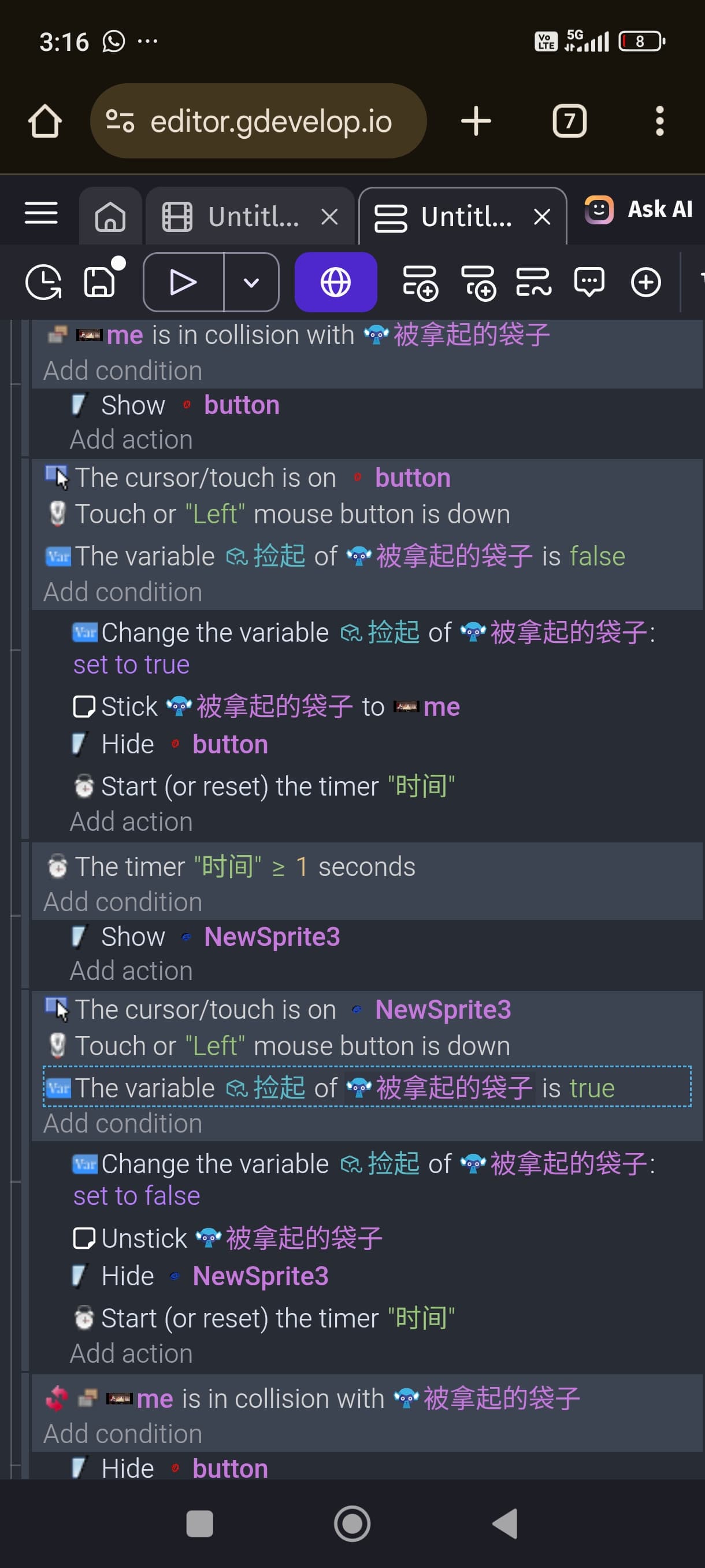
Help, someone please help me! I’m making a horror 3D game and there are a few things I don’t understand. I’ve tried to figure out how to fix it but nothing works.
(1) I need to allow the player to pick up a trash bag and move it somewhere else to throw it away. I set up the first event so that if the player collides with the trash bag, a button will appear. Then, if the second event is pressed, the trash bag will be stuck to the player using a sticker. However, it seems to be stuck even before the player touches the trash bag, and even before the button appears! Not only that, after dropping the trash bag, if the player moves to a distant place, the trash bag also moves! And when I pick up the trash bag and move it, it disappears for no reason! Can someone please help me?
(2) There’s something wrong with my joystick! I want to have the logic of turning it up to move forward and turning it down to move backward, but the directions of my joystick are like this: turn up → down, turn down → up, turn left → right, turn right → left! Oh my god, it’s so hard to control! I’ve tried many methods but to no avail…
(3) I’m using a free 3D streetlight model from the internet, but I can’t get it to light up. I’ve already enabled it in the properties, but it won’t light up. I’ve also used Light 3D, but that only shines on the ground; the streetlight bulb won’t light up in the dark!
Can someone help me? The remaining few problems will be solved!