Hi I’m new here. I’ve been working with gDevelop for a few weeks now and there’s something I just can’t figure out. When I drag/create a tilemap into my scene and go to paint with it, it erases tiles I had on lower levels. Even though I’ve LOCKED all other layers except the one I want to edit, and even though I’ve got it also set to be the editable layer on the left in the properties, this happens. For instance, I’ll create a base layer of green, for grass. Then I’ll make a layer above it for sidewalks, eventually my plan was to have a layer for buildings, trees, etc, and UI elements…but I can’t even get that far. Because if I make a mistake on the Sidewalks layer and try to erase it, first it completely erases everything on every layer below it, then also my tilemap disappears completely. Sometimes I get it back, usually I just make another one and try not to make any mistakes. Could some kind Dev patiently tell me why this is occuring? I mean, I can’t get very far in this no-code-required editor. I was hoping “no code” meant easier but my experience is telling me different here. Anyone care to comment? I would sure be grateful for some help…
And also I’ve got all the other layers locked
Are the tileset objects different objects or are they copies of the same object (instances).
Some changes in the editor affect all instances others only the selected instance. I tested the web version and I was able to edit instances tileset tiles without any issues. I could change and erase tiles. Although, changing the image, changed it for all instances. That is an object setting like object name.
Thank you for your answer, but yes I’m sure it works for you and everyone else, I’m still confused however. Here’s where what I’m not understanding:
If I make lay down some tiles on Base Layer (I want them green for grass), then switch to a new layer I’ve made called “Sidewalks” or “Trees” or “Buildings,” which I THINK I do by select the little radio button on the bottom of the screen and locking every other layer while also specifying in the left pane object edirot that I’m working on the “Sidewalks” layer, for instance, even if I increase or decreaseZ-index commensurately, no matter what layer I’m on all my tiles, ALL OF THEM, are editable on that layer. If I switch back to base layer and lock and hide every other layer, I’m still working with the tiles I just expressedly put on the sidewalks layer. And so on, such that no layer seems to be selectable exclusively and rendering the whole layering system useless. Since it works for everyone else, and since I can’t imagine the maintainers creating an inert layering system, there must be some flaw in my understanding of how they work. Don’t they work like they would in Photoshop or TileD? Please help me figure this out, I can’t do any more work at this point and may have to look for another engine.
Are you using copies of the same object (GD calls them instances) or different objects. I’ll test objects on different layers but I can’t see there’s any difference between the same layer and seperate layers. There could be a difference between the mobile and desktop version.
Locking layers don’t really lock objects. It prevents objects from being selected. If the object’s were copies then changes to the object itself could still affect objects on locked layers.
I’ll try to do some more testing.
I did a little testing. Making changes to the tiles of 1 object didn’t affect the tile selection of another tileset object whether it was a copy or a completely different object.
When I selected multiple objects in the editor, it didn’t allow me to change or erase the tiles of any of the selected tileset objects.
Selected objects on locked layers were still able to be modified. You can select them with the instance list.
You could try to lock the objects themselves by clicking the padlock.

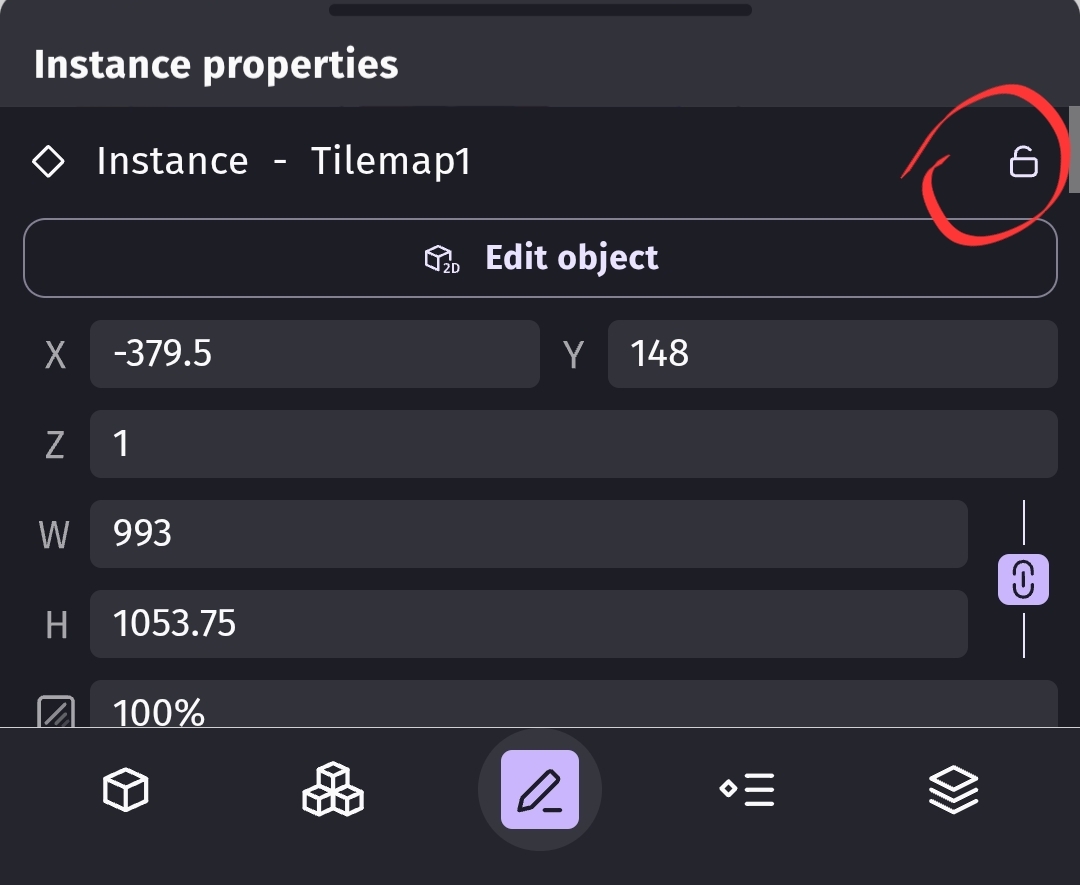
I’m still wondering if you have 1 object and you’re changing the object settings that are shared between the instances.
Just want to say I appreciate the time and effort you’re putting into helping me. It’s not every day htaht someone will go to th4 trouble to make screenshots and all that. i’m researching your reply right this moment
I think that might be exactly what I’m doing wrong. I still don’t know how to fix it though. Because I tried working with the instances AND the layers AND the object properties. Is it indeed necessary to add a new tilemap to every layer? Can they not just share one while still keep layer properties within their own scope? And what I’ve got now is a situation where I have one layer called “Pathways and Roads” directly above my base layer of green, and z index of 2, but down in the instances panel I see two instances of Pathways and Roads. What might I have done to cause that? Or is it normal? Everything else about this engine is so intuitive, I was really excited about it and telling everyone I’d found the perfect one. I KNOW this problem is a user error thing. Maybe you could recommend a tutorial I could do that would enlighten me? IDK, because I’ve done most of the beginner ones but I’;; definitely redo one if you have any suggestions. I’m just starting to think I’m beyond help and don’t like the idea of wasting your time when you’ve been so cool