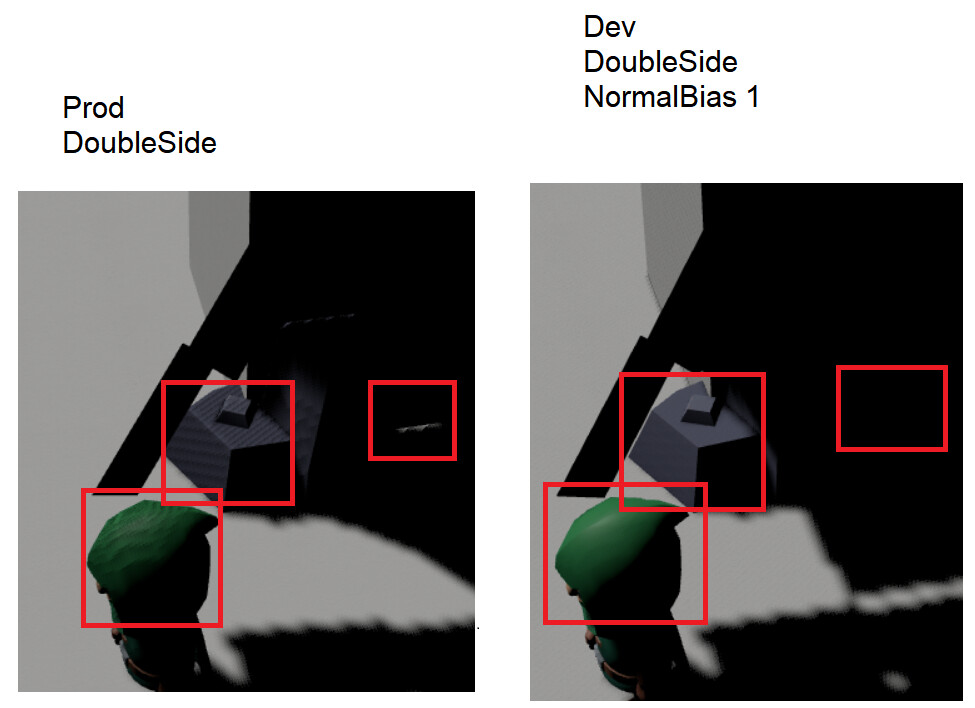
GDevelop 5.6.284 + Light3D 2.0: Severe shadow streaking/acne across walls and strange rectangular lighting artifacts.
My setup uses a dynamic point light positioned 100 units above the player that follows their movement and casts shadows.
I’ve already tried adjusting shadow bias, near/far planes, intensity, decay, updating extensions, and changing the directional light’s shadow rendering mode to “Fitted to camera view.” None of these resolved the problem.
Disabling shadow casting on the point light eliminates the artifacts, but also removes the dynamic shadows I want.
It was suggested that I modify my models in Blender to enable backface culling or implement shadow normal bias through JavaScript.
My concern is that these models worked perfectly fine before the renderer update. I have dozens, potentially hundreds of models, and manually re-exporting them or implementing custom JavaScript workarounds isn’t a practical solution.
I’d like to know whether this is considered a regression that will be addressed in a future update, or whether this is now the intended behavior of GDevelop’s 3D renderer.
I’m currently left with the choice of reverting to 5.6.282 or sacrificing previously working functionality.
I’ve attached comparison footage demonstrating the difference between versions.
Setting Three.js’s shadow.normalBias to 0.02 through a GDevelop JavaScript event completely resolves the shadow artifacts, without modifying or re-exporting any models.
This suggests GDevelop needs to expose the Shadow Normal Bias setting in its lighting options. Three.js already supports it, but GDevelop doesn’t appear to provide access to it through the editor.
Ideally, this should be configurable without requiring custom JavaScript, especially since the shadows worked correctly before 5.6.284.
Gdevelop does not automatically apply material.onesided to the 3d models like other popular 3D game engines does. That is why self shadows are currently is a problem that needs to be solved manually.
So having a proper self shadows without shadow acne on 3d models, You need to have backface culled 3D models or you need shadow normal bias to push shadows along face normals.
New light system and shadow maps are alright. we are having this problems because lack of other features in gdevelop.
both solutions are given by threejs already.
My suggestions are:
Every 3d model should come THREE.FrontSide on default and should have button doublesided or better yet with all three options as a dropdown menu.
We need Shadow.normalBias value in all lights. There is a reason threejs exposes these properties.
I just don’t understand the trend of not adding every exposed property when releasing features to gdevelop. If its keeping ease of use of the engine, it is not working. because like in this example people need to rely on javascript to solve issues while they can be done by click of a button.
Yes I’ve updated all extensions and have tried tweaking shadow bias of the Point light endlessly but it does not solve the issue. Only the javascript there helped, but actually it did not help fully, there is still a big bright square that appears on the wall (I guess because my Pointlight hovers above the character and is somehow casting it, but it never used to happen)
const threeScene = runtimeScene
    .getLayer("")
    .getRenderer()
    .getThreeScene();

if (threeScene) {
    let changed = 0;

    threeScene.traverse(obj => {
        if (!obj.isMesh || !obj.castShadow) return;

        const materials = Array.isArray(obj.material)
            ? obj.material
            : [obj.material];

        for (const mat of materials) {
            if (mat && mat.side === THREE.DoubleSide) {
                mat.shadowSide = THREE.FrontSide;
                mat.needsUpdate = true;
                changed++;
            }
        }
    });

    console.log("Shadow materials adjusted:", changed);
}
This second separate javascript seems to fix the bright square issue. Weird having to use javascript work arounds for things that used to work.
material.shadowSide = THREE.FrontSide fixes the ugly rectangular lighting artifact
Yeah main issue is actually that. As I said in my earlier reply, most of the popular 3d game engine automatically sets 3d models one sided, thats why self shadows acnes are not immediate problem in those. Because in reality you can’t have 2 surface inside each other. even a very thin surface has thickness.
Shadow normal bias property is useful when you have a two sided plane objects. like a curtain, a flag, a cloak etc. since you can’t sacrifice the inner face because it needs to be visible from both sides then you adjust shadow normal bias so faces does not drop shadows on each other, because they are inside each other.
In a future update, we could expose shadow.normalBias , which is different from the current bias setting, to allow for more advanced shadow adjustments. However, for now, there are no plans to change how GDevelop handles the double, front and back faces.
Having Shadow.normalBias is needed and will help a lot. Thanks.
We are lucky that glb format has ability to carry backface culling property. But for sure it will be useful to change the material side in-engine.
Why most 3d game engines enable backface culling by default? Because it is not clever to have two faces inside each other in game engine as we can see the issues it creates. It is ok if you want to create intentional two sided objects (a flag, a cloth etc.). Also if your model has some flipped normals it makes you detect it as soon as you imported in the engine.