So I’ve been looking at a way to make it look like an object is jumping/bouncing in the top-down type of game. I didn’t find anything in the existing extensions & most of the online stuff I found was how to simulate the player jumping. I am only wanting to make some ‘slimes’ jump around on a flat surface for now.
What I wanted was a bit more basic so what I planned to do was:
use a separate sprite as a shadow of the object, hopefully with a blend that lets it be a bit translucent
stick it to just below the object using the sticker behav
the object will be given one of 4 directions, at random (its a little creature on screen)
when it moves left or right I would (I hope) move the object in an arc but the shadow just along a line
when it moves up or down maybe just shift the shadow a little forward or back (not sure yet)
tweens might help sell the ‘bounce’ effect
I just wanted to check if this already exists in case someone’s done this already & there’s an extension out there that would do this for me. I know I can animate it using sprites but UUGGGHHH to having to match the faces, shadows & movements on umpteen of these creatures when I presume I can handle it with something I can turn into a function and use it on any object I plop into the thing.
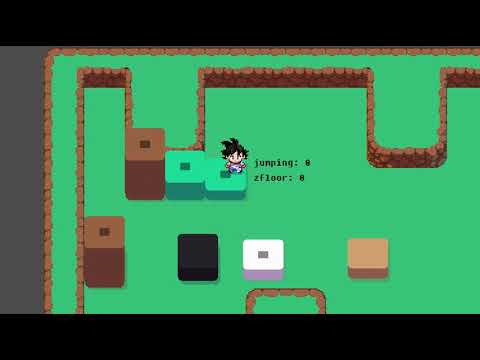
I saw a guy on discord who was making it actually using both platformer and top down behaviors
He just enable/disable them when needed
And it was working like actual jumping in 2d topodown where background had actual elevation
So you could fall down to lower level of a wall/mountain
When i approached him he said it works most of the time but he have still few bugs he need to polish
After that i saw 1 video of his in wip channel and never seen him again post anything
BUT for you i would wonder if tweens are not the answer?
I would literally tween it with bounce easing i mean its Y pos
Where dropdown shadow is also something i would make
It is what i done for my game when Rick must die.
And for me too, sometimes, the animations does not work, without reasons understandable.
I think after a lot of testings, it can be have a possible conflict between my events and extension “Platform” but i can not be sure.
And now you have access to Z axis
Where whole game would still look 2D you just need to set camera in some static angle
And there would be no behavior to adjust
I’m using the TopDown because I don’t have any experience with 3D, I tried and I couldn’t EVEN get a single sprite to show up properly in the 3D engine & it was annoying to have a fixed viewpoint when editing. I also have no 3D assets of the sort I’m using, so 3D will need to jolly wait, as much as I’d love it too. If I do 3D it’ll be in 1st person 3d where you can run around the garden the creatures are making. I’m learning Blender at the moment though, but not planning to do 3D yet.
My little creatures need to move in all 4 directions, so it sounds like not a common thing - except for a few ppl doing isometric games I found they are mostly either only using the jump to have the player jump obstacles or not jumping at all. I really only wanted to have my little creatures ‘hop about’ bc it’s cuter than them sliding around like marbles.
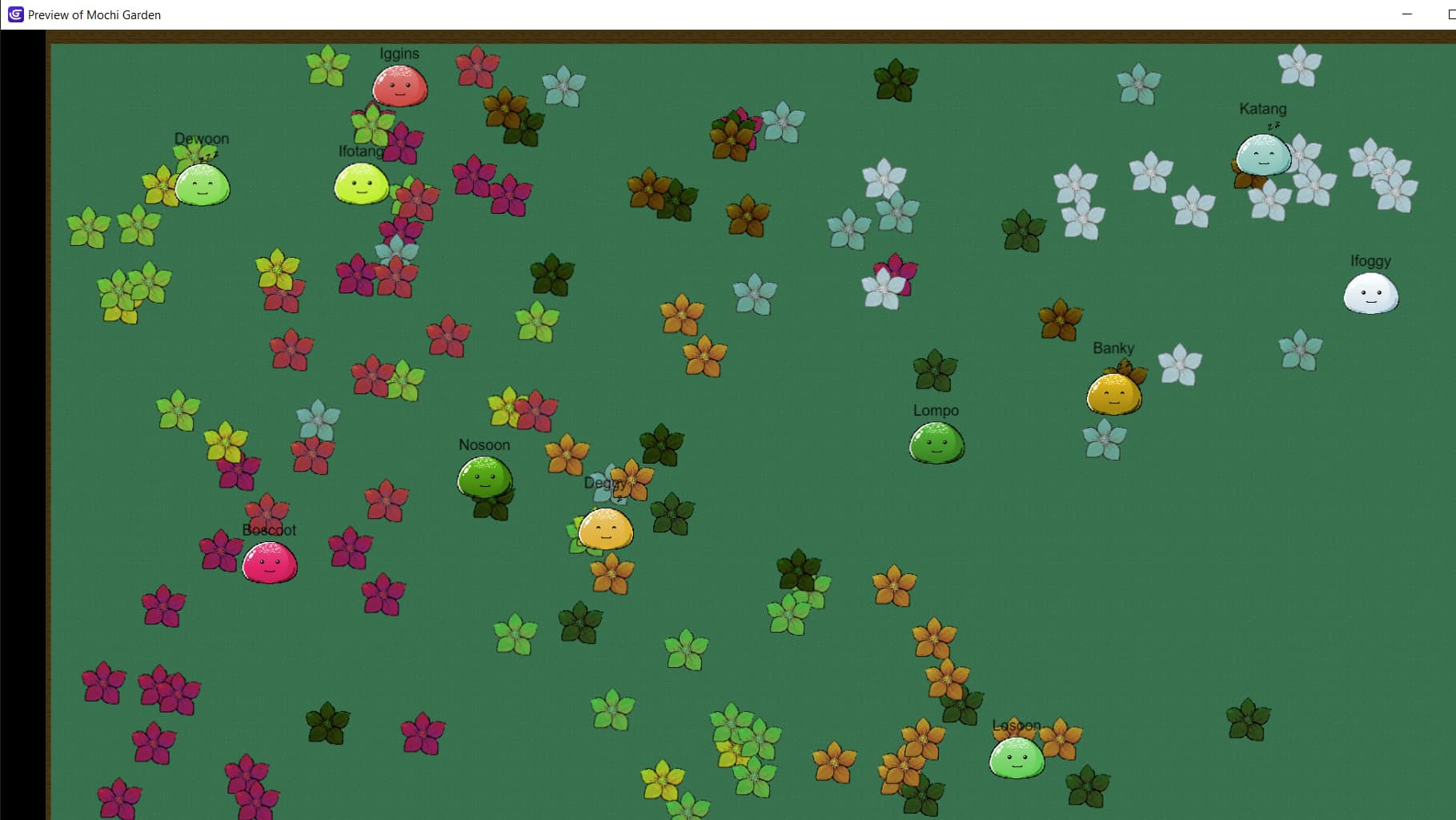
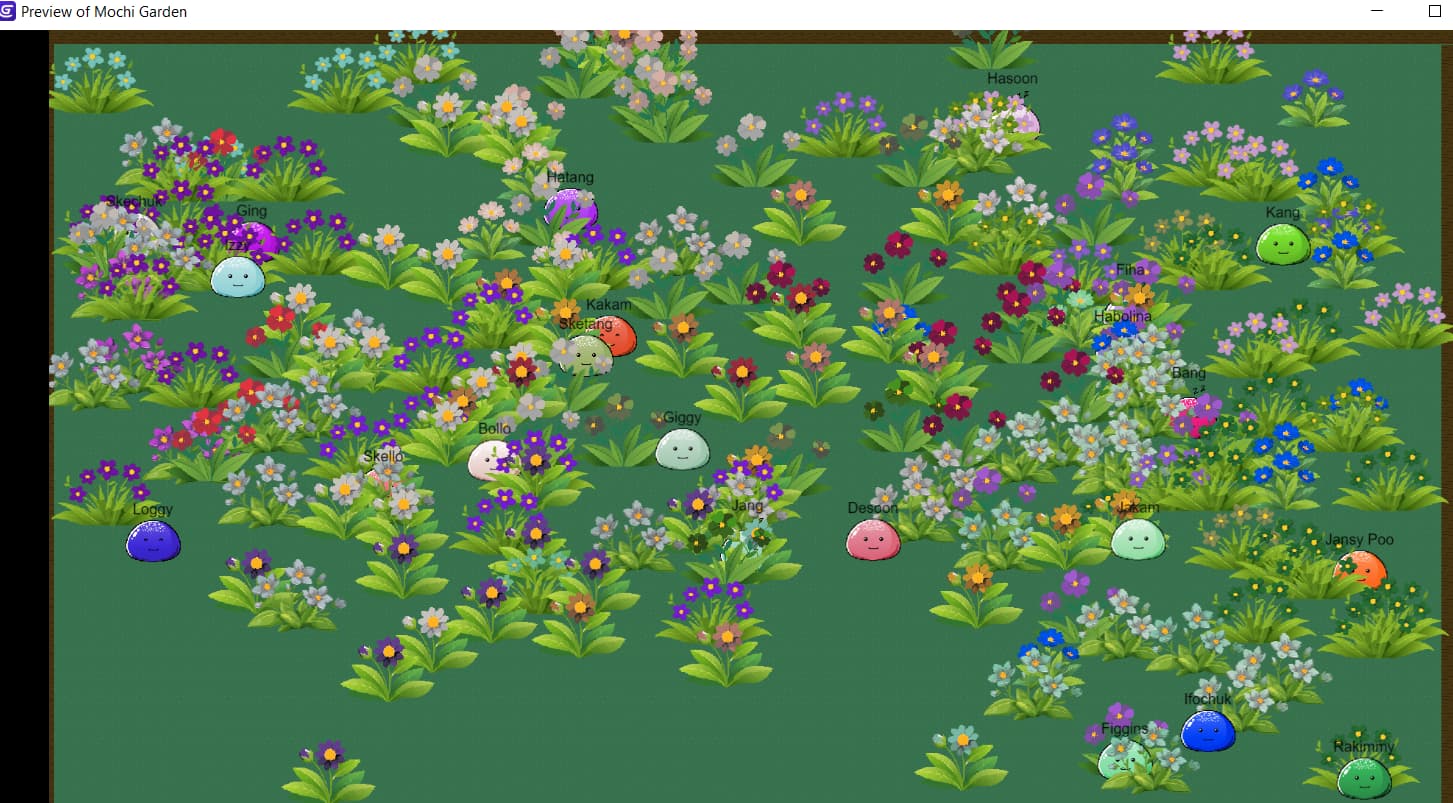
Here is a screenshot of the “game” so far. The little creatures (I’m using mochi’s, so eventually there’ll be a bunch of different types) get a random name, colour & they create flowers (again, there’ll be lots of different types including trees eventually). They have their own meters that determine when they create & sleep and eventually I’m going to add other meters & behaviours for them. More like a virtual fish-tank than a game.
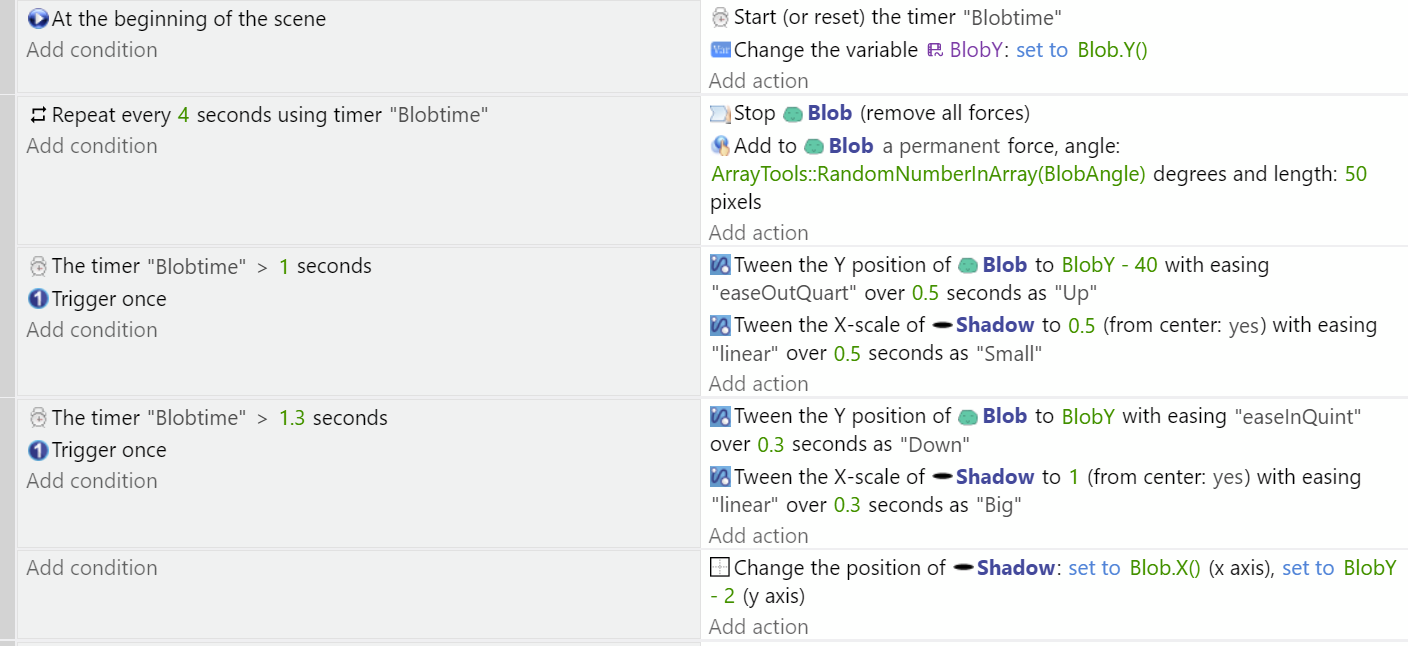
I had a go at this, Tambo you didn’t say how you were moving the creatures. I made a very unoptimised test using forces for horizontal movement and tweens for jumping. There’s probably better ways of doing it but I was interested in the visual side of it. I used a scale tween on the shadow. The creature only moves left to right as I’m not sure about how well four directions would look with jumping, I only wanted to test the jumping and the shadow.
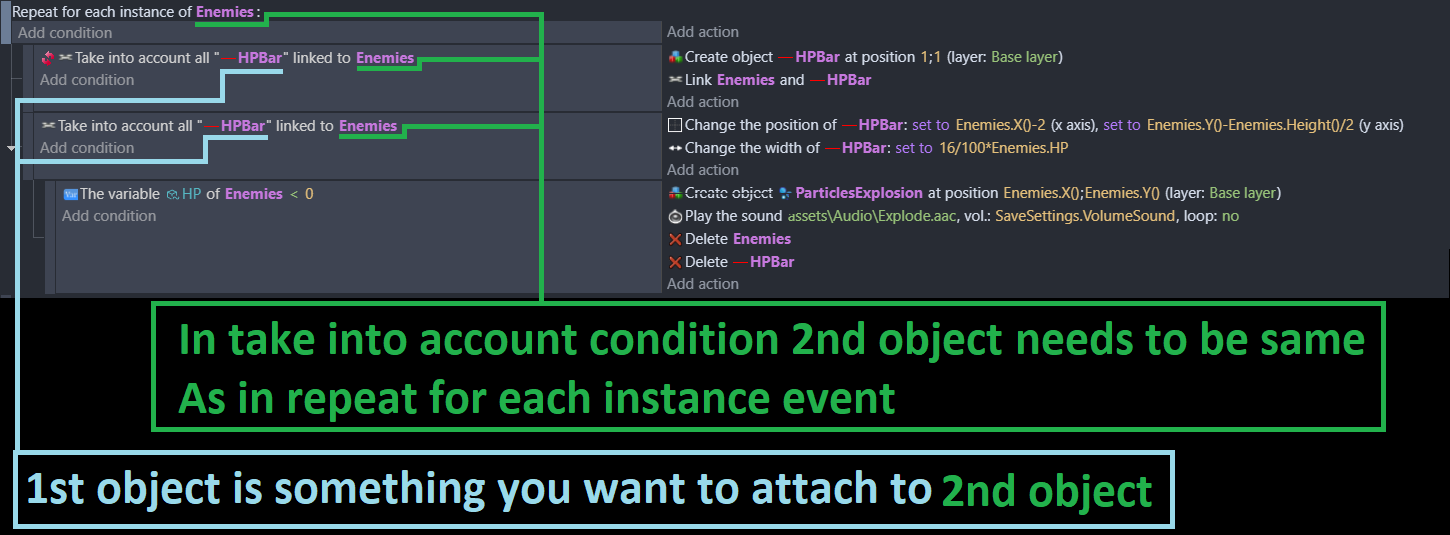
Here’s the events that are pretty bad, I didn’t remove any tweens and did things pretty shortcutty.
That’s likely what I’ll end up doing (albeit giving my little guy only the arc, so they appear to jump only), I’m hoping the ‘sticker’ behaviour will help when moving it, because you can attach or unattach it as needed (so I was wondering if I could set up different points on the creature’s sprite that I could attach the shadow to during different movements). Currently I’m just using a random movement thing, but that’s extremely temporary while I decide how, if any, the creatures personality might affect how they move.
So the basic formula will end up being that it when it’s state is set to ‘exploring’ it will choose a random direction from the 4 avail (possibly also checking for collisions to fences) then have one of the move events take it in that direction simulating the ‘jump’ using shadows & arcs & tweens & whatever else I figure out). I like the idea of having the movement of it set by the events, so that if they go faster or slower it won’t look weird (like, if I animated a ‘jumping’ sprite it would look wrong if it was moving at a different rate to the animation).
The sticker behavior is great in its simplicity but lacks adjustments. If you want to use points which sounds perfect then you’re better off positioning the shadow manually rather than with the Sticker.
In cuter news I swapped in some more flowers & gave each one its own flower type. Generally it’s still very temporary & since each mochi ‘gives’ the flower its own colour I’m tempted to find a way to only create mochi’s with specific subset of colours to avoid some of the uglier ones but I kind of like the way the more lurid ones stand out in the little groups they create on their meanderings.
Here is how you can fake a jump effect in top-down: This method should work. I used it in my game.
A simple boolean variable (true / false) for: Is the character jumping.
You can also use other variable values like 0 or 1 or even 2 etc. for more gameplay or animation variety (2: if the character should be able to fly or swim for example)…
(Animations and shadows can be painted or use tweens.)
How this top-down jump event could look like
If Isjumping false then basic animation (walking) and so on…
If Isjumping true then… well, jumping animation. Plus action “wait for x seconds” + Isjumping will be false again.
Jump effect actively or passively triggered
Actively triggered jump effect:
if pressed jump.key and IsJumping false then IsJumping true.
I assume in your case you want a passively triggered jump effect for your characters… so maybe a timer would be the way to go or a collision with an other object.
If you want to see this top-down jump effect in action:
Here is a video of my game showing the player.character jumping a few times while having top-down behaviour on.
Actively triggered with jump.key(in my case it is the key: space).
Video with timestamp:
Edit: I forgot to mention that in some cases, depending of how you create your game: use “Trigger Once” in some events.
Because you have a lot of characters which you want to see jump:
Maybe every individual need a seperate IsJumping variable…
If your characters are npcs, for a more natural look you can even randomize the trigger for the jumps:
You can use the action RandomInRange for it so the game can choose randomly a character who has to jump, in which interval it should happen and so on…
Thank you. I hope my explaination will help you to create your own game.
There is also another method you can try with so called placeholder objects but this method is not any more by exact word a fake jump only with top down behaviour. (Maybe you already heard about a similar concept: such placeholder are sometimes used for ingame cutscenes. Here they are used to do the jumps…)
Let’s say blue character (top down behaviour) should jump.
Let the game hide it and create a lookalike object (platformer behaviour) = placeholder at bluecharacter.xy.
This placeholder object will do the jump for the real character.
After the jump animation: delete or hide the placeholder and make the original character visible again.
The animation will look smooth after some fidelety with the xys of your objects.
I feel like there’s a place for an extension here, that would take the ‘shadow’ of an object & the object and create the tweens for you for a left, right, up & down ‘jump’ where you’d only need to have the object itself, & it’s designated shadow. Possibly even one that would add a shadow? I’m not sure in that case. Given in my case I only need the creatures to make one single jump in any of those directions each time it moves, I think it should be easy enough to call the relevent ‘event’ each time. I’m trying to avoid using animations/sprite because that messes with the position of its nametag which I could move the anchor point to but also then I’d need to go make a frigillion animations and frankly if I can do it with code and avoid making sixty trillion sprites for what’s essentially nonsense I will.
which was a long way to say I’m going to try and make it so that I can just call on a specific bit of code each time & it handles the effect of the movement.
Such an extension would might be 3D with light source and dynamic shadows but think about performance for an actual 2D game.
I would suggest in your case: 1 premade 2D oval shaped shadow (which don’t take long to create) which you can use for all of your same shaped characters and then: you and the game itself don’t have to fiddle arround with too many tweens. (Or put the shadow animation itself into the character images, that might be the easiest method for 2d.)
If the shadow is a sperate object for example:
"change position of shadow1: set to npc1(x)+/-value, set to npc1(y)+/- value. So the shadow will follow automatically the character.
If npc1 is chosen to jump then play animation of shadow1.
At least with this premade animation method you don’t have to tween the size of the shadow for every character.