I’m pretty sure I asked for else a while back (I can’t remember who or how)- I’m sure others have too…this morning i dismissed the updates window and got down to the serious task of pointlessly making objects fly about the screen - when I got back from work! - actually read it a bit and - blimey else is here!
4 Likes
Now that it’s here I need to try to think of ways to use it. It would be really helpful with events with a lot of conditions although it’s tricky because the else statement is on its own event and not a subevent of the previous event. So, any objects picked in the first event doesn’t change the picked object list for the else event. Both events would share the same list if they were subevents of something.
This would work because there’s no object picking.
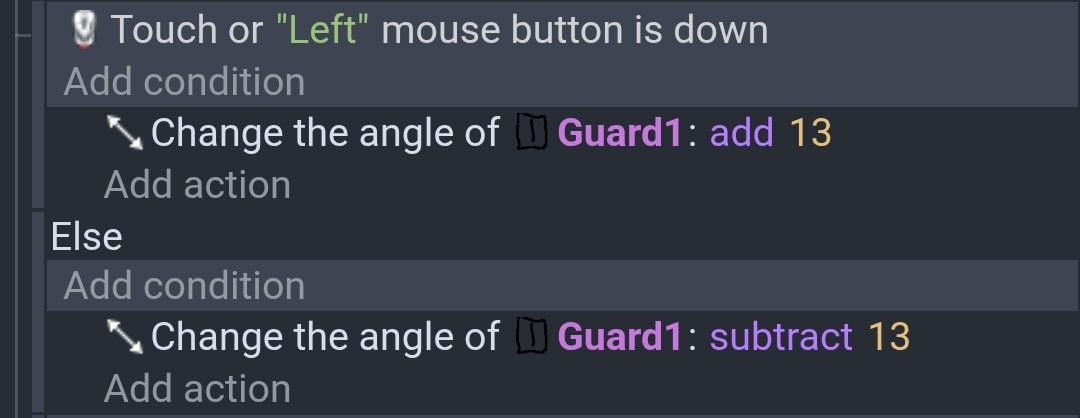
This wouldn’t work as expected if there were multiple instances because objects are picked when the mouse is pressed but not in else. So, one object would have its angle increased when the mouse is down but all of the instances would be decreased in the else event.
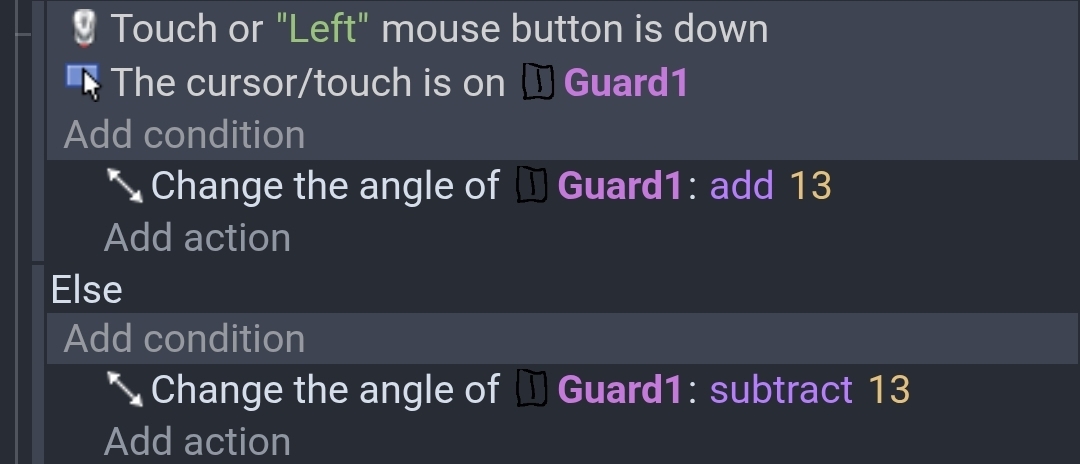
This would work bc the instance is picked first. Although, I prefer to always check the mouse first.

These aren’t practical examples. I just wanted to test the new else with something simple.
3 Likes
Right - I haven’t tried it yet! - I looked at the thing i was doing and couldn’t think where to use it!
I’ll have a play around with it tomorrow!
I’ve used it before. But I did it on my laptop. When I opened the project on my phone, it didn’t work. The event didn’t even appear; instead, I got an error.
ahh - i think you should probably mention that in the bugs section
1 Like
Ohhh no, I wish you had tried it just at least once before making this topic. Because then the title could have been
Else has arrived - has anyone else used it yet?
As a word person, I would have loved this.
2 Likes
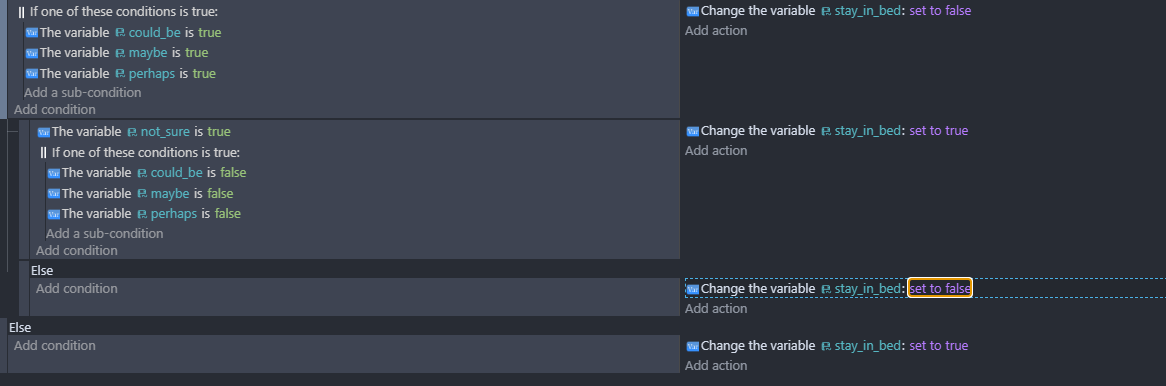
No, I’m not using it,
let’s suppose i do:
if the object is red ---- do this…
…otherwise?..
Otherwise what? …
You got a problem with me? You talkin’ to me? (Robert De Niro style)
(…sound of keyboard crashes and mouse cord strangling)
just saying, ‘Else’ goes against the way I think, so I don’t think I’ll ever have a reason to use it.
1 Like
Yeh i used it n its nice however, it’s only good viable if you are only doing like 2 events like if this doesn’t match else just run this. Other than that it ain’t bad but i woud still use normal sub events or multiple events
1 Like
i just agree with this.
Else would be more useful as “subevent” and with only the parent event taken into consideration
1 Like
@Keith_1357 - do you agree with @RMDB - that the else should be a sub event and take the pick list of the event into consideration or at least - there’s the option to have it as sub event
I’ve not used it enough to decide
It’s difficult. I originally expected it as a subevent but if you have multiple conditions then you could have multiple list.
Take the classic “make the enemy face the player”
Normal way
If enemy.X() > player.X() then flip is true
If enemy.X() < player.X() then flip is false
Now with Else
If enemy.X() > player.X() then flip is true
Else enemy flip is false
Now, this would work for 1 enemy but not multiple instances unless you put it inside a for each instance which would make it inefficient.
But with multiple enemies the first part would trigger as long as 1 object was greater. If none of the objects were greater than the the else would trigger and change all of the instance. The else part would rarely if ever trigger.
The else condition is good for conditions using pure comparisons like numbers or strings. It’s also good for single objects, sort of. But for objects with multiple instances, it’s just not going to work as you’d like.
In a way, it would help if it created an inverted pick list that the else condition used. So, the matching instances would be affected by the IF actions and the non-matching objects would be affected by the Else conditions.
Then my earlier version of flipping the enemy would work. Although, it would have to be an instance based Else. So, the else was triggered for the instances that didn’t satisfy the conditions. If it used the same list then it would just undo the flip.
I just don’t see that working though because would you want all object pick lists flipped? Even the player’s picklist which would mean that no player objects are selected. Some objects are modified and others are used for reference.
I think we need to continue to test the new feature and make recommendations. Things can always be improved and there are bound to be bugs or unexpected outcomes.
1 Like
Right - i hope you’re a teacher in the real world Keith - you’re very good at explaining the subtle complexities of this stuff!
2 Likes
I found it useful in this kind of situation…
when you have a random event, with else you can have the opposite result without a reroll.

2 Likes
In that example I might have preemptively set the variable to 1 and then changed it if the statement was true. Both work. Else makes your intention a little clearer which helps when debugging or going back to an old project.
1 Like

No, you can do infinite events. If you add an else event and add a condition to it, if becomes an else if event.
You can have infinite else if events followed by an else event and it’ll follow all of those above it.
So basically you keep your first evwnt normal, then every permutation under it should be an else if, followed by a final else.
An example I have used it for:
Event 1 - Object angle = variable (do option 1)
Event 2 - Else if object angle = variable - 180 (do option 2)
Event 3 - Else if object angle = variable + 45 (do option 3)
Event 4 - Else (treat as false)
This is in a behavior action, so it already is instance specific, but in this case it helped me avoid having to add a bunch of inverted/not equals conditions.
I didn’t give any conditions on the Else section, i forgot about that