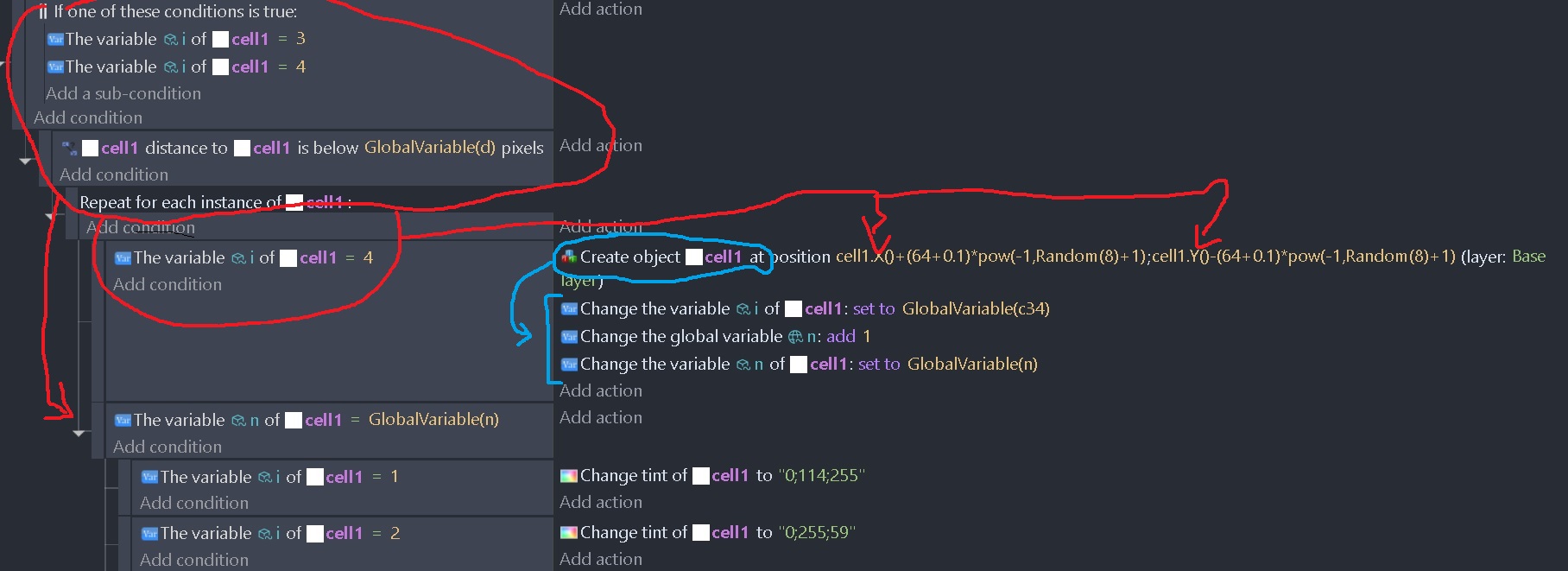
SO the first conditions select some instances of cell1. Then it creates one or several new instances of cell1. So here I’m not sure if it only creates 1 instance for all or 1 instance per cell1 selected. That would be the first question.
Then I want the subevents to be applied to the newly created instances.
The second question is How to do this?
The conditions inside the OR conditions picks all of say the blue and red.
It then compares the distance and picks the objects that are less than a certain distance.
This wouldn’t care about the i variable. So, it could be red close to red, red close to blue or blue close to blue.
It then checks if i is say blue
It then creates a new object. I don’t understand the purpose of the formula for placement. IDK if it’s working as you expect it to. What are you expecting?
It then changes the i object variable to a global variable. That variable doesn’t change in the loop, so all new objects will be given the same value during that frame.
Tip: you don’t need to use any of the variable expression like GlobalVariable() just the variable name.
It then changes the tint based on the i object variable. This could be simplified if you create an array of colors and change the tint based on the array. Set tint of object to colors[co1]
you mean for the “repeat for each instance” loop? if that’s what you meant then yes, i want to give the same color to the newly created cell1, but only to the newly created cell1 (not the one selected in the conditions).
Basically, does the action “create object cell1…” remove momentarily the instance selected by the conditions and replaced it with the created instance?
Thanks for the tips!
Yes. The only instance selected or picked should be the newly created object. The next time the loop restarts, it should be the next object in the for each pick list.
It’s a bit like how subevents create their own picklist but the old list is kept and used if the previous level is returned to.
thanks but it is still unclear. And I can’t find clear explanations.
I made 2 versions of the code above. They differ with a slight change. In both version I draw a diagram showing which conditions apply to which actions.
In the first picture it is the same code as above. The red group of conditions select 1 cell1 and it is apply to the expression cell1.X() and cell1Y(). The blue group is the new cell1 created and it becomes the selected instance for all actions that come under and in the sub events.
I represented these with arrows. I hope the meaning is clear.
In the second picture. There are no subevents after the creation of cell1. So the following events apply to the group of cell1 selected by the first red group.
Do you agree with all that?
forget the random numbers, the only thing important in the expression is that i use cell1X() and cell1Y(). DId you understand the difference between the 2 pictures and the diagrams?
Yes. The 1st sets the tint if i is 1,the 2nd sets it if other object variable equals the global variable regardless if i is 3 or 4. Although, since only 1 object variable is being changed, it should only effect objects set to 4. Although, other events or the previous frames could also set the object variable to the global variable.
Again, does anything happen? Are objects being created? Did you check the object variables in the debugger?
I like to use a text object to display the object variables of the object under the cursor.
I’m heading to work. So, I won’t be able to post for awhile.
this is the thing, it is not changed if i understand correctly, it is assigned to the created cell1
as the tints only apply to the created cell1 in the first example
yes the object is created but the actions seem to apply to the selected instances AND the created one. Having clear explanations on how gdevelop really works would be better than asking these questions and losing hours each time
I would need to test it myself but I don’t currently have the time. Occasionally, weird things happen. Sometimes it’s placement, sometimes timing. I’ll test it later if I can.
Most of the time it’s only the conditions that change the picklist but there are times when actions do as well.
I had to time to test it with similar events. The action does affect the new object as well as the current object. I’m guessing it’s because the current object’s variable is being read.
exactly! same conclusion. I’m rewriting everything. Instead of creating the new object inside the “loop” I save the data I need (in your case NewSprite.X and NewSpriteW) in variables. And then create the new object when the loop is finished.
Yeah. That’s probably the best way. I was thinking with variables like an array or temporary objects that get replaced afterwards.
There’s an object picking extension that has an unpick function but I’ve never used it. IDK how it would work inside a for each instance. You would also rely on the extension that might not work with future versions of GD. So, that’s not practical.
I wonder if it would behave the same if you created the object inside a function. It probably would. IDK.
You need to get the picklist down to just the new object. Maybe an inverted pick nearest object from the X, Y of the current for each object.
Another way would be to use an object variable. If the default value was true then set the objects in the scene to false. Then when a new object is added, it would be the object with the default value of true.