There is an issue which I have seen many times on this forum, which is getting pathfinder objects to not overlap with other pathfinding objects. There are no existing playable solutions to this that I could find, and while mine certainly isn’t triple-A, its better than all the other stuff.
The main reason for this problem is the fact that the pathfinding behavior moves the object on its own, rather than just allowing the object to compute a path and do nothing with it. So my solution begins when I create the enemy object, also create an ID for it and create an Enemy Target with that same id (to be able to match an enemy with its target).
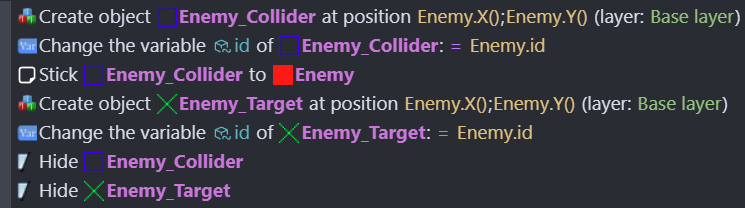
(Ignore the Enemy Collider, I am using that for other things in my game).
Unfortunately this solution’s main drawback is its use of the Physics behavior which is notoriously janky if you use it in combination with other things. However, for this case, it is necessary because it is the best way to keep two objects from overlapping without ridiculous code. I added the Physics behavior to my Enemy sprite, and Pathfinding behavior to the target sprite. Here is the code for the main functionality, it is quite simple:

Basically each frame, the Enemy Target moves to the player as normal, and I use a physics force to move the enemy towards its target. The targets might overlap but the enemies won’t because they are using physics and they physically cannot.
You can change the force to whatever but there are some other components that reduced the jankiness for me that may also work.
First of all I used the behavior to limit max physics speed to the targets max pathfinding speed, this makes it so that the enemy does not overshoot its target and cause weird movements.
Second of all, I made the Enemy physics hitbox a bit smaller, because when going around walls the Enemy gets stuck and falls behind the target, and can’t get out. If I make the hitbox a bit smaller it won’t get caught on edges and it follows a lot better.
You do need to add the physics behavior to your pathfinding obstacles as well. Make sure those are static, and the Enemy is dynamic, and also has a gravity scale of 0 so that it doesn’t just drop down.
If you try this for yourself you will see that the enemies appear to vibrate and as I literally just got this to work, I do not know how to fix that. Also I am aware this is probably very bad for performance, like recalculating path every frame, but hopefully somebody sees this who knows how to improve on the performance aspect of this.
It is far from perfect but with some slight tweaks I will be able to actually include it in my game.
Please give any feedback you can. I will give updates as I find ways to fix the vibration and any other bugs.