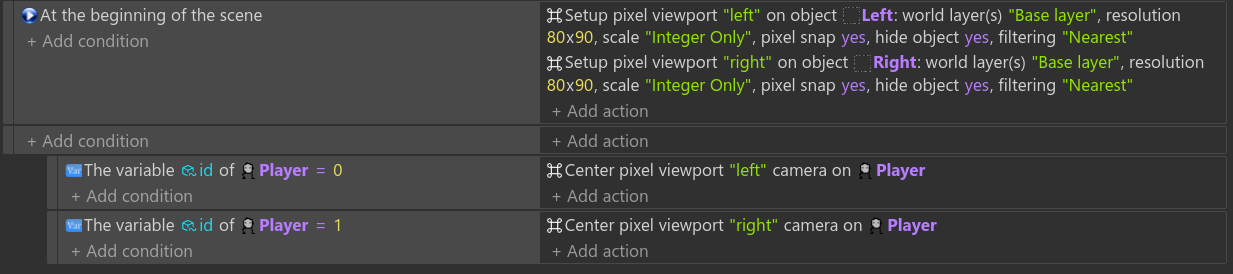
Got a chance to poke at this a bit. There’s some performance caveats, but I think it’s a solid extension.
High level:
Infinitely easier than manually setting up the zoom scale on each layer.
Still not quite as easy as if you could set a GUI layer because then the editor would scale things visibly for devs, but not a huge deal, as realistically once you have your GUI set up you can just zoom in the editor and turn off that layer until later.
You are simplifying a dramatic amount of math people would have to do (especially around pixel snap and other items). Kudos
There is a performance hit on my machine, but it’s hard to gauge how impactful it’ll be in real world scenarios. For example, my old project gets about 5591 frames per second in the profiler, your new example project gets about 4210.
For the purposes of this example, not impactful. For real world scenarios it’ll depend on if it’s still a 1/5 performance loss or not.
Either way, it’s a great workaround to simplify the method I was doing. If people need the performance they could try the manual method (assuming the devs don’t ever add a better way of dealing with scaling.) What’s more, your method allows for a much easier way to implement split-screen viewports.
About preview, I was thinking about to try to make this extension built-in gdevelop, so there would be real-time preview in editor, custom behavior or object and maybe even better performance (I also will try to make it better in already done extension.)
The greatest issue that I see, that GDevelop camera system isn’t quite good for such things as viewports. The best way would be is to implement 2D and 3D cameras from godot as objects, and then users will get much more control for their viewports, etc.
Performance in your original example project but with the new extension is greatly improved. Seems nearly the same as my original example project, within 5% at most (many times within 1%), more than acceptable in most cases and could even just be a margin of error.