Hi everyone,
I am trying to set up a “Remove Ads” Non-Consumable In-App Purchase for my game on Google Play, but I am stuck in a loop with the Google Play Console regarding the Android billing permission.
The Problem: Google Play Console displays the following message when I try to open the In-App Products tab: “To add one-time products, you need to add the BILLING permission to your APK.”
Steps I Have Taken:
-
Installed the Mobile In-App Purchase extension in my project settings.
-
Incremented the Version Code in Project Properties before generating a new export.
-
Exported the project as an
.aabfile using GDevelop’s Cloud Build system. -
Uploaded the
.aabto an active Closed Testing track on Google Play Console and rolled out the release. -
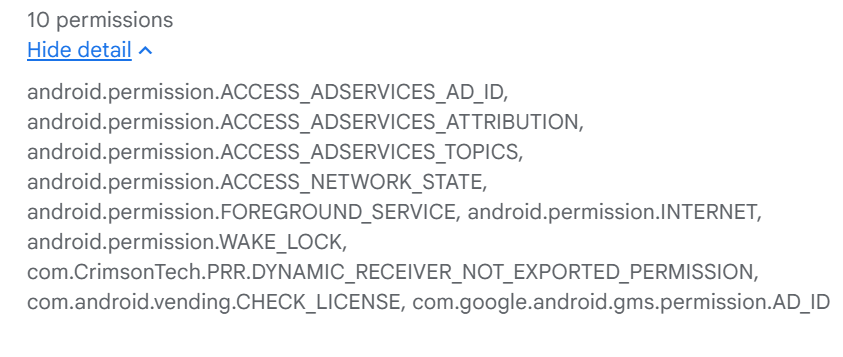
Verified under Google Play Console’s App Bundle Explorer Permissions tab that
com.android.vending.BILLINGis still missing from the uploaded build.
Questions:
-
Is there a specific project setting or event requirement needed for the GDevelop exporter to package the
com.android.vending.BILLINGpermission into the Android Manifest? -
Is this a known issue with the current cloud build exporter for the Mobile IAP extension?
Any advice on how to get the permission properly injected into the exported build would be greatly appreciated!
As of now im using
Gdevelop Version 5.6.279