Hi Gdevelop community
On mobile (iphone, both safari and chrome browsers) when I test the game and hold a touch-screen, I get the typical selection cursor selecting the entire screen with a light blue color, and the options “select all” “copy” typical of the mobile browsers. How can I avoid that? else the game runs well but it is disturbing
If you can try on your mobile:
Thanks!
EDIT: I tried other games from gd.games and a couple had the same issue
EDIT 2: I checked an older game of mine and the issue didnt happen, BUT, it did happen when I rebuild it with the latest version of GDevelop (5.3.180)
Can someone check/help please!
I also think SceneWindowWidth/Height() are not working as intended. From the documentation it should be the game’s size, defined in the settings, not the browser window’s size. I noticed in my game when played on a browser that creating an object on SceneWindowWidth()/2 places the object in the middle of the browser’s screen, not the defined game area.
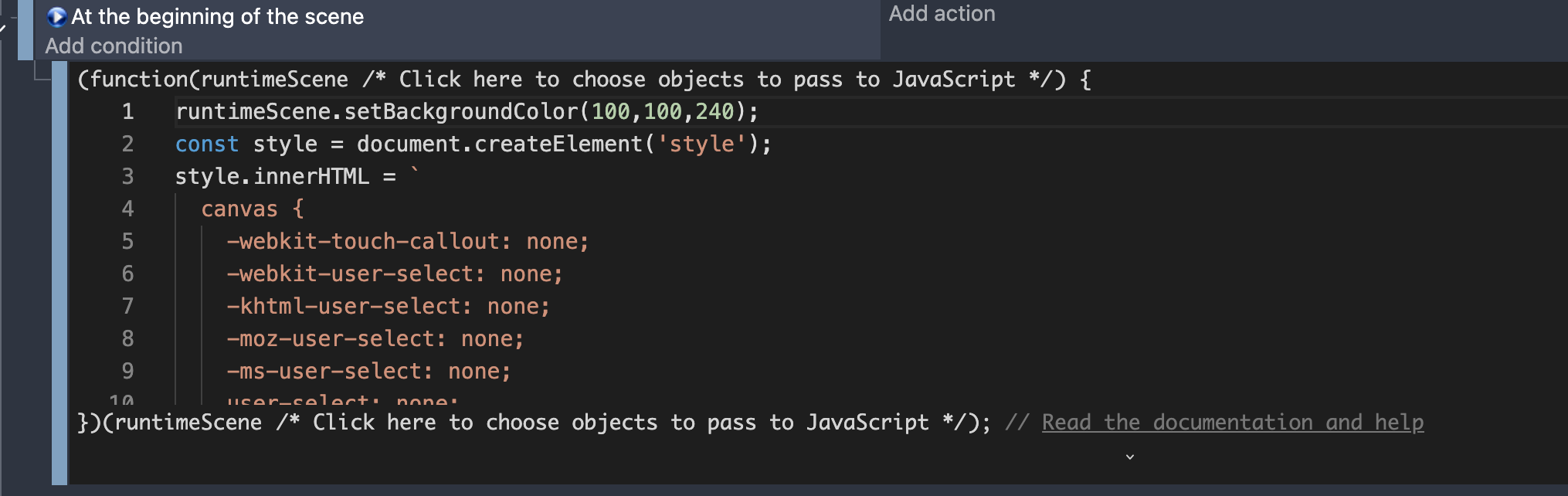
Okay, so I have a possible solution. I found it with some searching online, and I think google ai gave me the answer. Put a CSS tag in at the beginnig of the scene. This also changed the tint of my scene, which is interesting. Anyway, here is a screenshot and the code. It still asks you every now and then if you want to stay in fullscreen, but that’s not as bad as selecting things on screen.,