Yep, you can. But (sadly) in exactly 8 days you would log on to realize you can’t change it anymore, as your 30 days to edit it are over! GDevelop locks posts (for you since you are trust level 2) after 30 days. This made Devlog/Megathread posts very annoying, as they pretty much were unusable. Thankfully, I convinced Bouh to allow them if they are in the devlog catagory, so putting devlog on your post allows you to edit it whenever.
(You can see the conversation here: New Megathread Category Request)
So i wanted to try the game and the game was very VERY loud Heres video of me recording it its this loud in the video times like 10 i had to quickly take my headphones off
I dont know what caused it so you could take a look why it did that
Very weird, I have the sound set to play at a reduced volume and the condition to play it is “at the beginning of the scene” so it should not be stacking or anything like that… tho even if it was repeatedly playing the sound it should not be stacking.
That’s the setting for the music, and i’ve tested it on several devices and browsers without this issue appearing.
I also converted the sound files from mp3 to ogg as I saw that that would be more appropritae in a guide a while back, but all my sounds are converted and I have not encountered this issue nor can I replicate it. So I am not sure what to do about it.
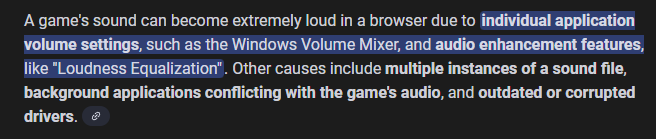
I did a quick google search about sound being too loud in a browser game with the prompt being “what would cause a game sound to be extremely loud on a browser” and the answer I go was this:
There’s explanation bellow that, but I won’t post the whole thing here.
I’ve also encountered the game not running as it’s supposed to on the browser Firefox, but as I understand, the browser itself is not suited for Gdevelop games.
So to be honest I’m not sure what to do about it if I cannot recreate the issue and after extensively testing the game already on several devices and browsers without encountering it… I have no idea what could have caused it except the settings of the individual computer.
If someone else has any ideas on why this could happen and if it’s engine related, I’ll be all over it.
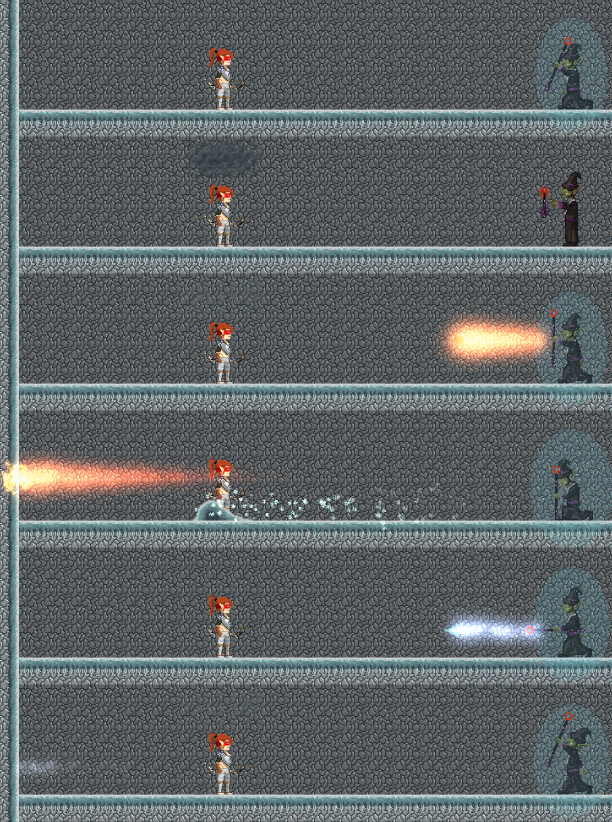
It has been a while so here’s a sneak peak on what I’m working on. It’s for the last 50 floors of the game.
The gif does not represent how it looks exactly due to recording issues I guess, if someone has a better alternative to LICEcap, please do tell.
Other things that have already been added for the 1.0.4 update are:
New mobile controls, switched from joystics to buttons, they really feel better.
Option to change your name for the leaderboard. You can either have a custom one or the one from your registration in gdgames. But cannot change it once it’s chosen.
Loading screen and icons for android.
And other things that will be described when 1.0.4 comes out.
There seems to be a workaround by making a new scene to use as a start screen and make the players click “continue” or “press any key to continue”.
Then the game will load the sounds.
Not sure if i’ll implement that since the game is being developed for android and it’s almost ready for release there. I’ve got a lot to work on towards that release in terms of integrating firebase.
So a workaround is to simply refresh the page so that the sounds load properly.
Sorry for the confusion and the late reply, I only recently encountered the issue myself.
This is probably the last update towards my first game and I consider it completed.
If no bugs are reported, it will stay as it is right now.
I’ve also changed the name because I failed to notice that there’s a game with the name “The climb” on VR. So to avoid any confusion and legal issues, i’ve decided to change the name to “Apex Arcade”.
Here are the latest additions to it in an update list:
1.0.4 Update.
New Features
Particles.
There’s a new option for Particles that can be either turned on or off from the settings menu.
Particle trails for the Arrows, Bullets, some enemy projectiles and portal effects have been added.
New mobile controls.
Switched from joystic controls to button controls, they will feel more consistent now.
New loading screen and icons for the game.
Icons include android and desktop only.
Added the final “Ice” biome to the game.
With it comes also the final boss that appears four times throughout the game.
New enemies “Goblin Mages” for the ice biome.
The projectile breakthrough power up does not work in that biome, you cannot kill enemies through the floors and you’ll have to fight them to progress.
Finishing the game now lands you on a score of 400 “floors”. But the floors are not 400, they are much less than that.
Added the option to change your name for the leaderboards when you open the game for the first time.
You can now change your Username only once before you start the game for the first time.
You can either choose to register with the servers or use a custom username.
Once you’ve started your first run, the name will be bound to your device and cannot be changed.
If you’ve chosen a custom name and later decide to register, you can do that by doing a run ingame and looking at the leaderboard afterwards. There you’ll be prompted to connect to the servers and create a new username or login with your old one. But once you’ve chosen to use the registered Username, you will not be able to switch to a custom one.
This is done so that players can’t use multiple usernames for the leaderboards and result in flooding of the same player entries.
Enabled the Checkpoint after you reach “Floor” 200.
You can now save a checkpoint after you kill the Goblin Lance Rider Boss.
This will allow you to load your checkpoint and go forward to the last Ice biome and face the final boss.
Optimization (again, yes)
With the new ice biome, particles and increase in enemies, further optimization was done to the previously existing scenes.
Switched to tile maps instead of single tiles for the construction of the scenes.
Even though the overal event cycle times were not improved, they remain the same as in the last update.
Loading times were improved.
Fixes
Fixed enemy events.
Previously some enemies did not react as they were supposed to when met with the character Bluey.
Fixed a movement speeds of enemies, projectiles and anything that required movement over time.
Some enemies and projectiles were not behaving as expected on slower devices, they should now move at the same speed over time.
Increased Bluey’s jump distance when he has the jetpack equipped(when you’ve taken the jump power up)
Now Bluey can “jump” higher than the Archer when you’ve got the Jump Power Up.