Here I show how devastating the issue is. Showing off my game freezing as it loads more scenes. Effectively killing my game, I cant work on it anymore.
.Freezes at 0:50, after I load a few scenes.
Because the memory did not properly get released across scenes, it accumulated too much, and now the engine crashes on loading.
After more testing I believe physics3d static mesh makes the problem worse/is the cause.
I did stairs_floor.glb with it, and the memory infinitely climbed across scenes.
I disabled physics, and it seemed to stabilize across scenes.
Physics3d static mesh ON = Memory problem infinitely grows as you change scenes, eventual freeze as enough memory gets consumed.
2. Physics3d OFF = Memory seems to stabilize now on the same model across many scene changes. No more issue.
I removed physics3d from everything now I can change between scenes as much as I want and memory doesnt keep growing And my game doesnt freeze anymore after changing scenes a few times. I think something about phys3d mesh is not being discarded on scene exit and keeps accumulating memory across scenes until eventual freeze.
Spoke too soon. Removed phys3d and it did help a lot, but the memory still does grow across the same two scenes over and over leading to eventual freeze. just takes more scene swaps.
The last time I saw anyone with a changing scene issue it was due to them using some extensions with javascript that kept running in the background (and therefore would duplicate every launch of a new scene).
I’m not seeing any mention above, but is there still anything in your extension list at all? (regardless if you added it via the behaviors list or otherwise, as well as regardless if it is added or not (or even disabled) on any of your objects.)
Disabling phys3d isnt the fix sadly, but using it does make the problem way worse
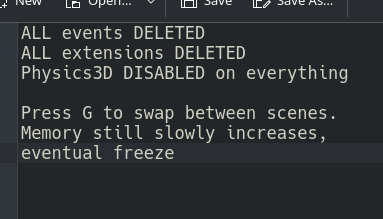
Here i swap between 2 scenes, with no extensions or events. Starts at 12.7gb usage (my entire os), ends at 15.5gb usage. If I kept going it would just keep increasing forever until the engine freezes.
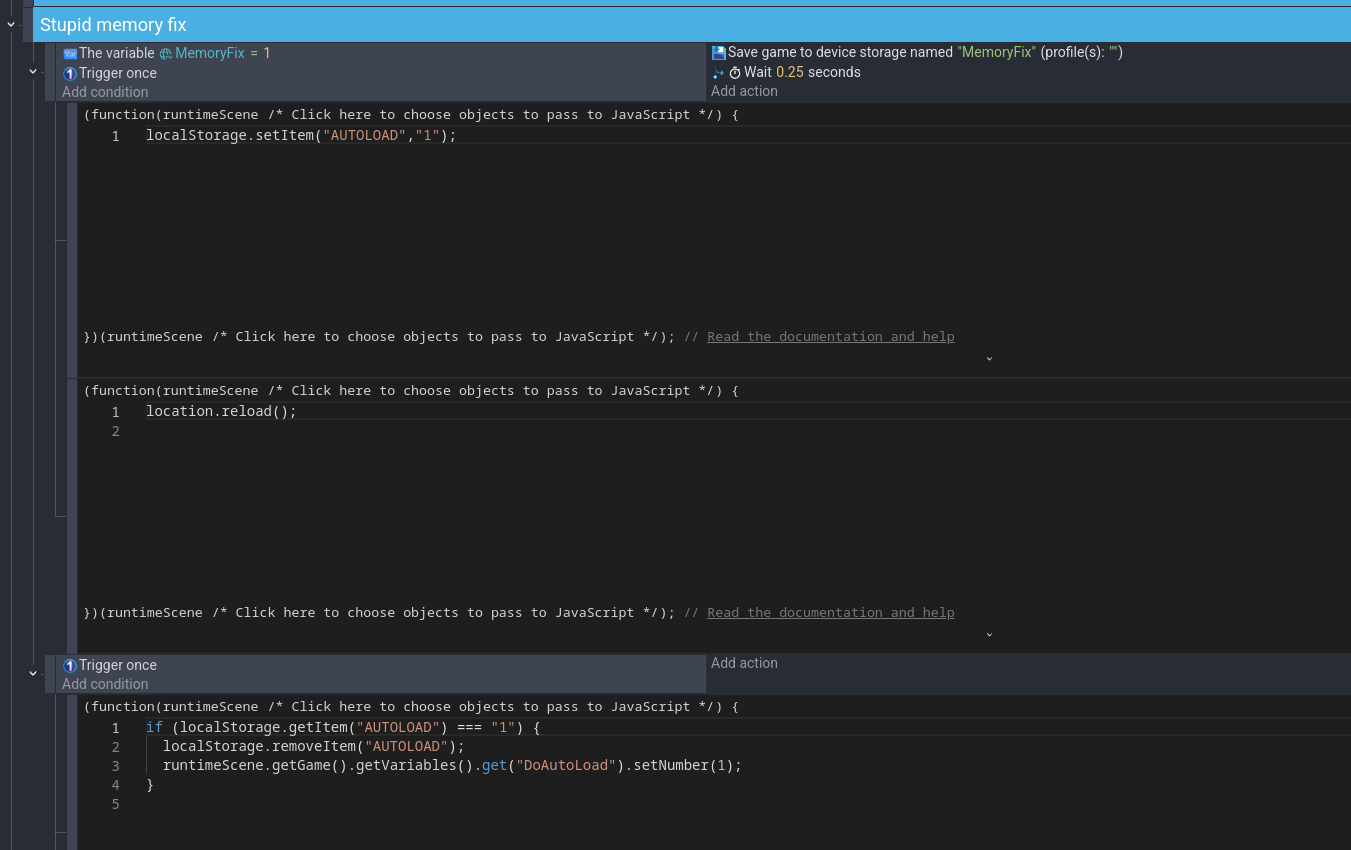
Heres what it looks like in practice. Memory doesnt grow across scenes anymore, and no more freezes - because I’m literally killing the game (with javascript location.reload) and resetting it when I go back to the main hall.
As soon as I exit any door back to the main hall, I set some variables inside javascript which survive the kill , and then create a save state, then kill the game.
When the game comes back, it runs a check and loads the save state, then turn off the check until the next kill.
Which fixes my game freezing because it finally flushes the memory.
Fortunately on the desktop, this just looks like one long black screen.
This is roughly what should already happen (memory gets released) , without having to kill the entire game with this hack.
But I’m sure doing things this way will introduce more problems. Its just a really weird bandaid.
Thanks for running through the extra testing. I’m unclear if it’s something specific to the 3D Renderer implementation itself or something specific to scene switches, but I’ve at least raised the question elsewhere.
Just a community member myself so I can’t make any promises on it, but I don’t think you could do any other testing without starting to tear about the source code to find the original item.
I also did some test with empty project and I confirm ram usage is accumulating again and again every time you change the scene.
I create an empty project throw some 3d models from gdevelop asset store. switch between 2 scenes and memory usage increases each time you switch the scenes. I confirm that Gdevelop doesn’t dispose the memory on scene exit even though every resource unloading option is set to unload on scene exit.
So gdevelop write things on memory on scene load then on scene exit it doesn’t release those data, but when you load the same scene again it write new data to the memory while keeping the old unused memory. Because of this memory usage keep increasing indefinitely.
and the worst thing is some of the allocated memory stays even if you close the preview or close the project. You need to close to gdevelop and open again to free all occupied memory.
But actually, I’ve disabled my memory fix hack work around, and upon testing now I cant get it to freeze anymore across scenes. Maybe some update fixed it entirely recently, or maybe I’ve just compressed some models more to where it pushed the issue back further away. Fingers crossed I don’t encounter it again.