@Bouh or anyone else : is it possible to adapt ReadPixel to read a pixel color in a layer (and specifically when that pixel is hidden by a layer above it) ?
Actually, that would do the trick for me if I could read a pixel color in a sprite (generated with the extention “RenderToSprite”)
The extension will read the pixels directly on the final canvas.
Unfortunately it is not designed to read the textures of objects or layers that are in the rendered canvas.
Maybe by using extract from PixiJS we could. I don’t have time for now to implement it in the extension.
The raw idea is:
- Get the PixiJS container of a layer, this get all the instances living on a layer.
// "" is the "Base Layer" in GDevelop.
// you can replace it by a layer name like "background".
runtimeScene._layers.items[""]._renderer._pixiContainer
- Then extract an image of the PixiJS container by calling the PixiJS renderer and their methods, here extract.
runtimeScene.getRenderer().getPIXIRenderer().extract.image()
So, to generate an image of the base layer in base64:
runtimeScene.getRenderer().getPIXIRenderer().extract.image(runtimeScene._layers.items[""]._renderer._pixiContainer)
A result of it with the platformer example:

I don’t have the time to code this in the extension, but in theory it’s possible.
2 Likes
Ok. Thank you ! I’ll explore that.
sorry in advance to the mods for bumping on a two year old post, but I’m actually needing this.
Did you manage to integrate the change to the extension?
I also hope Bouh reads this because they say the extension reads the final canvas but I actually had it bug and read the base layer ignoring the layer on top by attempting to read the values on a custom object from inside of it
here is a screenshot of the function in case you want to replicate it:
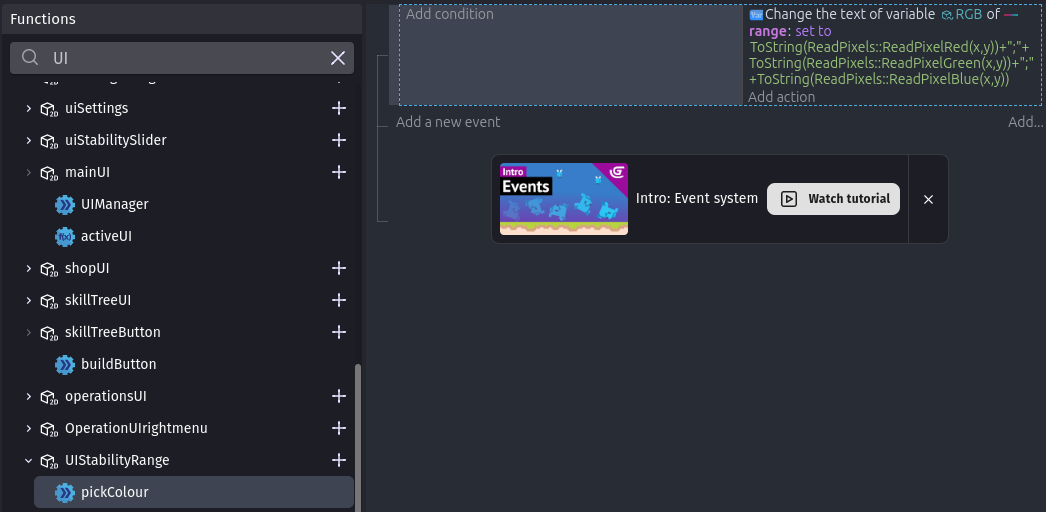
tried doing it this way cause the goel was tinting an object with the colour of the object behind it.