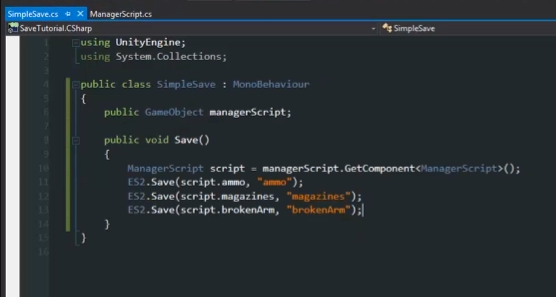
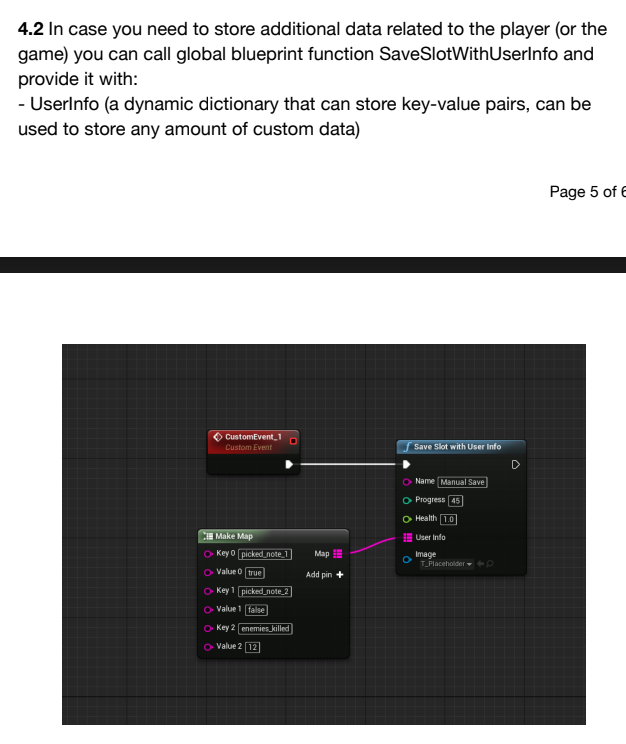
Construct 3
Unity
Unreal Engine
I’m not even gonna bother at this point.. I’ve told you multiple times how it would work. Answered your billion questions and you still don’t get it. You are talking for the point of talking. Stop.
…Ok…now i understand…thx for clarify.
… 
This thread went wild places since I last looked in.
Not coming to debate the merits of this request since that seems to have gone on forever above past the original intent of the thread. Just ensuring that accurate information is being kept in the thread incase a dev does ever review it.
Again, these save processes for UE5 and Unity are (out of the box) even more complex today than GDevelop’s method, and these scripts only work to bring them close to the level of effort/simplicity that exists in GDevelop today. I already spoke to the Construct option above, so I’m just adding details on these other engines mentioned here.
Hello @Silver-Streak!
This possibility seems quite easy and i quite like.
In all case, for a programmer, it must please him…
Thanks Silver-Streak to clarify this demande.
PS: it looks a little like Pascal language with syntax of C (cf. { } )
A+
Xierra
Yep this honestly would work. As for the construct option both on the screenshot i’ve sent and on your reply it’s already said that you can mark the stuff you want to save / don’t want to save. And like you’ve said this also simplifies the said steps to do it. As for the memory issues etc. it’s up to the developer to decide honestly (whether or not to save the whole scene)
Yeah. I didn’t want to lash out like that or anything but over the days what i went through is
Going through all of these while ALSO going through the comments just “making up problems” is honestly irritating.
Nevertheless other people shouldn’t go through what i did and that’s the point of the feature. Implementing ways to save object states, variables (global/object) and such with a 1 simple click. Mark the ones you want to save/not save with a simple behaviour so bigger games won’t have memory issues and boom. Issue solved. Simple, one comment and doesn’t need 25 comments to explain.
As for the post itself i’ll keep it up unless i get ridicilious replies again as i’ve said before. Mods can decide if they want to delete the whole post, certain comments or even penalize for harsh comments. But i’m sure people here can get why i’m frustrated.
Wait wait wait wait
I see we are trying to hit different birds
All this time i was NOT referring to your system but to what we most likely will get
And you answered about system you would wish to have in gdevelop
Maybe that is the confusion here
You keep telling us that we’re giving you ridiculous replies… Fair enough, it could be true… since you started from one thing in your initial post and ended up somewhere completely different, in my opinion. However, I honestly don’t see the issues you’re reporting here. If I had to choose, I’d still prefer having a structured variable to store everything in, rather than ‘choosing’ (in whatever way you want) what to save… as I believe Mr. Men mentioned above. As Silver explained above, the things you linked aren’t part of the engine, as you claimed, but extensions created to make saving easier. However, they are still part of a developed piece of code, so it’s not like the engine magically becomes able to save just by pressing a button—there’s much more behind it. Lastly, you keep saying
Could you please explain this issue in detail with some screenshots? It’s just that this is new to me… as far as I remember, it never caused me problems
"Even regarding the second issue you mentioned about merged objects in a group sharing variables… it’s true, but it’s still possible to edit them individually. And even if you had 500 objects in play, what would it take—an hour or two to change their variables? Not to mention that this situation should be considered from the start, like anything else when developing a game. If you end up discovering something went wrong at the end, then it’s clear the problem lies in the planning
I didn’t tell you you were?
Go ahead and find a better way without merging all of the object variables into one or without breaking the global array variable i’d be more than happy to use your method..
Why should i merge all my variables into every object? That’s the point of the object variable.
If YOU prefer to be that way sure go for it and handicap yourself one way or another. I don’t want me or other people to just constantly find workarounds or deal with other stuff that i have mentioned before.
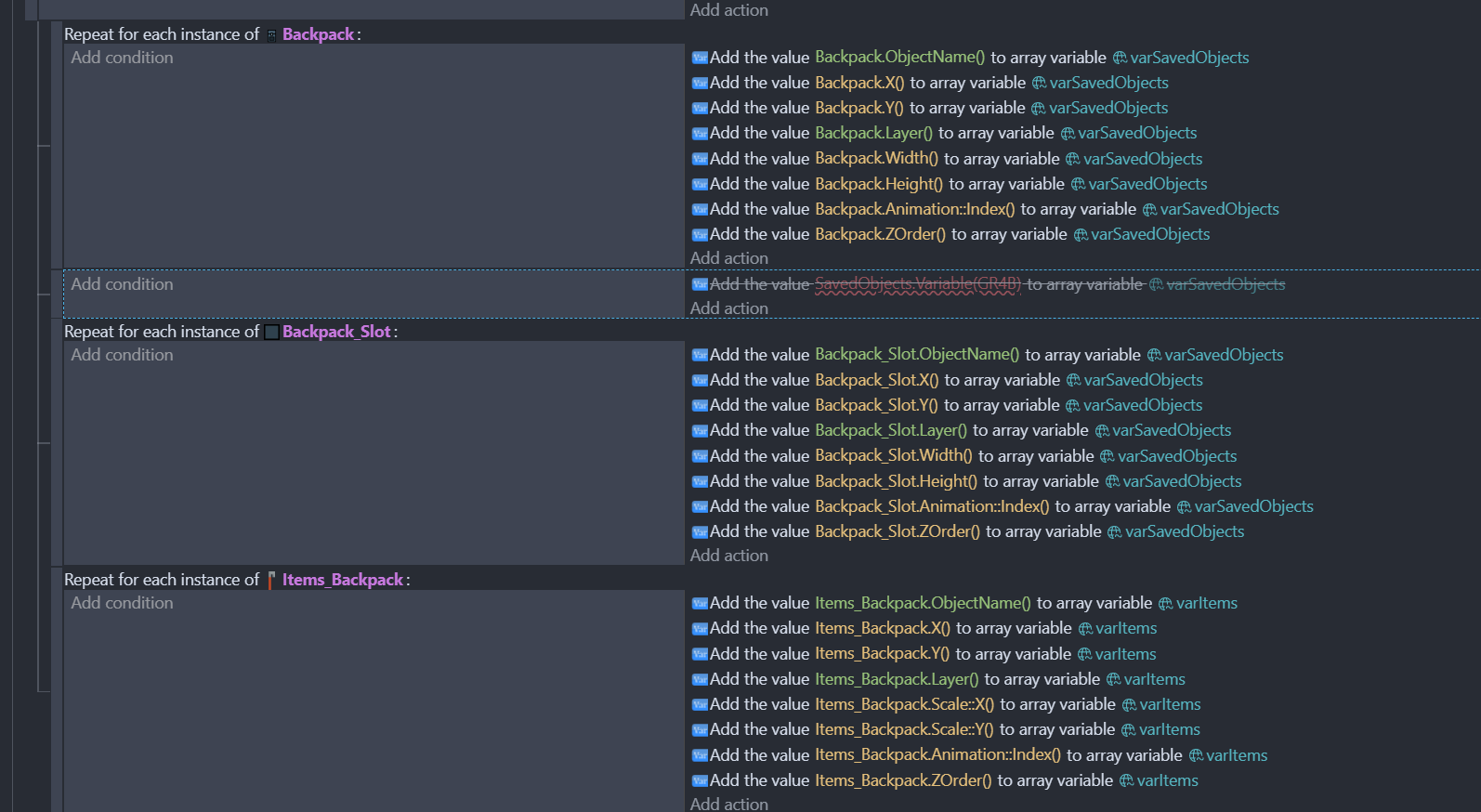
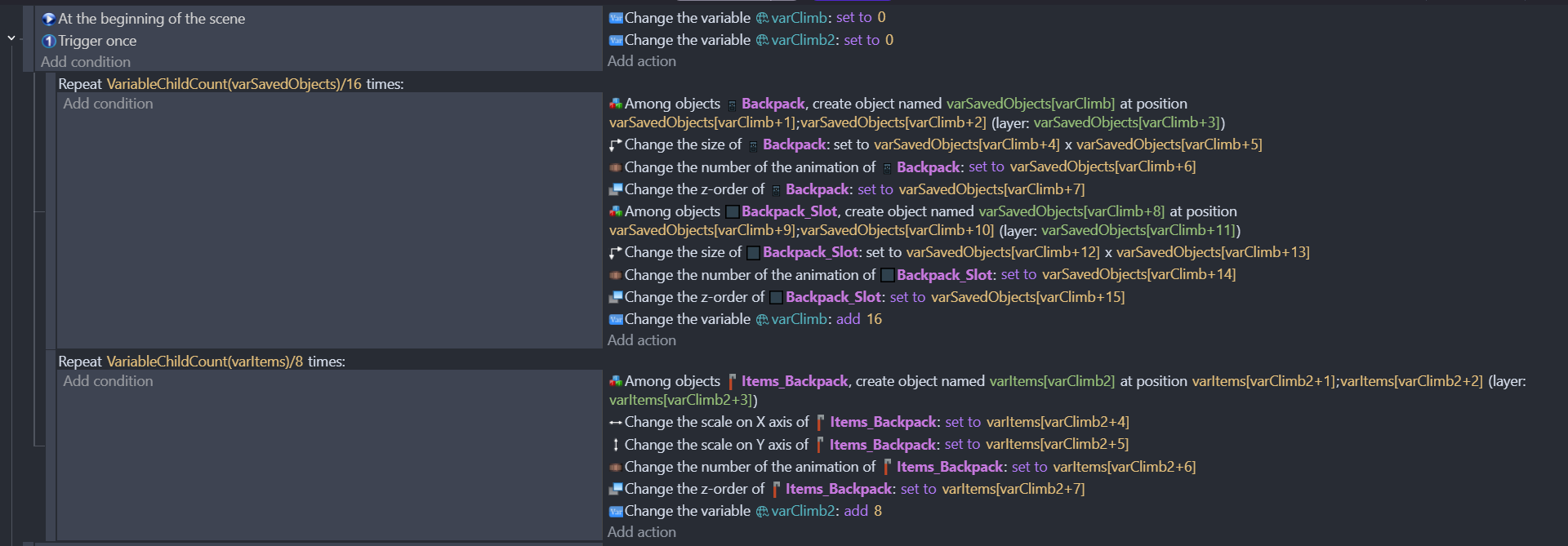
Edit: Just before you say “But it works on me! I’m always right!” Here is what happens if you store everything into one array instead of splitting it
I had to look around in the forums and the internet for days to come up with this solution and it’s been 4 hours just trying to get this to work properly. If it was honestly someone else i’m pretty sure they’d just give up at this point.
Huh i actually didn’t change some of the varItems values here. Either way it doesn’t work (varItems values came AFTER i saw the engine freaking out and the system not working)
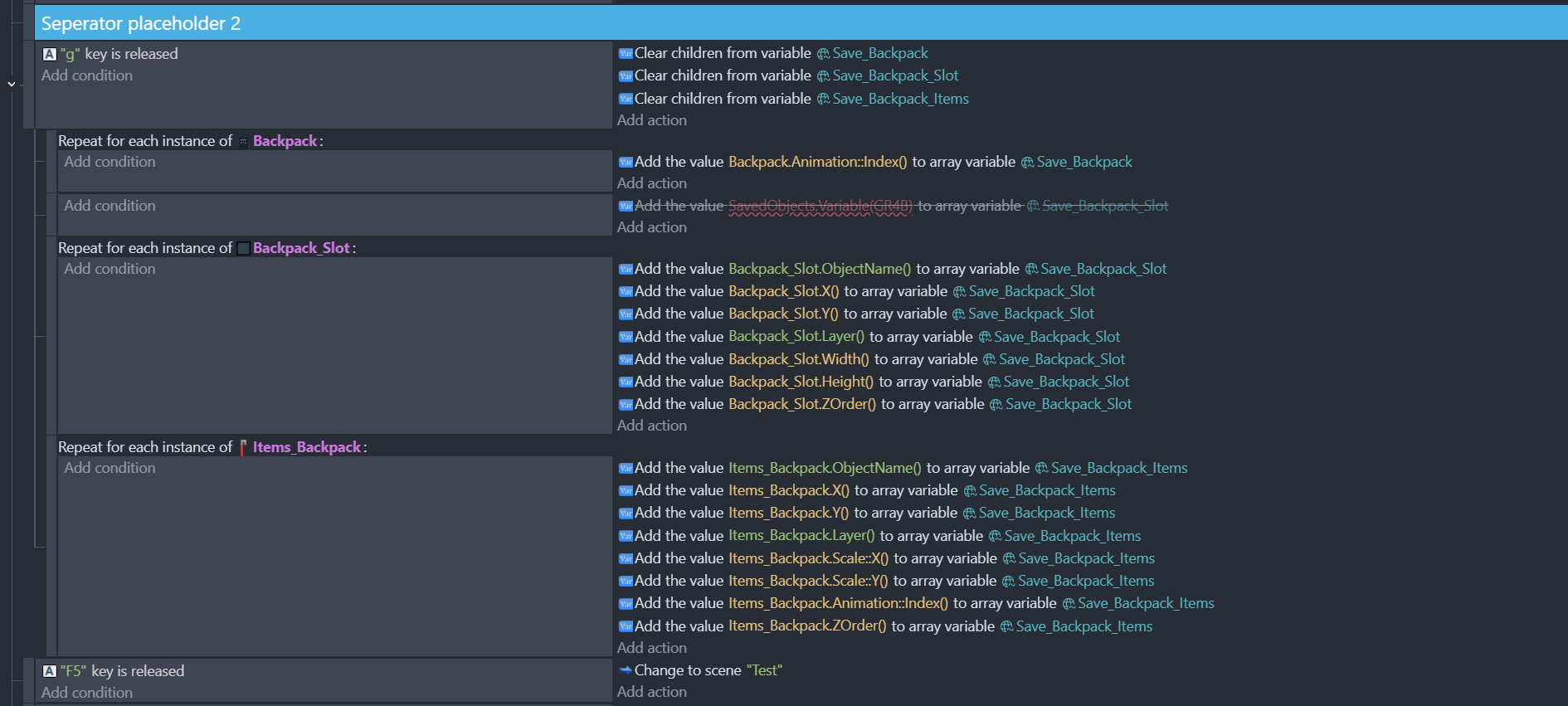
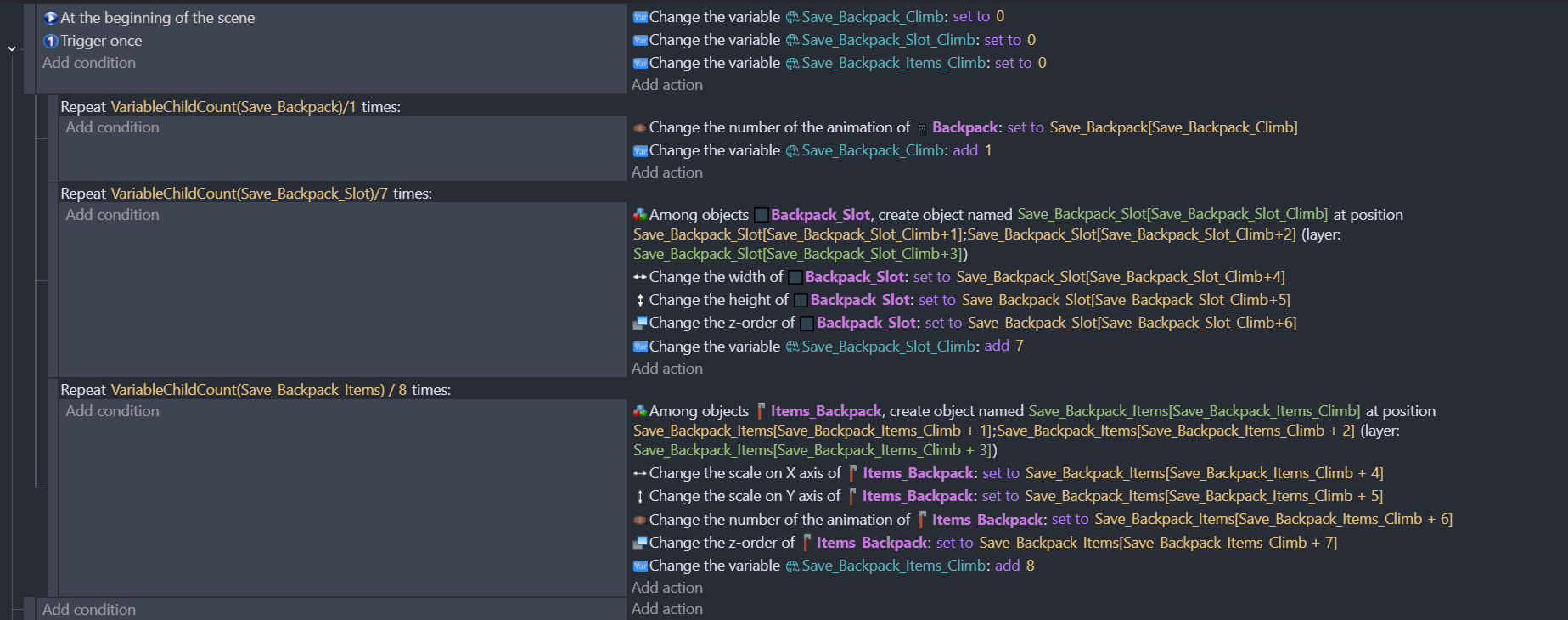
Ended up making it like this for each objects i’m gonna save in the inventory system:
Finally… now at least we have an idea of what you’re trying to do.
Let me start by saying that no one here has ever intended to diminish the work you’re doing.
And if you think everything always worked perfectly for me without struggle, you’re mistaken.
That said… I’ve seen many inventory systems here on the forum, and none of them—at least as far as I can remember—use a system similar to yours. And I’m absolutely not saying your system is wrong—on the contrary. As far as I’m concerned, I have one that’s very similar to yours, but I don’t use arrays, simply because I’ve already defined all the variables within the individual objects (which are grouped together anyway)—something that, from what I’ve understood, you really dislike…because you want it dynamically…
Personally, I used the inventory extension and a single structured variable that contained the various properties of the object (which I still modified from the scene editor).
On the other hand, you want to read these properties directly during gameplay (dynamically)—and that’s why you need a save-state system that stores all the object’s properties you need.
Now, I don’t know how feasible that is…
My advice is: if you believe it’s doable, keep going as you are.
But if you have doubts that this approach might not lead anywhere down the road, don’t expect a quick GDevelop update that adds this functionality
—something I’ve actually requested myself, based on different things (like the debugger…)
That’s not the only thing i want honestly. There are other objects that needs saving aswell. The game just has a lot of dynamic objects. Crates, vehicles, doors that won’t allow you to pass through after going through it once, puzzle pieces that can move and is used as a platform to get over an obstacle. And as the development goes these are gonna add up.
Apart from that getting a proper save system going took me days because both in the forum and online there were barely any info for saving object states. People just made tutorials for saving the player position and that’s it. While other engines do have it’s own features or community/official extensions and templates with save systems included.
Either way i’ve got it going and hopefully in the future we can have a proper implemented save system for other people so they won’t have to go through what i did.
This feels INCREDIBLY selfish.
There may be someone, somewhere, who wants this feature, but isn’t on the forums and such.
I like the feature! It’s out now, and it works well, and I’m loving it!
Think about the world before thinking about yourself.
Do you understand what you are reading or you just came here to pick a fight?
Nobody here is talking about save state not getting implemented or getting removed
I am explaining my concerns about what save state system will bring with it
And turned out i was right
So what is selfish here?
NOBODY did vote/opt in/ask/request/suggest ANYTHNG about this feature should not be implement
You should not reply to something you don’t understand unless you are asking for meaning of it
In fact seems like your message is selfish one here
Cause if you use this as argument
Do you care about ppl who have problems with this new save state feature?
I mean from your comment i assume not
We’ll stop this before anything happens to anyone
I don’t wanna argue rn