So, here it is.
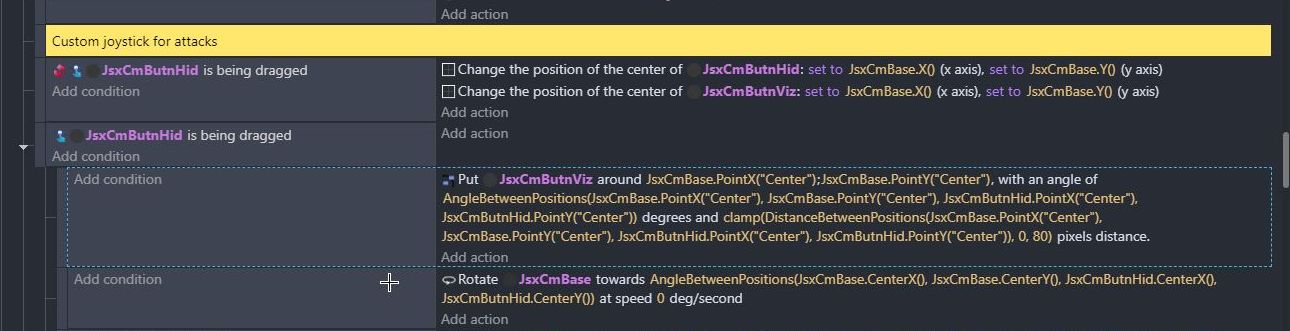
That’s for the custom joystick so it works to aim at all angles in 360 degrees.
I use 3 objects: a hidden joystick button, a visible joystick button, and a joystickbase.
The hidden button uses the draggable behavior and can follow the finger around if it goes beyond the set boundaries of the base.
The visible button stays within the boundaries of the base and is seen on the screen as the image for the joystick button.
Note that you probably don’t need to rotate the base or anything, you could use the ‘anglebetweenpositions’ function directly for the aiming part. (I should probably change that in my project as well. lol. Though it’s probably not that big of a deal and one object angle is easier to reference, idk)

This one is the event for aiming. I’m using a crosshair (Crosshair3) in my project that’s set at a certain distance away from the character. If you’re not using a crosshair, you’ll probably only need the “rotate” part.
As mentioned earlier, here you’ll likely just need to rotate towards angle and use the function ‘anglebetweenpositions’ from the joystick.

And this is for when a keyboard is used. In case you wanted to have the keyboard as an alternative to the joystick. But as with the default joystick, it gets limited to just 8 directions.
Rotate to angle would be set as 0, 45, 90, 135, 180, 225, 270, 315, with a separate event for each direction.
So, yeah, that’s pretty much it. I hope it’s not too confusing or anything. Good luck to you.