Am I misunderstanding how ANDs and ORs works? Because for some reason this code only works if I remove the highlighted AND (which contains all the things below it aswell). (in the example im running the turtle is unshelled but it only returns true if i remove the AND)
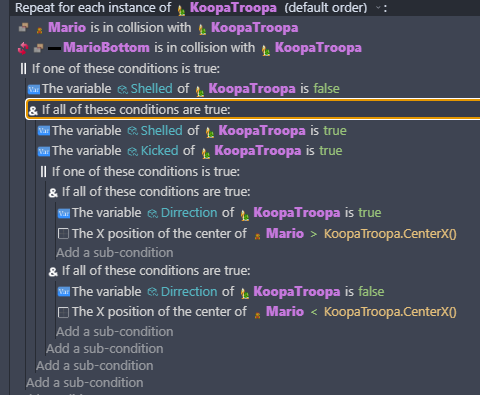
(Fixed your title for you, please try to keep it shorter next time  )
)
Currently, all your AND’s and OR’s are inside of each other. They need to be next to each other like this:
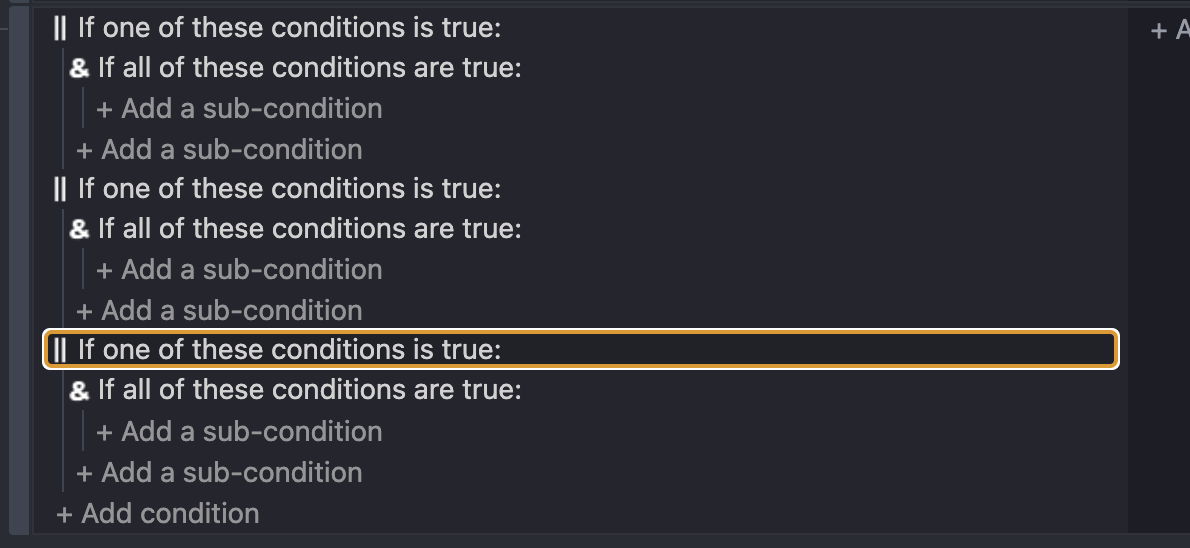
NOT like this:
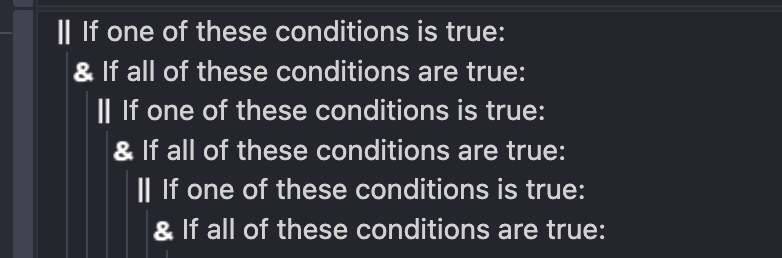
Hopefully that helps
(Sorry I’m writing this quickly so let me know if I’m missing something and I’ll come back to this post later!)
Just complementing what @SnowyRawrGamer said with some unsolicited advice: Most problems with logical expressions stem from a misunderstanding of how they work or from poorly thought-out logic. Without knowing the exact expected outcome of your expression it’s hard to point what is wrong with it. Both examples can be valid, depending of what you want to achieve.
Remember that AND operators are inclusive, meaning the result of the whole expression will only be true if both your conditions are true. If the expression always results in false, but when you remove the second part the result is true, then the second part of the expression is probably always resulting in false and you need to check your logic (not the expression but the reasoning behind it).
1 Like
Yes, and nesting them is correct. What you suggested will not do what @Cipherus is aiming to achieve.
@Cipherus, you may want to debug this the old school way to figure to what’s going on. But first, change that "Repeat for each KoopaTroopa":
Have a normal event with the 2 conditions “Mario is in collision with KoopaTroopa” and “!MarioBottom is in collision with KoopaTroopa”. Add the repeat as a subevent off that one.
To test, I suggest you put each of the logical conditions into a separate event and use a debug to console action to indicate what was just tested (keep the event you have, make a set of new events for this). Run it as “Start Preview and Debugger”, and check the output console.
3 Likes