I am making a turn-based battle system. The general idea is that an action is randomly generated (did this) and when you click on the target, the action affects them (also did this). However, if I want to do something that affects multiple targets, something just dies in the code and I haven’t been able to figure it out.
For example, when I click on Rayne’s action, and then click on one of the Guards, both Guards should take damage. However, when I click on one of the Guards, just the Guard being clicked takes the damage and the other Guard isn’t affected by any of the code within even if they specifically named.
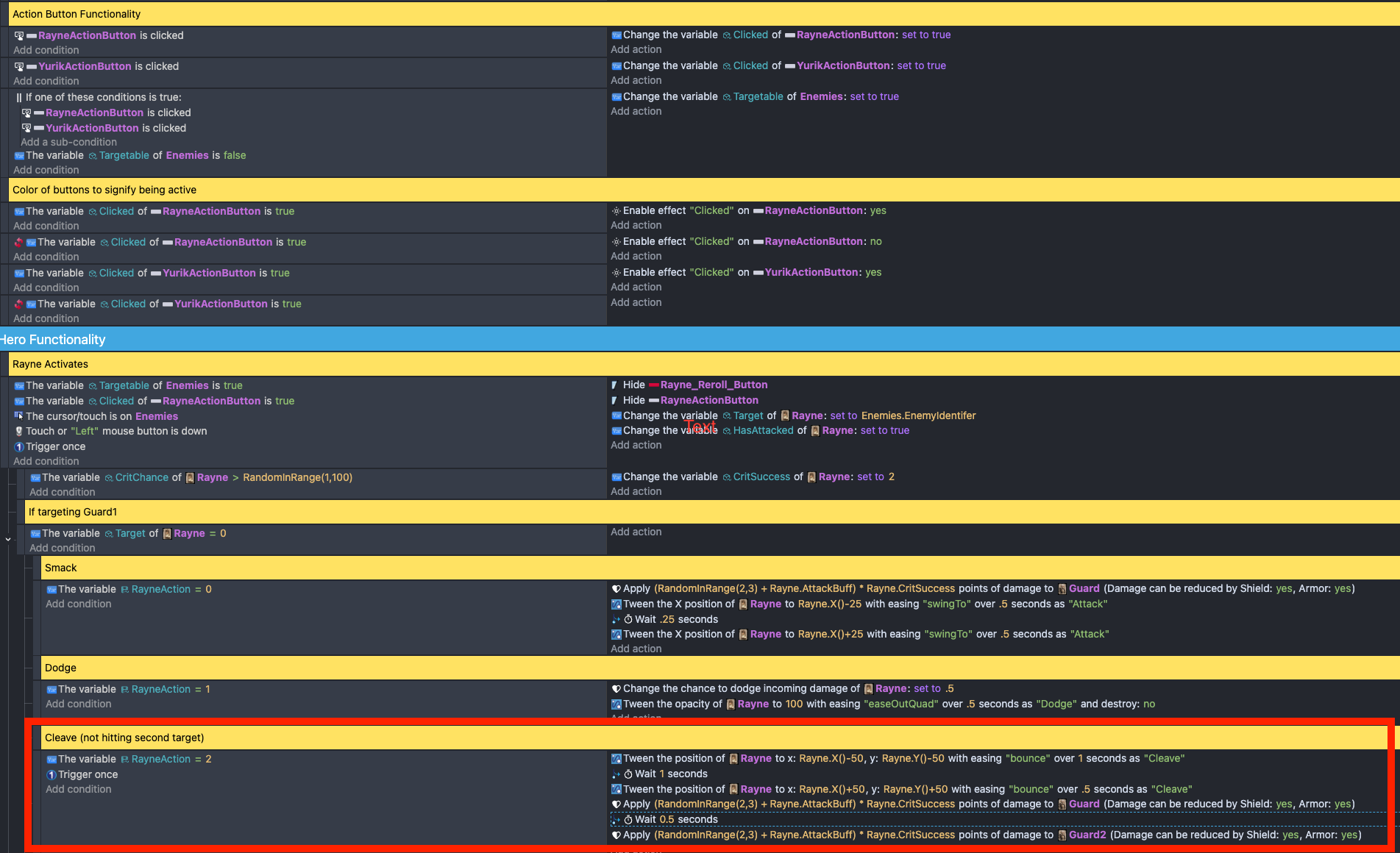
This is the code for clicking the Action Buttons so the system knows that a button is clicked (and can identify which action is being used) and making the Guards targetable (under the Enemies group) makes so that you can click on them.
This code is so as long as they are targetable and the button is active, then you click on them to activate the action.
I’ve put a red box over the key code that may be the issue. Rayne tweens appropriately. Damage is applied to the Guard you click on but the damage is NOT applied to Guard2. This also applies if I want anything else to happen to one Guard but not the other. Like if I make Guard no longer targetable (so there can’t be repeat effects, even if I put the code for Guard2 to not be targetable, it also doesn’t change).
I’m sure there is some logical flaw I’m missing. Any guidance would be wonderful. Thanks!
Is Rayne in the enemies group? If so, at the beginning of the chain of events, it’s only picking the enemies under the cursor. Should it be affecting more enemies? You might need to expand the number of objects that are picked. IDK how many secondary object are also affected.
Rayne is part of a different group called Heroes. The Guards are part of the Enemies group. The idea from what you’re seeing is that each Guard has an “Enemy Identifier” variable and that when you click on them, it assigns Rayne’s “Target” variable to whatever the “Enemy Identifier” is (what he clicks on). So that we know who the action targets.
If the guards are part of the enemies group then it’s only picking the guard under the cursor. You could add a pick all guard2 objects before adding damage to gaurd2 and maybe afterwards do a distance check. IDK the setup.
How many guard1 and guard2 instance are there?
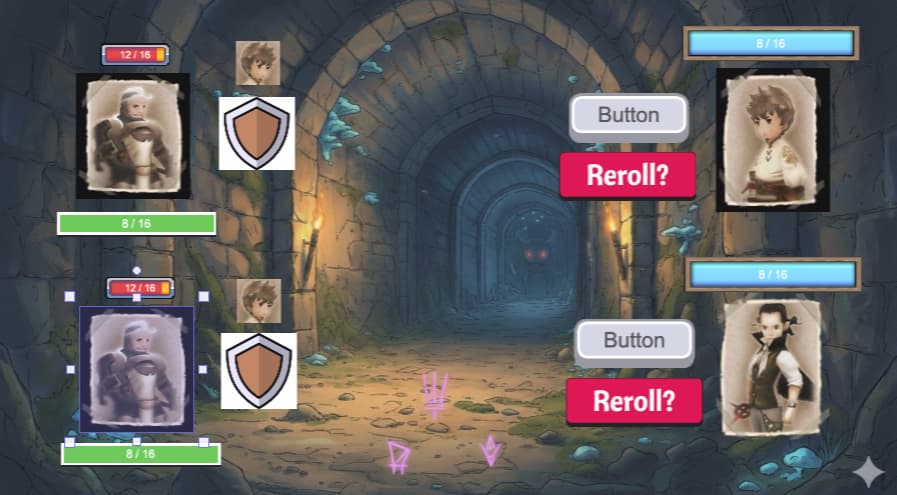
this is sort of the set up. Only instances (in this case is the two guards) though eventually it will expand to more. The images are just stand-ins until I get proper art assets to replace them. It’s more of a proof-of-concept than a full on game at this stage.
So you click the Button and then you click on the enemy you want to attack. Works great on single target attacks. But if I do a “cleave” where it hits one and the other one, then it only hits the one.
Also an interesting note is that the Guards also have an attack that hits both heroes and I use basically the same code and THAT code works and hits both. But the Guards don’t have the extra code of needing to click to target. They just automatically attack both if that is the random attack chosen by the game.
If both guards are in the enemies group then when guard is clicked then it’s the only one that gets picked. You could use pick all guard2 objects or maybe object linking when there are more objects. Either that or the objects could use sort of like object IDs but more like names or classes.
Can you click on either guard or gaurd2?
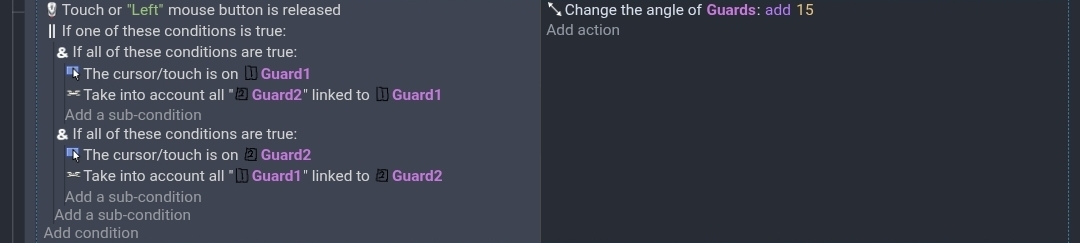
I tested my events by rotating the object. It’s a quick visual way to tell if the correct objects are selected.
This just picks all of the objects in the guards group regardless of which guard is clicked.
This uses linking. I added multiple sets of guard1 and guard2 objects. I then linked the matching objects.
There are multiple ways to link the objects. I just linked the closest objects.
This has been great! The picking really solved the issue. It was the missing piece. I need to massage the code a bit to make it work but I think this put me in the right track.
Thank you! You’re a genius.
1 Like
Adding the effect to a Layer is definitely the cleanest way to do this if you want everything on that layer to share the look. But if you only want it on specific objects that are mixed in with others, using an Object Group is a lifesaver. It keeps your events list way shorter and makes it so much easier to tweak the effect settings for the whole group at once later on!
I definitely need to go back and clean up/optimize the code after getting the functionality work and hopefully now that I can affect the group better, I can use the Object Group to clean things up more.