I am working on a project that plays very similarly to bingo, a 5x5 grid that you place tiles on and score points depending on a type of “solve”. I want to let the player score 5 different ways: 3 in-a-row, 4 square, 4 corners, Row/Column, and Diagonals. My grid is setup as a regular 5x5 (A-E,1-5) with each tile as its own instance of an “Obj_Tile”. Each instance has object variables marking what column and row they are in. Without hard coding in every possible solve is there a way I could make it so that it checks every turn weather or not a solve has been made and tell me which tiles were used? I know a few ways this can be done but they all involve hard coding or using a bunch of hidden collision boxes to do the checks and I just want to make sure there’s not a faster or more optimized way of doing so before I go that route.
The only thing I can think of that’s different to what you’ve suggested is
Repeat for each tiles with the right id.
Store it’s x and y in a scene var
Then point inside object checks
Eg three in a row …pick all tiles …tiles with the right id…point x+64,y and point x+128,y inside tile
I seem to always end up suggesting point inside object and it’s probably becoming tiresome.
I wanna see how you do it considering all possible ways for player to acquire bingo status
What I’m doing at this moment in time is I’ve basically hard coded in solves for Rows, Columns, and Diagonals and I plan to do the same for 4 Corners.
I what I’m doing at the moment is this. I have one Scene Object called Obj_Tile and I have it copied 25 times in a 5 x 5 grid (using different animations to make a checker pattern). Each instance of this has variables depicting the row and column and whether or not the tile has a token on it.
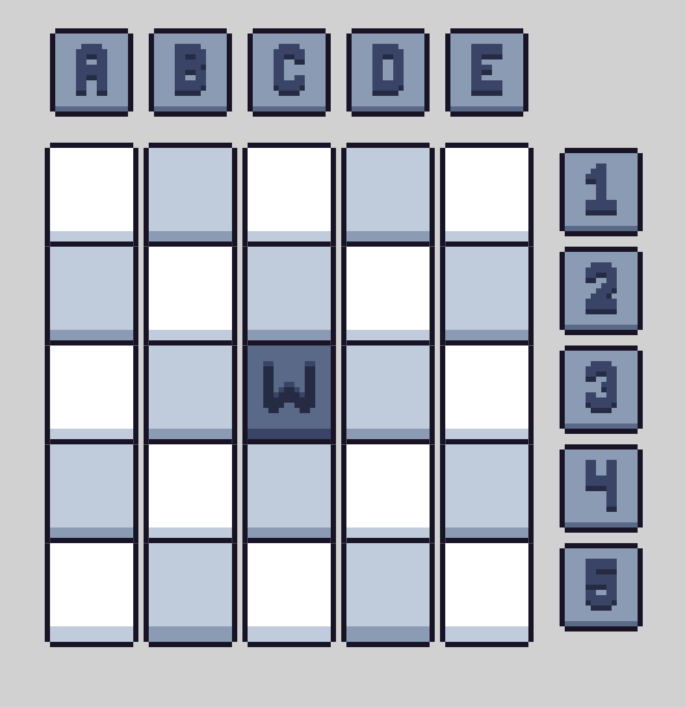
(5x5 grid of Obj_Tile with animations used for tile color and/or "Wild Card or Free spaces)
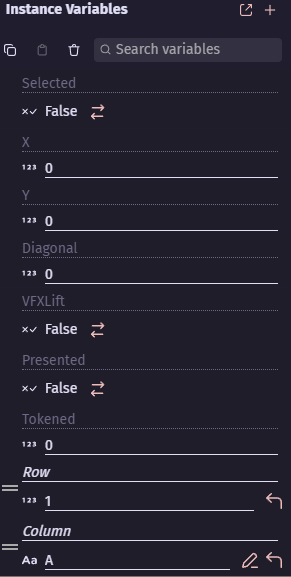
(Instance variables for each Obj_Tile: X and Y fill out at the start of the scene and VFXLift and Presented are used for animation purposes and Diagonal is unused atm.)
I have it so that a scene variable reads the Obj_Tile.Tokened variable and copies its value into and Array organized by columns. And then checks if all the values from an entire column or row are true and if so it triggers a row/column solve.
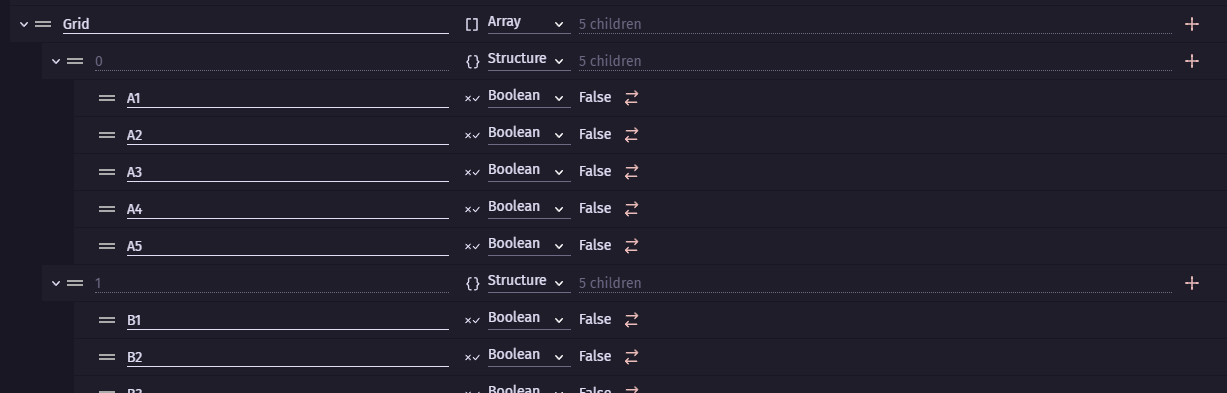
(Scene variable for Grid scoring tokens)
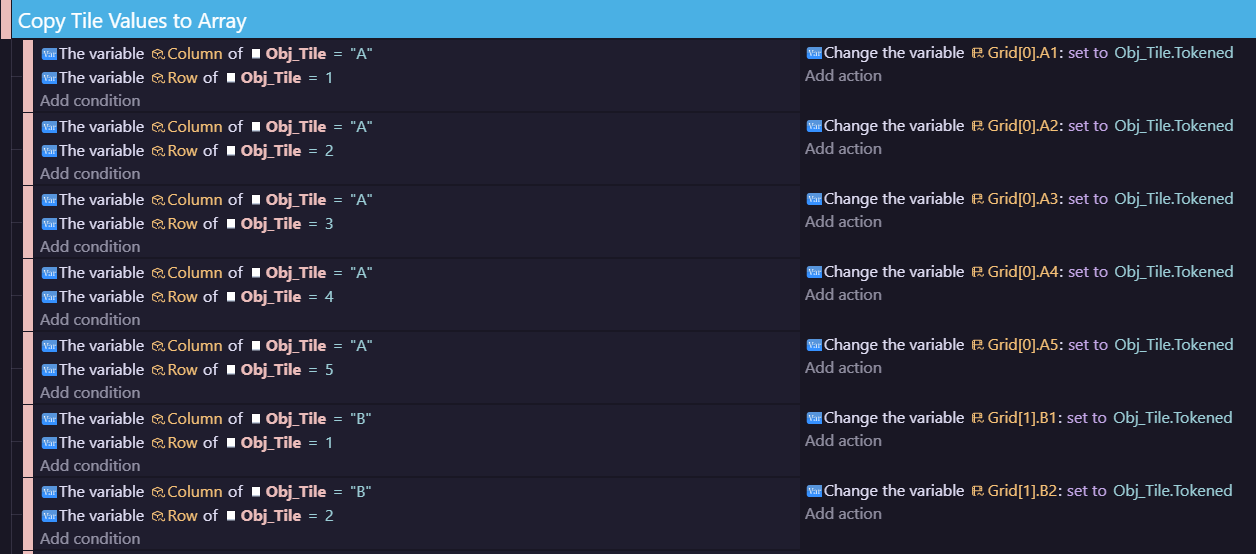
(Events used to copy Obj_Tile.Tokened)

(Part of the events used for triggering row/column solves)
THIS WORKS - partially. All of the Column and Row checks and solves work and I plan to use this same method for checking diagonals and 4 corners, but hard coding in every possible 2x2 square and 3 in-a-row in rows, columns, and diagonals, in a way that I can easily amend later on to add more content to just doesn’t sound feasible. I also can’t reliable find where on the board a solve was made using this method without adding on hundreds of more variables and checks to grid and using math I don’t know. I would definitely like to use an Array to make this easier but I don’t know a lot about them and I don’t know weather or not they could even do what I’m asking. My other solution is literally just to attach collision boxes to the cursor and check for every possible solve from the placed token outwards and honestly that still sounds like there has to be a more efficient way.
You can use an array of 25 that corresponds to the x and y of the tiles which would work and in some ways it might be easier but i think there’s a clever way to do it with a ‘repeat for each’ tile and ‘point inside object’ checks. The patterns of points that are checked could be read from arrays.
If you have an array containing all the patterns and each pattern is an array containing the relative x then y to check.
so within the repeat for each tile
have a repeat event to run through the patterns
and inside that have a repeat event to check each point in the pattern relative to the tile.
As @petlimpet said, I have created a tile puzzle. I have a board where the tiles are placed which I’ve given a custom behaviour. This basically holds a array of the tiles which are on the board, but most of the functions that manipulate it are in JavaScript as I find it easier to iterate the array that way especially as I have a dynamic array which could be any size.
I can give a bit more detail, but I’m not sure how comfortable you are with using JS.
Unfortunately, I’m not at my computer at the moment so can’t post any code at the moment.
So what I’m gonna end up doing is again probably not the most efficient way, but its a hybrid of hardcoding and using my array and it should in theory work. I’ve reworked the array I already have In place to now read as Tiles[0].0, Tiles[0].1, Tiles[0].2… to make it significantly easier to comprehend, working with equations that read as “Tiles[4].D3+Tiles[3].C3” was just very confusing after a while and it makes it far less daunting of a task to hard code what needs done that way because now I can sight read it from a chart and it actually gives a better representation of where it is on the Array I already use. After drawing all out on paper there are 10 possible 5 in-a-row horizontal/vertical solves and 30 possible 3 in-a-row horizontal/vertical solves as well as 2 diagonal 5’s and 18 diagonal 3’s and lastly a total of 16 individual 4 square patterns. I could absolutely do this using loop functions or a crawler of some kind but I think if I want to get the exact tiles involved in a solve that would probably actually make it more efficient to just go ahead and hard code it all in using the checks in my modified array. Since I’m only using a 5x5 grid and not something larger I don’t entirely think this is gonna affect performance as badly as I anticipated in the long run, especially now that I’ve actually counted out all the involved checks, and if it does I can always come back and rework it later.
Check this out
Your tiles are ONE sprite object which you just spammed over your scene
So change their collision mask to something like this red square
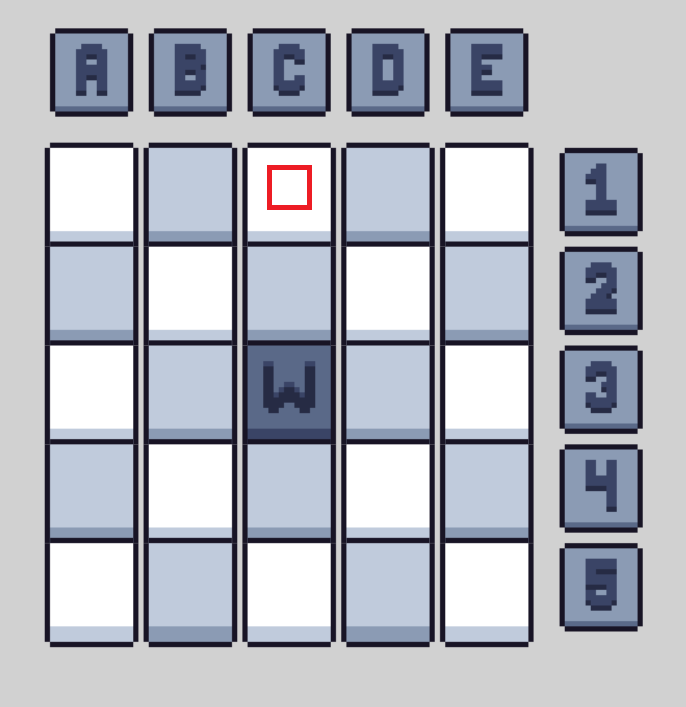
Since they are the same object it will change it for all of them
Now let’s assume your row/column signs are also same one object just with different animations
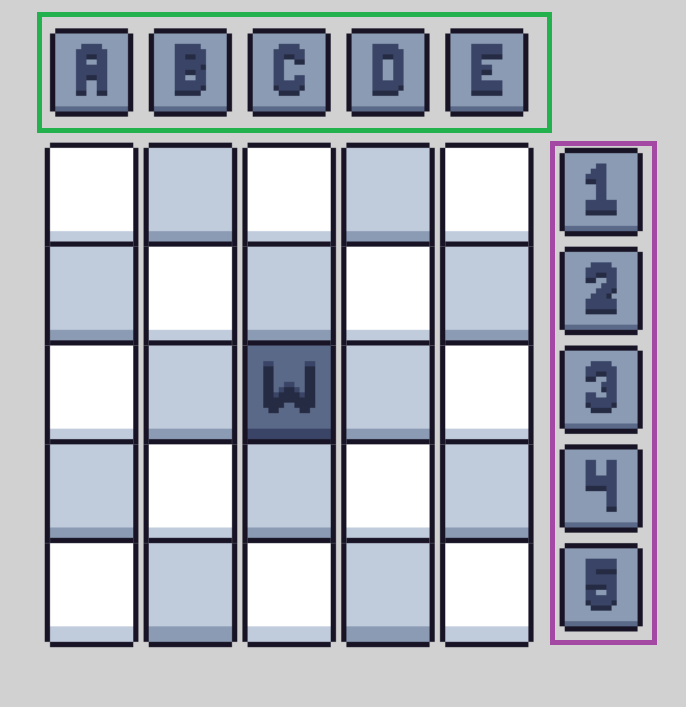
Green horizontal purple vertical so let’s give green instance variables from 0 to 4 so 5 in total
And purple from 5 to 9 so again 5 in total
Now you can either use fire bullet behavior or just use add permanent force
And you need to make some small can be even 1x1 pixel object and just call it bullet
You check in condition if row/column object variable is equal or greater than 0 but less than 5
And you use repeat for each
You fire from them bullet object toward angle 90 so down
In another event you check if row/column object variable is equal or greater than 5
And from these you fire bullet toward angle 180 so to the left
IN BOTH CASES YOU FIRE FROM CENTER OF COLUMN/ROW OBJECT
Now you make event
Bullet is in collision with (that is why you made collision mask of tile smaller)
Tile boolean var = true
Trigger once
Action
Change bullet variable add 1
And only thing you need now is check if bullet variable is equal to 5
Which will indicate bullet has fly trough 5 tiles which was marked as true/winning/correct or however to call it
And so you just made logic for checking all columns and rows at once
If you make collision mask of tile properly you can even fire 2 additional bullets diagonally
All left to do is delete bullets after some period of time and when you have that right
You can hide bullets when they are created
That’s actually a really good idea, and you are absolutely correct about the markers for the columns and rows being another object, Is it possible to use this to check the patterns though and possibly have it tell me which tiles were used in the pattern? I am gonna play around with this and see what I can do in the meantime. Very appreciated either way.
I replied to you but of course bot jumped in
I gonna delete original message and just send screenshots
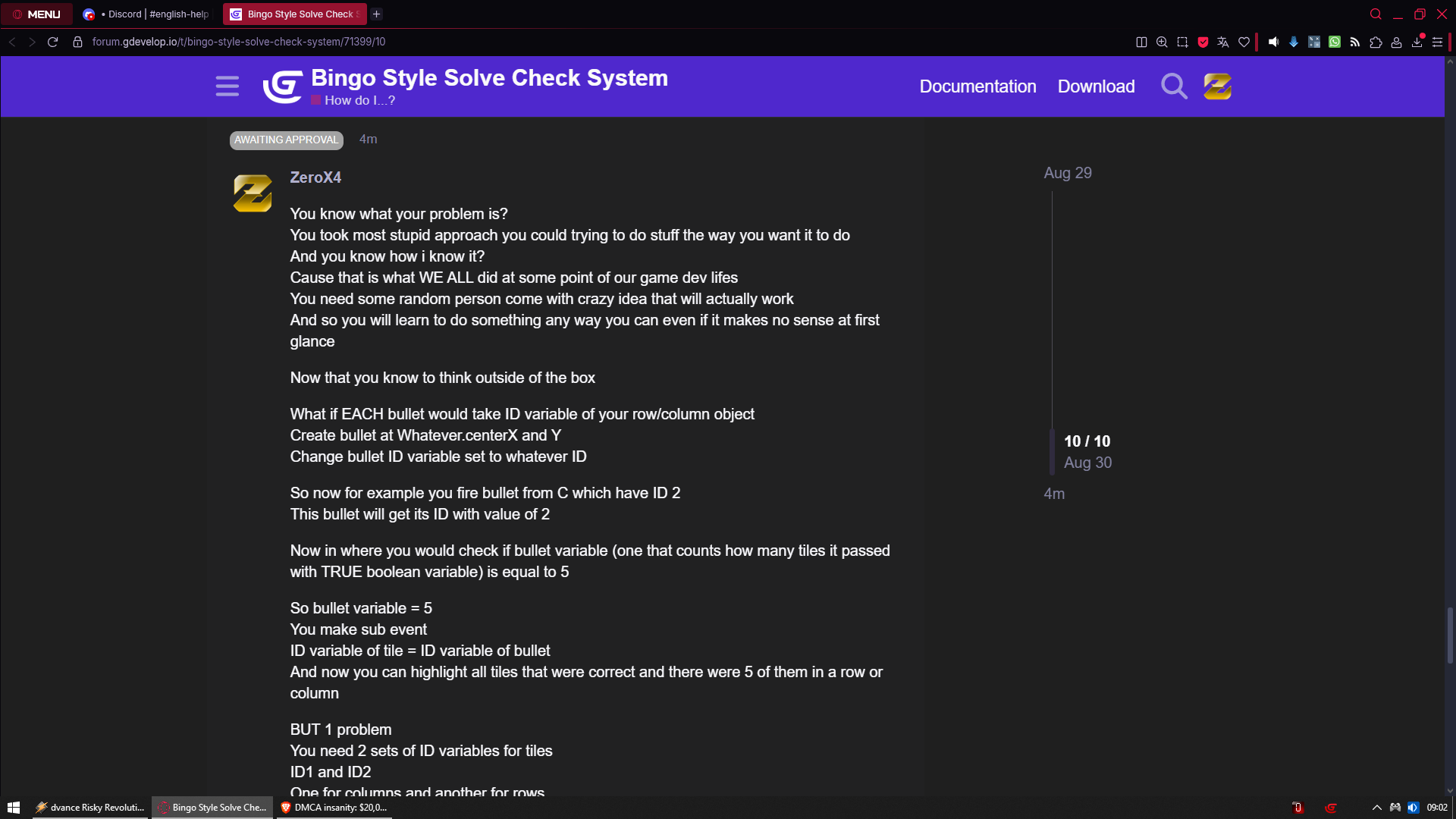
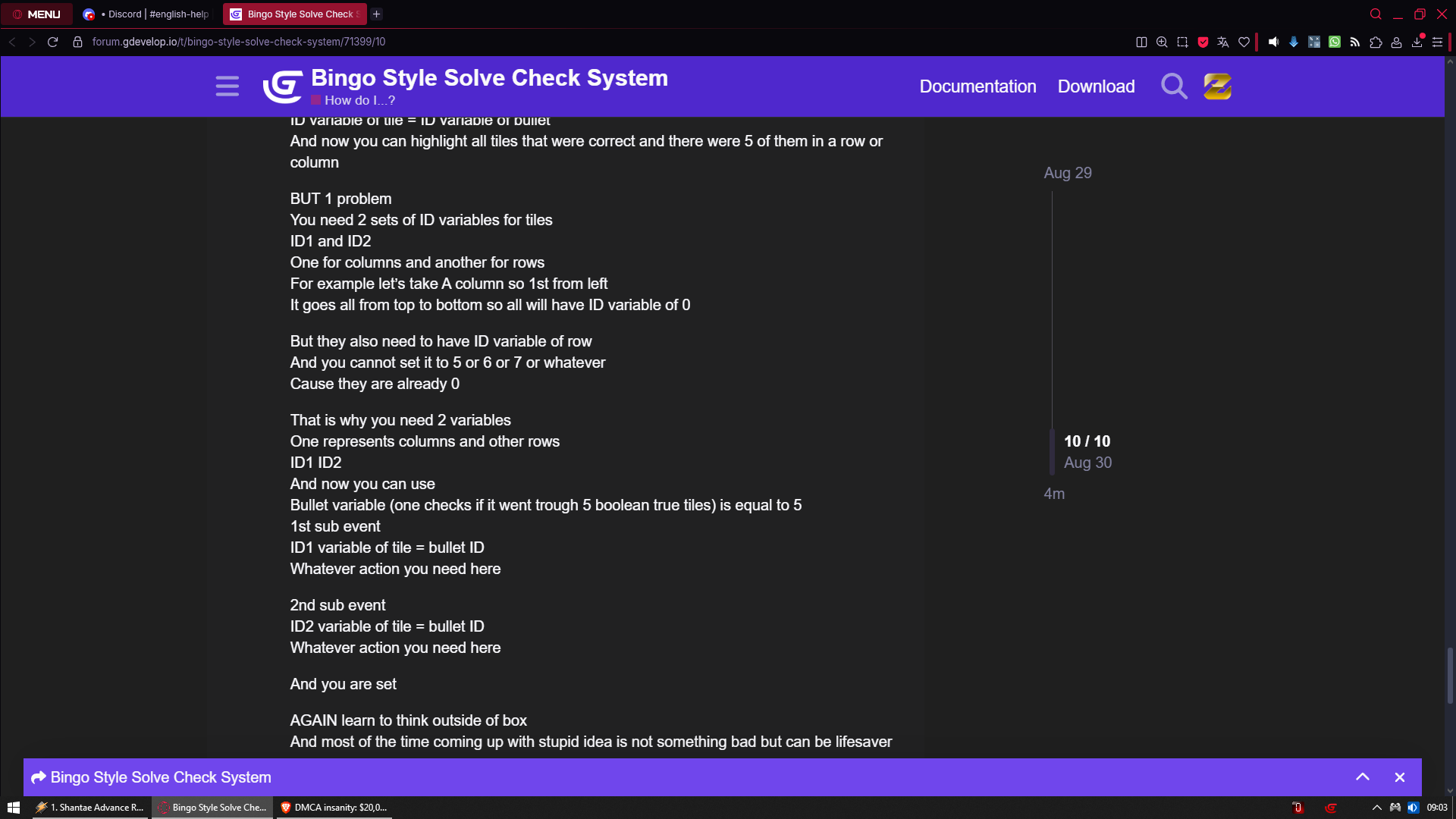

Hi @KroyIsYork
You mentioned early on about having different grid sizes. As I said before, I normally handle grids directly in Javascript, but I wondered if it could be done easily in GDevelop. It turns out it’s not too tricky.
The array and code I’ve put here doesn’t contain you Bingo logic, but perhaps the array generation and manipulation might be helpful.
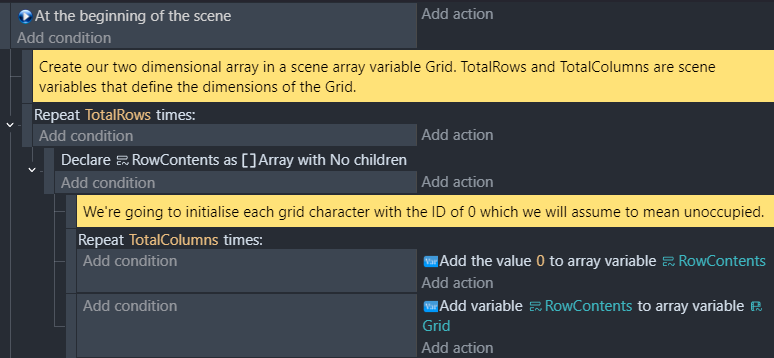
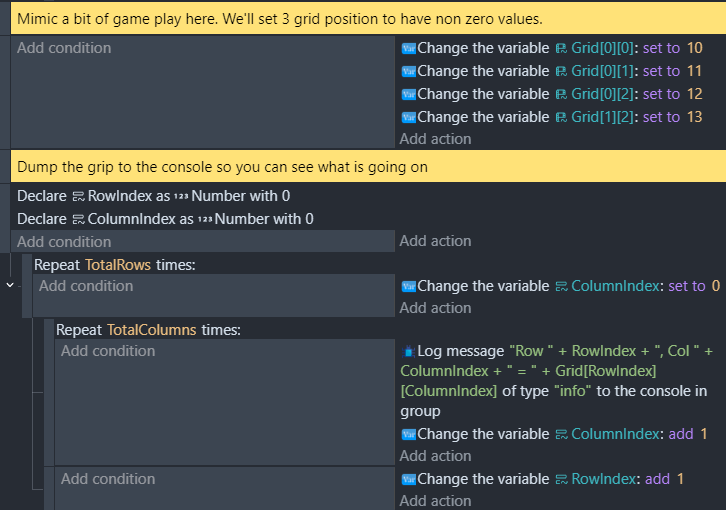
Instead of using an Array containing structure elements as you have, I’ve used an Array containing Array elements; this a a common way to create a two dimensional array. This allows you to access them as Grid[row][column] which I think might make programmatic access easier.
There’s some screenshots below which I hope helps. The array is created completely dynamically, so you don’t have to hard code the array sizes.
In the scene variables, I have an empty Grid variable, and two others which define how big the grid will be.
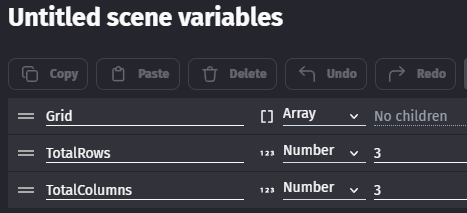
This is the initialisation code to set up the grid
This code mimics some gameplay putting tiles in the grid.
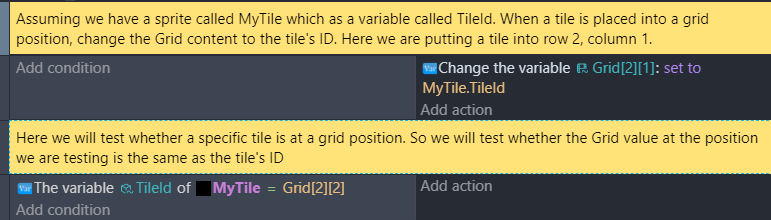
Here’s a bit showing some manipulation and tests.
There’s some wildly differing approaches on offer here @KroyIsYork - too many to reconcile together and so do what works for you. I’ve book marked this @Henspace in case I do something grid based and might need to set things up the way you’ve done them.
@ZeroX4 - a very creative approach which might also look interesting and work if there aren’t too many combinations to fire bullets at. The bot stepped in because it sensed you weren’t being terribly polite. But you did put more effort than I did into solving the problem.
If you want to use the object or animation instead of an array then you could create a condition that would check the animation using column, row and object as parameters. You could also as an animation compare parameter or just check if the value isn’t the default animation. If the conditions inside the condition are true then it could return true.
It would be similar to an array and it would be 1 condition instead of checking the row and column variables and animation or another variable separatly.
Sorry, been busy the last few days, if my point got lost somewhere I was trying not to do the laziest thing. Implementing it all the easy way here is absolutely not most efficient way to do it performance wise, which is why I only did part of it just for testing purposes while I figured out another way of doing it more efficiently in the long run.
I actually even have the bullet logic mostly implemented, I was just unsure as to how to move forward with specific patterns and still am.
Thank you, @Henspace I honestly don’t know entirely too much about all of this, I’ve been learning game development off and on in my spare time for 9 years and I’ve only been using GDevelop for a couple years, before that I used RPG Maker, honestly everything I know about game development might as well be self taught because I love the thrill of solving a puzzle and that’s why I enjoy doing it. That click when it finally works. I just need some help here because I’ve never worked with Arrays or any kind of logic quite this complicated. And this helps a lot, I kind of understood what you were saying before but I didn’t entirely know how to do it or how it would look. I’ll be honest when I say that I don’t know what Declaring means, but as far as the rest goes, I think I understand a bit more on how to do it.
Hi @KroyIsYork,
I totally get that feeling that happens when you suddenly realise how something works. It’s great. Good luck with the game.
Just one thing on the ‘Declare’ bit as it might be a feature of GDevelop you’re not aware of and it might be useful in the future. Apologies if you already know this.
You’re already familiar with Scene variables, but sometimes you can finish up with lots of scene variables that are only really being used for small blocks of events. GDevelop lets you create local variables that only exist for small blocks of events. They’re created in a table of variables that looks pretty much the same as the scene variables, so they’re very easy to use.
They can make the table of scene variables much more manageable and the code more maintainable. There’s some info here if you’re interested: local variables
I got it!
Everything works. 3 in-a-row, whole columns, diagonals, 4squares, and 4 corners. Thank you @Henspace, I’m ngl I did all of this before reading your bit about local variables and instead did this with scene variables and a very similar concept.
First! Every time the play plays a token the board updates, and I’m using 1 event to accomplish it. Each of the tiles on my board are assigned a Column var and a Row var and are each numbered 0 - 4, every time a token is placed it updates the array variable corresponding to that tile and cycles through all of the variables and checks every possible solve combination using the information saved to the Array and comparing each outcome to a set pattern using variable checks.
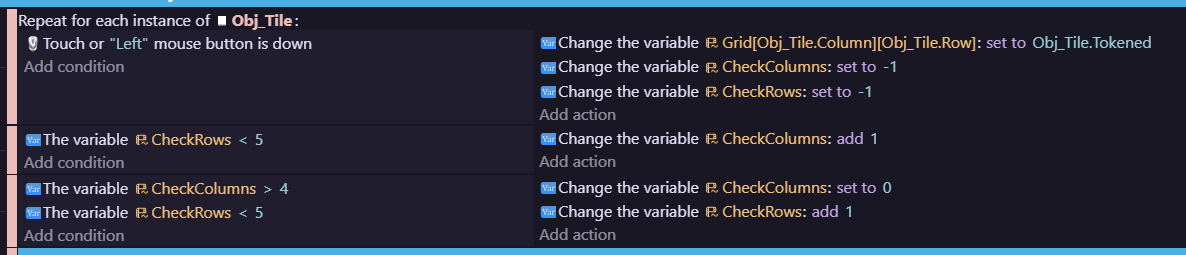
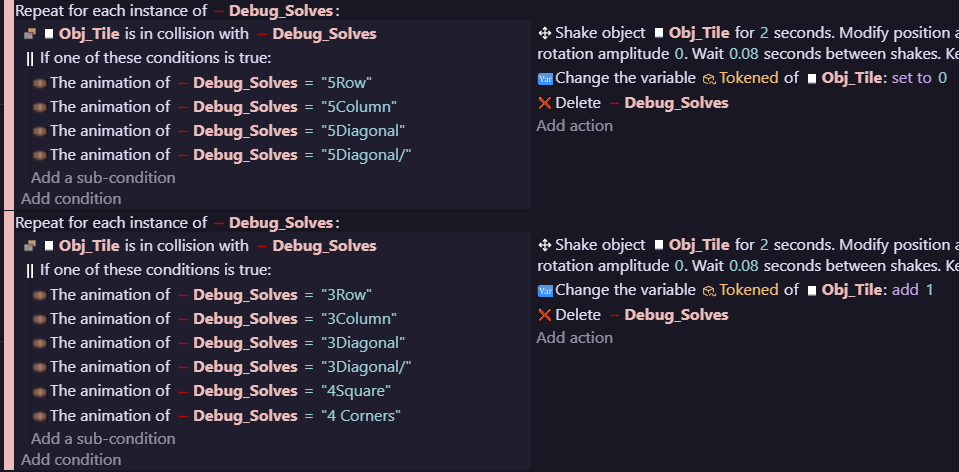
Once that is done it places an invisible debug object on top of the “root” tile of the solve and sets it to the animation corresponding to this object. This object has specific hitboxes for each animation updating and animating the used tiles without even needing to actually log which tiles were used via collision boxes instead of math.
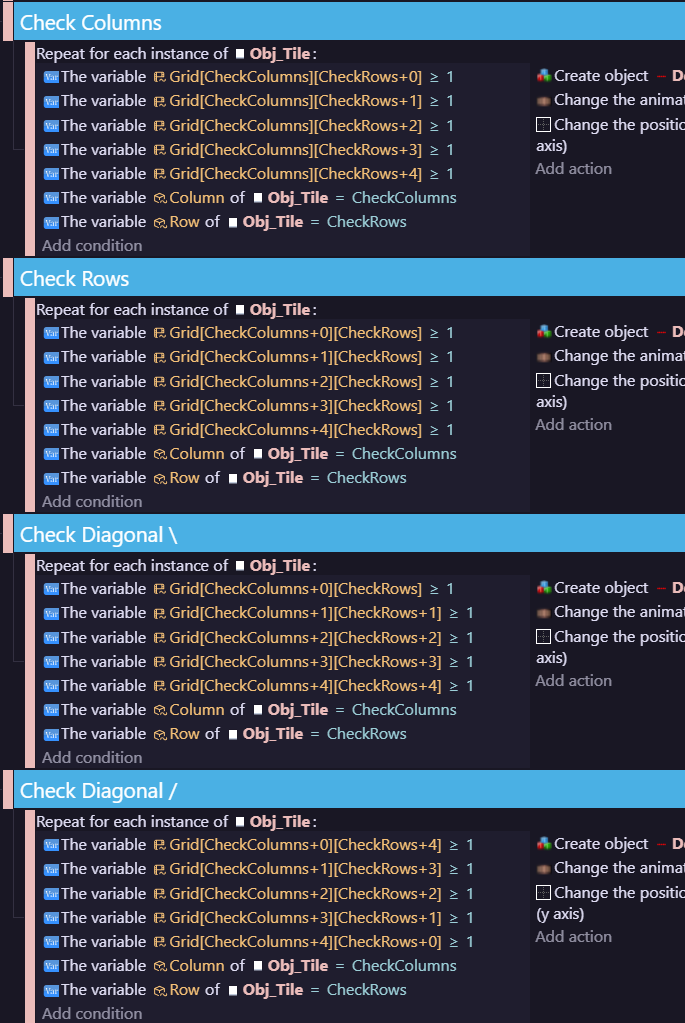
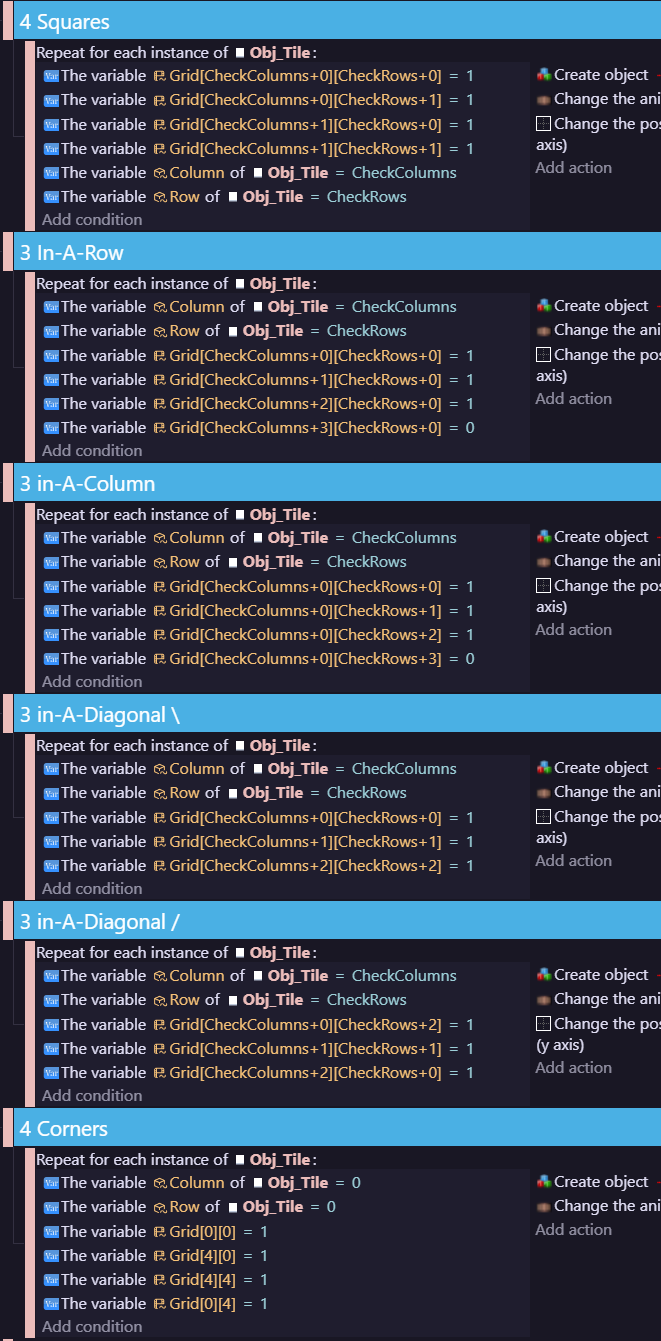
One thing I did too my system is I limited it so that tiles used in a 3 in-a-row, 4 square, or 4 corner solve can only be used once. They cannot be used to solve any pattern that isn’t a full bingo. However this can easily be changed for whatever reason down the line.
I do genuinely appreciate everyone’s help, ideas, and encouragement. And I hope to give some kind of a progress update soon.