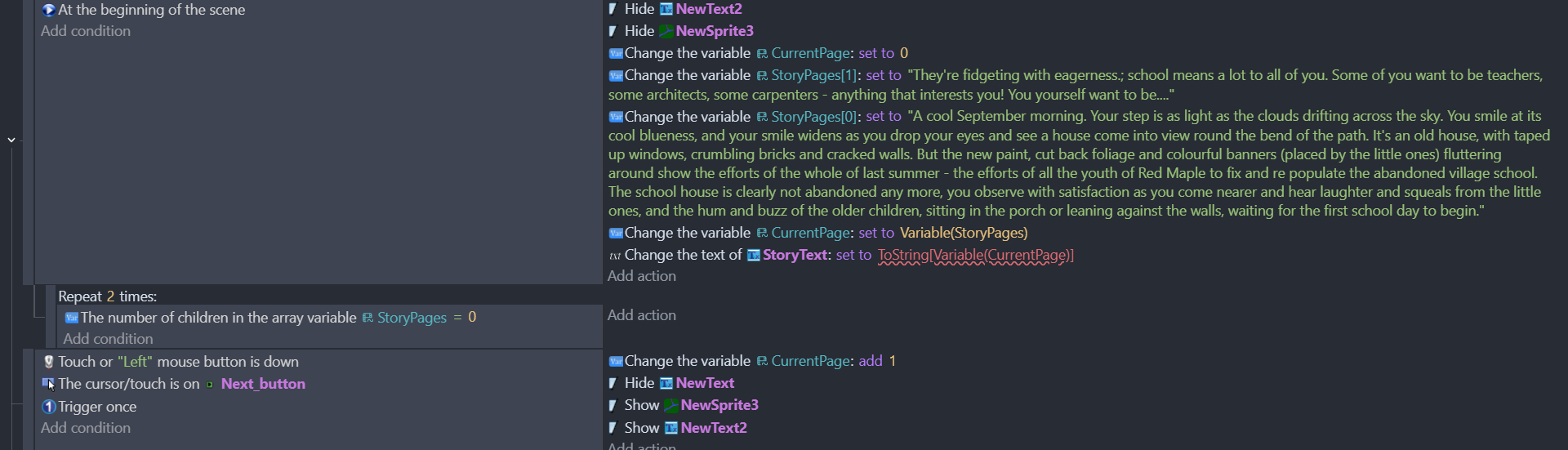
I’m trying to write an interactive novel, and I have been using an array variable and a number variable to keep track of my pages. I write down one page of my story in the first array child variable(StoryPages). I want to make the Currentpage (number variable) equal to the corresponding StoryPage child. For example CurrentPage = 0, go to story page child 0 and show that in the text object (StoryText) on the page. When the player presses the next arrow, I want it to add 1 to CurrentPage and therefore it will go to storypage 1 etc.
However, I don’t know how to code this and make the currentpage value equal the storypage child of the same value. Currently, no text is even showing up when I run the preview because there’s no relation between storypage and currentpage. I tried writing “Storytext set to variable(Storypage[currentpage])” earlier, but it didn’t work until I made the connection between the two variables when I added the currentpage to storypage, but of course that relationship wouldn’t help my project. I tried setting the variable currentpages to the childcount(storypages), but the text object StoryText won’t be set to currentpages because it returns a number. How should I solve this problem? Am I trying to do this the wrong way?

 :arrow_up_down:
