
- Object variables for your target object would be a start, and you can do this a variety of ways, But I would create a variable that checks for the angle between the gun and the target object, and a boolean variable that checks to see if the object is being targeted.
1½. Make sure you have a global object group for all your target objects, this way you don’t have to set variables for each individual one.
-
When the fire button is pressed, while the boolean is true, create a bullet object at the x and y positions of a point you manually place somewhere near the end of the chamber.
-
Then in a new event, check to see if a bullet object is visible, and a target is targeted, then set the set the angle of the bullet to the angle variable.
Moving the bullet is the hard part.
Do I have to handle it with a Boolean variable?
The problem is when the player, and therefore the weapon, are facing horizontally.
In this case, the projectile doesn’t fire toward the position where the weapon is facing, but the opposite direction.
Try setting the speed to a negative value?
It doesn’t work, the bullet comes backwards. The same thing happens to me with the drawing.
I solved it like this

Actually, it’s not entirely resolved; the projectile is aimed in the direction of the weapon, but it’s slightly offset.
There’s something annoying about this:
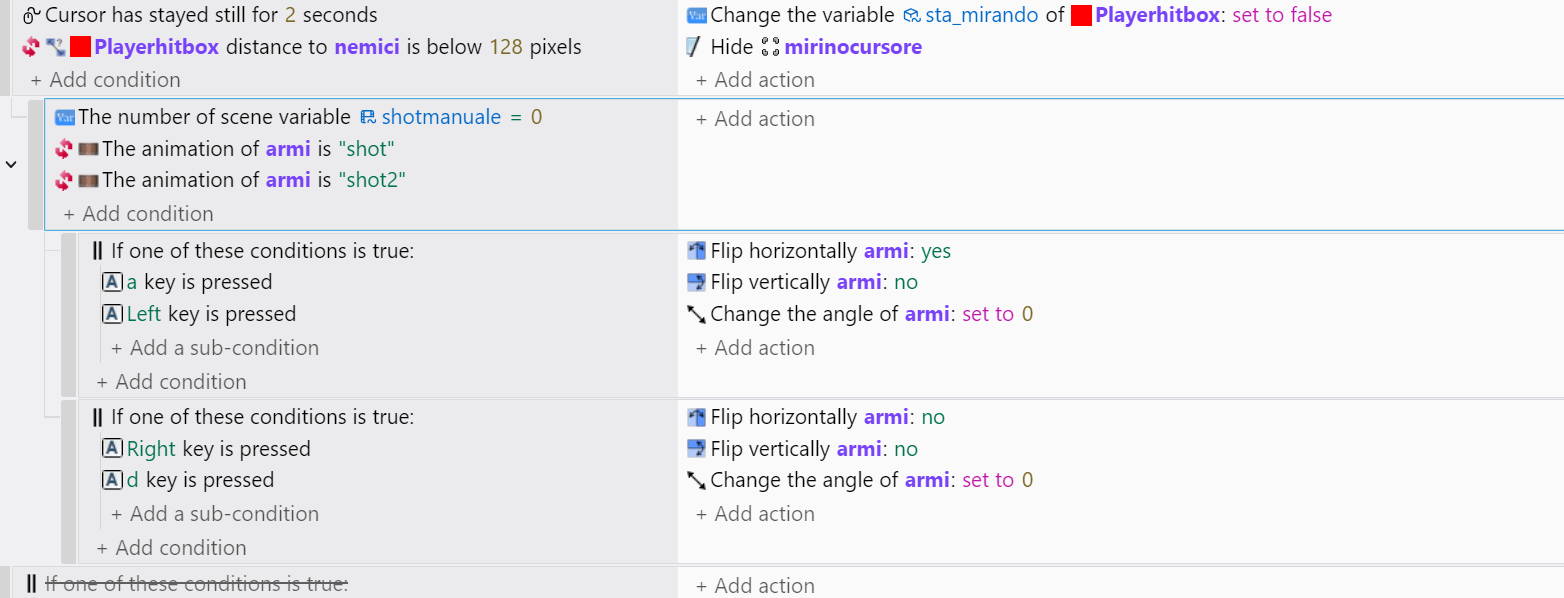
When the player turns and stops aiming, the weapon returns to its original position and is set to zero.
Does anyone know how to make these two things fit together?