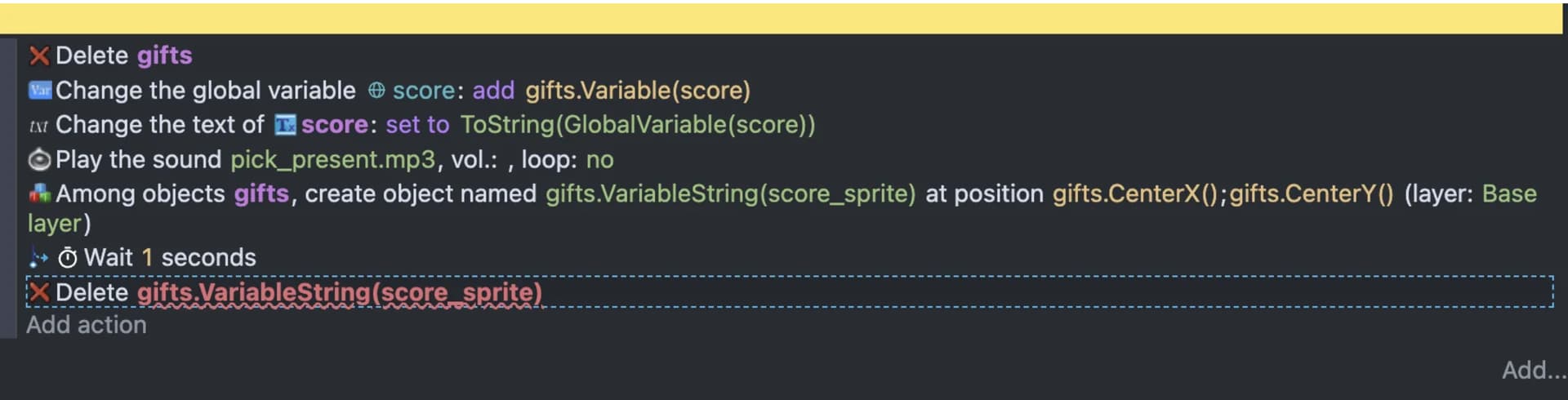
Hi, first post here, and a newbie in Gdevelop. Im pretty much stuck on this:
I´m right now creating the function in my game that manages what happens when you pick a fruit. Each time you do it, the fruit will disappear, a score sprite will replace it (saying “100” or whatever), then it will move up for a couple seconds and then disappear.
I´m doing this by object variables, one for the score and another one for the name of the sprite it must change to. The scoring part works fine, and I can actually create the new sprite based on the “replacer” sprite name variable. Sadly, I cannot move it nor delete it, since apparently I can´t make reference to an object by another object variable (can be created that way, but that´s it). So… How do I delete it?? (please skip the code thing, I only want to use DND)
You can use the gifts group name. It will delete the objects in gifts
You can use group names anywhere an name is used. Actions and conditions will apply to any picked objects in that group name. If there are multiple gifts then you might need to use other conditions to “filter” only the object(s) you want. Conditions work like filter. You can use as many conditions that are need to choose the specific objects.
I know you delete the gifts first but if there were existing gifts objects it would delete them as well. To prevent that you could add the gifts to its own layer and then use gifts is on layer as a condition which would pick only the objects on that layer. Then the delete gifts would only delete that object.
After a lot struggling, I’ve decided the scoring sprites will not fly up. I’ve somehow found the way to make them appear, stay still and disappear, more like in Wonderboy. I will keep digging that in the future, by now I will move on with more features.
Thanks for the help 
1 Like
Good to hear and welcome to the forum.
It helps if when a post is solved that you change the subject by clicking the pencil near it and add [Solved]
Well, it’s actually not solved. I just decided to leave it as it is and carry on with the rest.
I didn’t look at all of the events because I thought it was just about the delete object line. It’s refencing the previous gift not the new gift.
Here’s how I would do it. I would use different names for variables and objects. Having the same name can be confusing. I used 3 objects named “Gift1”, “Gift2” and “Gift3”. You can replace the random event with your variable. This is triggered with space
There’s a problem though. If multiple gifts are added before the previous one was deleted then the object would be deleted but the wait event would still trigger after 1 second. So, the previous wait and delete action might delete it first. IDK if that makes sense.
This would use an object timer instead of a wait.
You can remove the first delete and the objects would delete themselves in sequence.