I want the enemy to change it’s color to full white and change it to normal quickly (like flashing) to represent that it’s been hit. I try using the white (255,255,255) tint but it’s not working. I try to use reddish color and it works. Is there a way that I can do a effect that represents hit and change the color of the object to full white?

Hi, this thread discussed your problem Sprite flash solid white when damaged
1 Like
As stated in that other thread, the tint action treats 255,255,255 as default and there unforunately isn’t a way to adjust brightness or anything like that in Gdevelop unless I’m mistaken, so you’ll likely need to create a white version of your sprite and manually switch to it when your enemy takes damage
1 Like
Thanks to both of you!
1 Like
I was almost for 2 years looking for a way to achieve this
So for any1 still looking for it
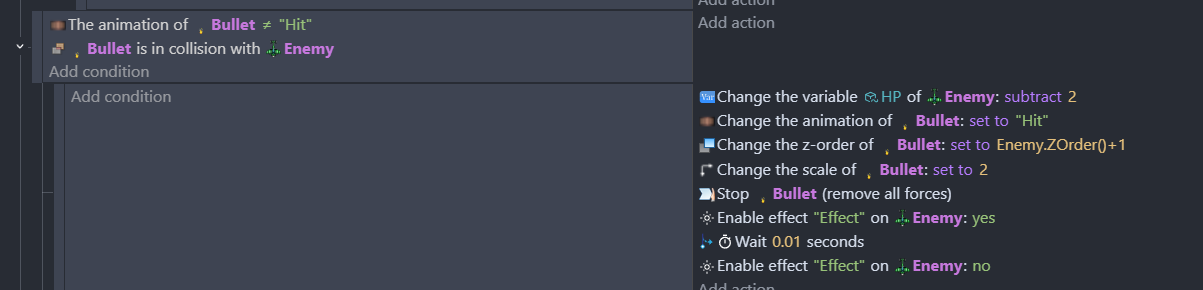
Adjustment effect

Shoot bigger enemies
How i achieved flashing
1 Like
I sent the same solution too but I thought it would be necroposting and a lot of people don’t like it for some reason
You found this post somehow
So wouldn’t it make sense others will find it also?
SOOOOO it being unsolved wouldn’t it make perfect sense to add solution here if someone knows one?
You make new post someone will tell you to use search function next time
You will ask for solution in old post someone will tell you you are necro posting
I say DO NOT CARE
Idea of necroposting feels more like broken circle than solving anything
I say if forum points you out to use search function
EVEN BETTER this forum when writing title of your topic literally suggest you similar topics so you don’t double post
Then you are in perfect right to necropost
1 Like