Changing avatar per line in Yarn

I’m trying to get some light dialogue in my game, but Yarn is giving me… trouble.

I’d like a conversation between two characters, with an avatar change to represent who’s currently talking. Within a single node it looks like this:

<< avatar Azami >>
Hey.
<< avatar Hostess >>
Oh hey, Azami. Playing with the old claw machine?
<< avatar Azami >>
I guess, but there isn’t much in it.
<< avatar Hostess >>
That’s because I haven’t been able to upgrade it. But you could buy some upgrades with those tokens.
<< avatar Azami >>
Guess I have nothing better to do.

I have a single Avatar object in the text box with each of their avatars as different animations; when the <> command is called, it should change the animation. I’m having two problems with this.

The first is that is won’t change the animation from Hostess to Azami (Azami is the first animation, Hostess is the second, if that makes any difference). If the first avatar is Azami, it does her for a line and then Hostess, and then won’t change back to Azami. If I start with Hostess, it simply never changes the avatar. You can see a flicker like it tries and then immediately switches back.

The second issue is that for some reason it won’t display more of the final line than a single character, right now that being “G”. If I change the dialogue, then it displays whatever that first character is and nothing more. If I remove the <> command, still the same problem. It does this on the last line in the conversation, regardless of how many lines there are.

I’ve tried this with all the dialogue in a single node or each line in a different node and each of them linked, and I get both problems either way. I heard Yarn was finicky but, like, what is this?

UPDATE: It’s still acting insane, but I can get it to properly change the avatars if I place the avatar command at the end of a dialogue line before a return. However, this results in the lines automatically jumping to the next once they finish, so the player can’t read it.

<< avatar Hostess >>
Oh hey, Azami. Playing with the old claw machine? << avatar Azami >>
[[Answer:FirstCoin1|FirstCoin1]]

I feel like I’m going crazy.
Well, a solution of sorts has been found. I still can’t get the commands to run properly, but if I put each line in its own node and then tag that node with the character name, I can change the avatar object’s animation to DialogueTree::BranchTags() and it works. This may end up being enough for my purposes.

yarn is nothing without the commands. commands are nothing without your code.

if i don’t see code i can’t help

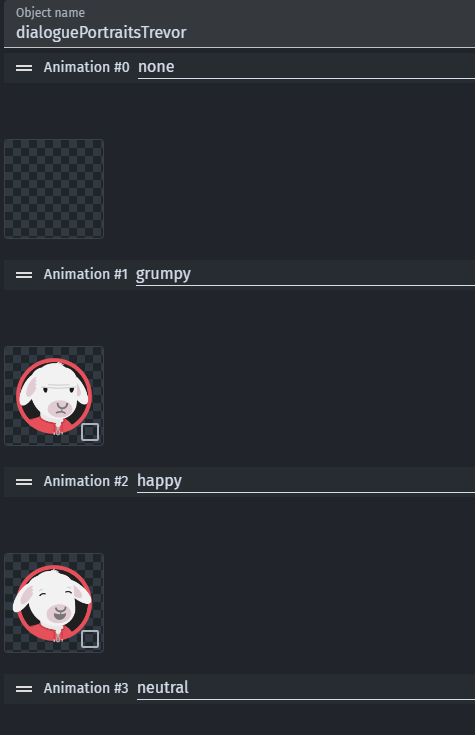
This is how I do it: I change avatars (I call them portraits in my game) between many characters in dialogue. I use a few commands when characters switch, and I have events that animate the portraits. In the portraits sprite objects I always have an empty animation at anim zero (I call it ‘none’), and I switch to that often as a way of hiding. I use one sprite object for my protagonist (global) and one for NPCs (scene). I use names like neutral, happy, angry. In Yarn:

<< nameHolder Trevor >>
<< portraitsTrevor neutral >>
<< portraitsNPCs none >>
Excuse me, sir…
<< nameHolder Important-looking Person >>
<< portraitsTrevor none >>
<< portraitsNPCs leaderNeutral >>
And you are?

You animate the portraits with events in the scene or with Yarn commands? My scene-side events are working fine, changing the animation to DialogueTree::CommandParameter(0) works when the information parses to it correctly. The issue I’m having is how the commands themselves respond inconsistently.

Otherwise your system looks solid and what I’m going for is something along those lines, with different facial expressions per character all saved in one portrait object and called upon as needed.

It’s not possible to animate anything with Yarn itself. When my portrait command is called, the portrait does a little tween/wobble. I use the ‘command called’ condition, and then do anything I want in the actions. I use the ‘compare two strings’ condition too to check if the anim being called is different from the anim currently shown (usually ‘none’). I use one object for my protagonist, with all his expressions in, and then I use per-scene objects with the NPC portraits in, so I swap between them during dialogue using ‘none’ to hide whoever isn’t speaking.

image

I do understand that the ‘command call’ within Yarn is used as a trigger for the event side actions, and as far as I can tell, my events were responding just fine, the issue seems to be on the Yarn side because changing where in a Yarn line the command is changes the results radically.

In the events what I had been using was this first event, the extremely simple “command called - set animation to DialogueTree::CommandParameter(0)'”. Aside from some object name differences, it’s the same event used in the Murky Seat game template from Gdevelop itself.

I am no longer using this command, and am currently instead using the second one seen here, setting the animation to DialogueTree::BranchTags() and tagging each line of dialogue with the speaker (eventually to be expanded to the speaker and facial expression).

Again, my problems seem to lie with the commands in Yarn itself; as I understand it, the scroll function should read the whole line, and respond to commands as it finds them, which should mean that if I use the command ‘avatar’ multiple times, it should change the avatar each of those times. But depending on where in the line I place the command, it either changes the avatar once and never again, changes it the first two times but doesn’t change it after, or changes it every time but also doesn’t pause between lines of dialogue. Testing it out, I’m having similar issues with the pause command; without the pause, my dialogue reaches the end of the line and the player can click the mouse to start the next line; with a pause command at the end of a line, the game reads the line and immediately displays the first character of the new line, then pauses, and then finishes the line, even if I’ve spread the lines over linked nodes. In some of the variations, it just skipped the pause command entirely.

Yarn can be a bit clunky and fussy, but it works. You might find tutorials helpful, even if they help you identity what might be going wrong for you. I’ve done a basic Yarn/dialogue setup video that’s simple and solid. It’s a good basis for more complex setups, though I always urge people to get a basic system working first before adding anything bespoke or unique to your game so that you know you have a solid working base to build from.

Over the years people have had problems with their final lines not displaying properly because the button used to launch dialogue also closes it, causing a loop or other unexpected behaviour. Sometimes the final line vanishes quickly because of a very short timer condition (for auto closing dialogue) that doesn’t give players enough time to read it. Sometimes developers use ‘button pressed’ to end dialogue and make the text go faster, which means it’s easy to accidentally close dialogue too soon (developers might instead use ‘button released’ to close dialogue as one way around that issue, or perhaps use a different button to the one used for speeding up/advancing dialogue). Another common one is having the typewriter animation extension applied to the text object and the clipped-line-text Yarn setup: they clash with each other and prevent dialogue lines finishing or displaying properly.

Without seeing your events, anyone reading this thread is going to struggle to assist further, but perhaps the tutorial below might help. Good luck with your game.

Yarn commands can be finicky with spacing and placement. Try ensuring each avatar command is on its own line with no trailing spaces, and double-check that the command name matches exactly. For the single-character issue, it often happens when the text object’s string is being overwritten or when a newline/command is being parsed as part of the string. Also check if any events are triggering a text change or auto-advance after the dialogue ends. If you’re using a custom parser, verify it handles the last line correctly. Hope you get it sorted!

