So I have a sprite (with button functionality added) that I would like to have various things happen when different parts of the sprite are clicked. For example, think of a map - when Australia is clicked I want the word “Australia” to pop up, when “Asia” is clicked I want the word “Asia” to pop up, etc.
The things I want to be clicked are oddly shaped and sometimes close together, so having invisible buttons wouldn’t work (they’re square), even putting collision masks on individual invisible buttons would be suuuuuper annoying to try to line it all up properly.
Ideally I’d love to be able to set multiple collision masks on the single sprite and then have different things happen based on which collision mask was clicked. I can set multiple collision masks on one sprite, but I haven’t figured out how to access them individually. I imagine there’s a way in Javascript, has anyone else figured out how to do this? OR has a different workaround? TIA!!!
Unfortunately, collision masks are not addressable via events or javascript in that way.
The closest thing you couod do would be to add multiple points to your object for each mask you want, then add uniquely named objects with the mask shapes you want, and pin them to your main object via events, then you can address the masks via their object name.
Yeah that would be way too much of a bother to do, plus a little impossible for me to align everything perfectly… I don’t need the masks to be created dynamically, I COULD make invisible buttons beforehand like I mentioned, but it’s too difficult to do given the nature of the images I’m working with.
Right now my fix is that I’m stacking sprites with the same image on top of each other, each one with a different collision mask. I grouped all the sprites together and can tell which one was clicked based on the sprite’s variable, but this is hardly a viable long-term solution!
I understand why what I need seems like it wouldn’t be possible, but this whole thing is made out of Javascript, so there’s gotta be some way to do it. I just struggle with finding the correct secret-code sequence that makes me able to do what I need to do on this platform (there’s absolutely no consistency with how things are sorted and it drives me wild on a weekly basis)
My choice would be seperate objects. You wouldn’t need to align them or mask them perfectly because you could use a solid image for the map and hide the individual objects.
There could be tiny gaps between the hidden objects. If the point is not inside then choose the nearest. (using the NOT condition not inverted) The gaps would only be a few pixels here and there.
Or you could use a hidden object for a hit test near the top of the cursor. The object would be larger than the gap so it would always be touching an object. Again, you could use pick nearest.
A plus of using individual objects is that the individual objects could be used to highlight the selected region or the region under the cursor.
You could have a slightly darker full view map and the individual objects could have the normal image. You could use an effect on either object or use merging styles. It would help to provide visual feedback.
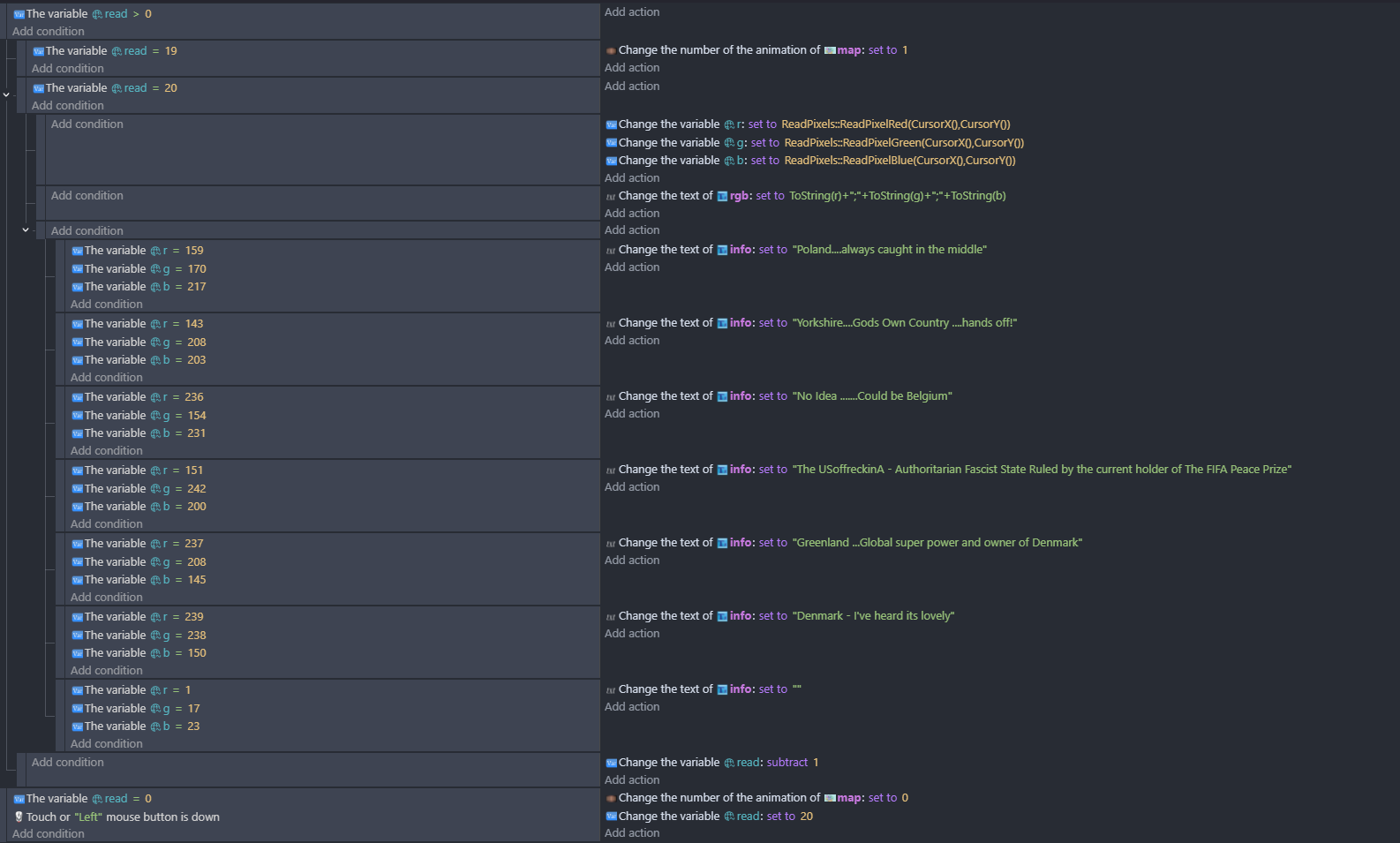
Could this work? There was a similar how do I a few months ago where the conclusion I think was to use the read pixel extensions to check the colour of the pixel just above and to the left of the cursor. On that project the objects were all different colours. They only need to be slightly different but solid and this could be only for the frame that the pixel check happens …when the map is clicked.
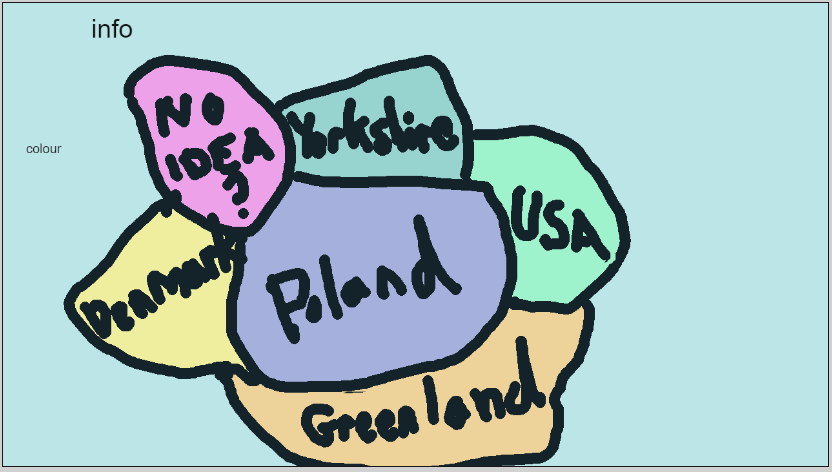
Yes. The entire image would need to be solid colors. No borders or text. The transition between colors would also need to be solid not soft or smoothed.
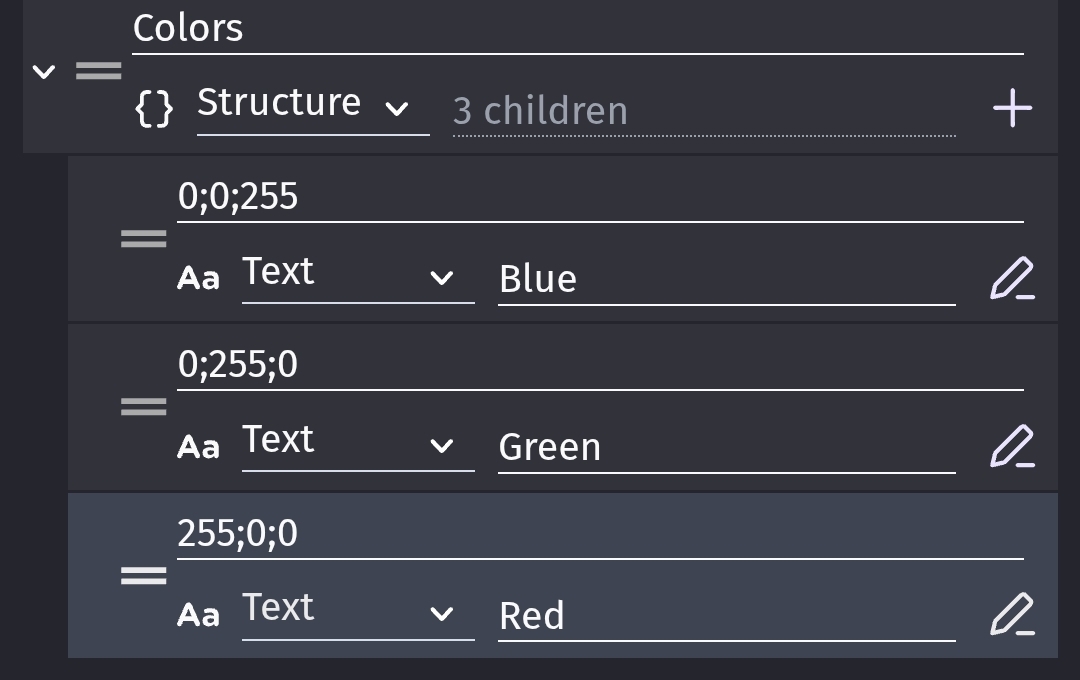
You could assign each area a color and then check for that color in say a structure to get a more friendly name. The read pixels extension has separate RGB functions. I don’t know why there’s no combined function but it’s easy enough to combine them into the R;G;B format.
The image only needs to be shown for a frame to be read. So I guess you could flash the color coded image or maybe hide a text overlay on click. The flashing could look bad but hiding a text overlay might not be too annoying.
It would be nice if you could read the pixels of specific objects even when hidden. Then you could have a hidden image with the zones and a more pleasing to the eye map or whatever.
I guess you could use multiple colors for each zone or even a range or offset.
Sounds like a contradiction in terms there Keith - but yes reading the colour of a pixel on a hidden layer would be useful!
Can you check pixels that are offscreen and have the hidden image at plus 3000 on the X() and check the pixel at CursorX()+3000 or something? - edit nope!
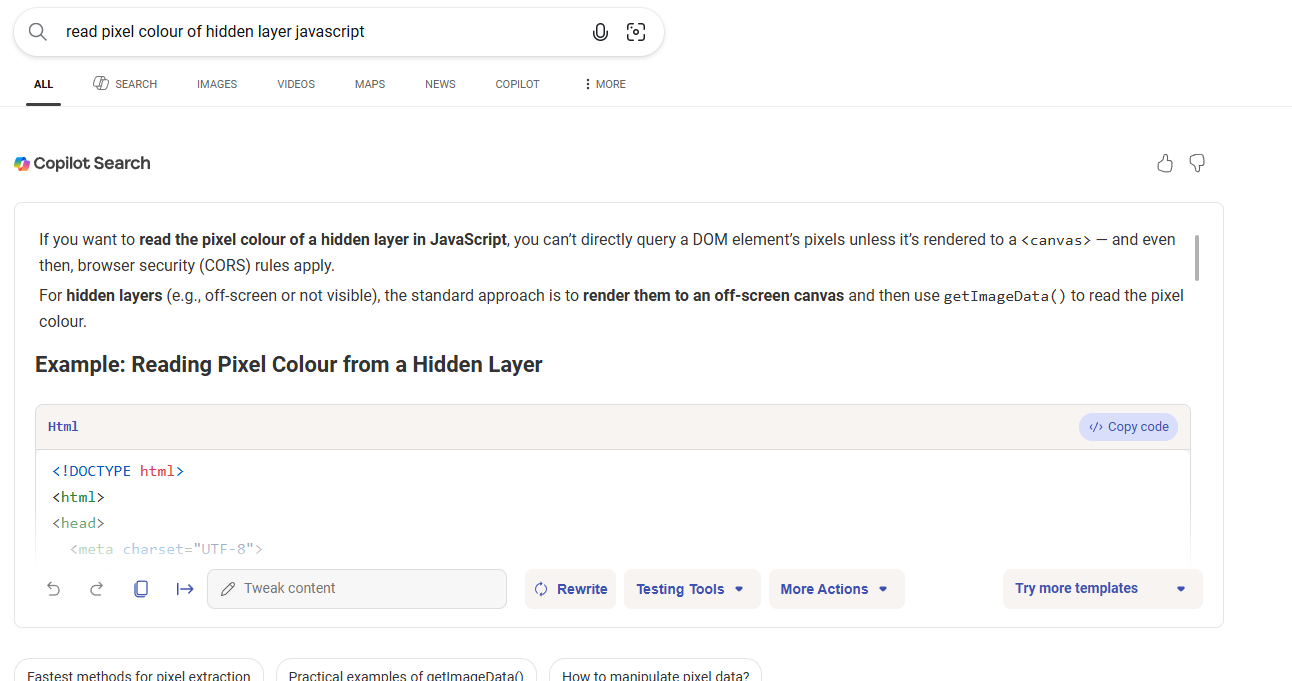
Google claimed you could still read pixels if the opacity was zero. I tried it and you can’t.
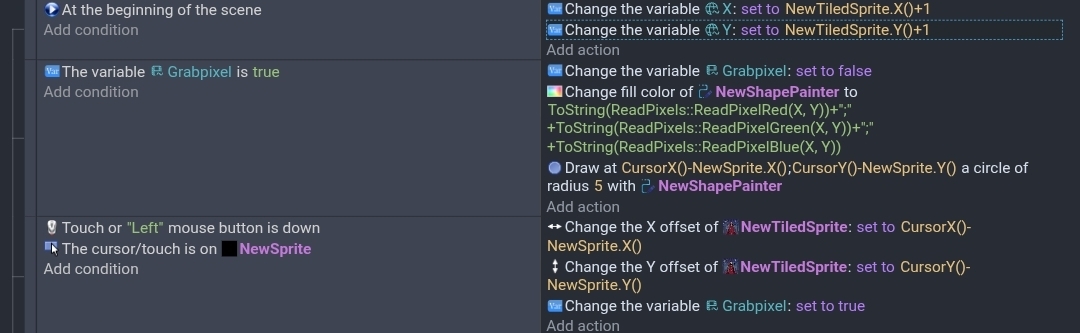
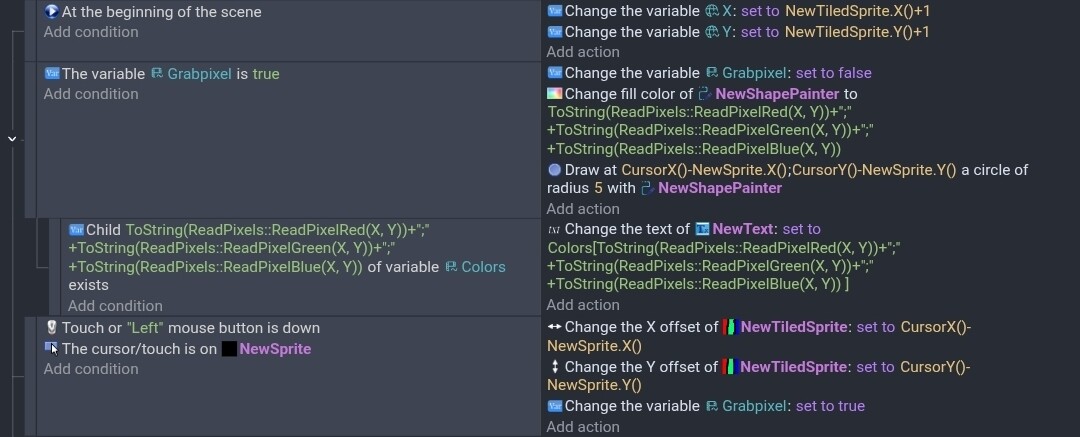
But it gave me an idea. What if you put the image into a tiled sprite and made the object like 1 pixel. Then you adjusted the Offset to match the position of the cursor on an object. You then read that pixel.
It would be like having a tiny window showing the matching pixel. It probably wouldn’t even be that noticeable. A bit like a dead pixel.
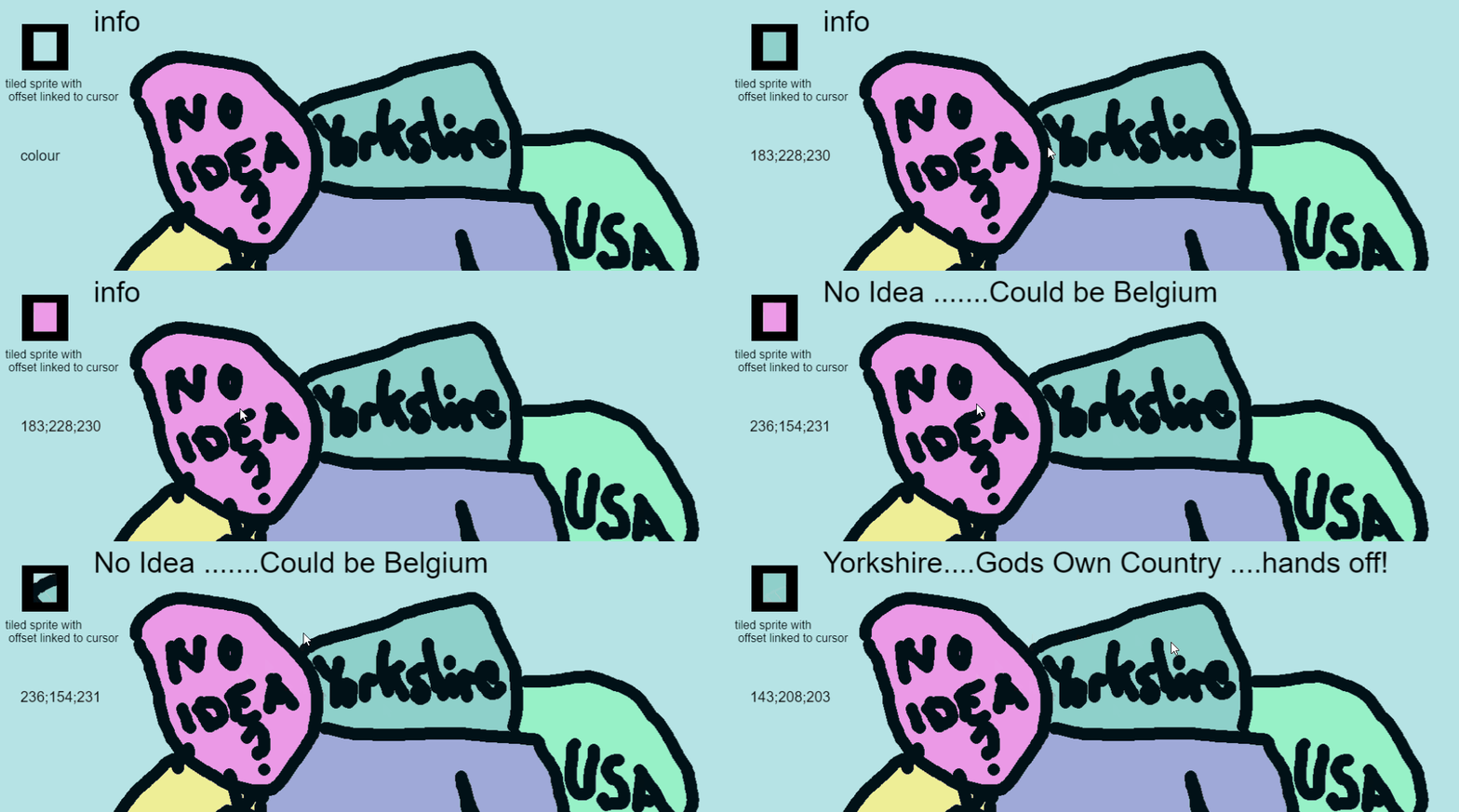
It worked. I used the read pixels on a tiled image and drew a pixelated version onto a shape painter. I used a large circle because drawing 1 pixel at a time was too slow. I also made the tiled sprite larger than a pixel so I could see it.
I used a boolean so it would read the pixel on the next frame.
What @Keith_1357 did with the tiled sprite is great - I put it in the thing i did above to create a gif as i had to read it a few times to get my head around it! It can be smaller than this. So the tiled sprite is the same image without the words on it
Hi everyone, sorry for the late reply (I got busy on a different part of the project and totally forgot to check back with this page again ) I’m really impressed by everyone’s contributions, usually stuff I post on this site goes dead pretty much right away Thank you so much for working up a solution, it’s so creative and amazing!! I’ve used the read pixels function before, but it didn’t even cross my mind to try using it here.
Yep. Same for almost everyone else. You get used to it eventually
But hey, since this post got lots of traction, now you know people are interested in it! I personally haven’t been replying in here, but I always read posts and can’t wait to see the finished product!


 ) I’m really impressed by everyone’s contributions, usually stuff I post on this site goes dead pretty much right away
  Thank you so much for working up a solution, it’s so creative and amazing!! I’ve used the read pixels function before, but it didn’t even cross my mind to try using it here.