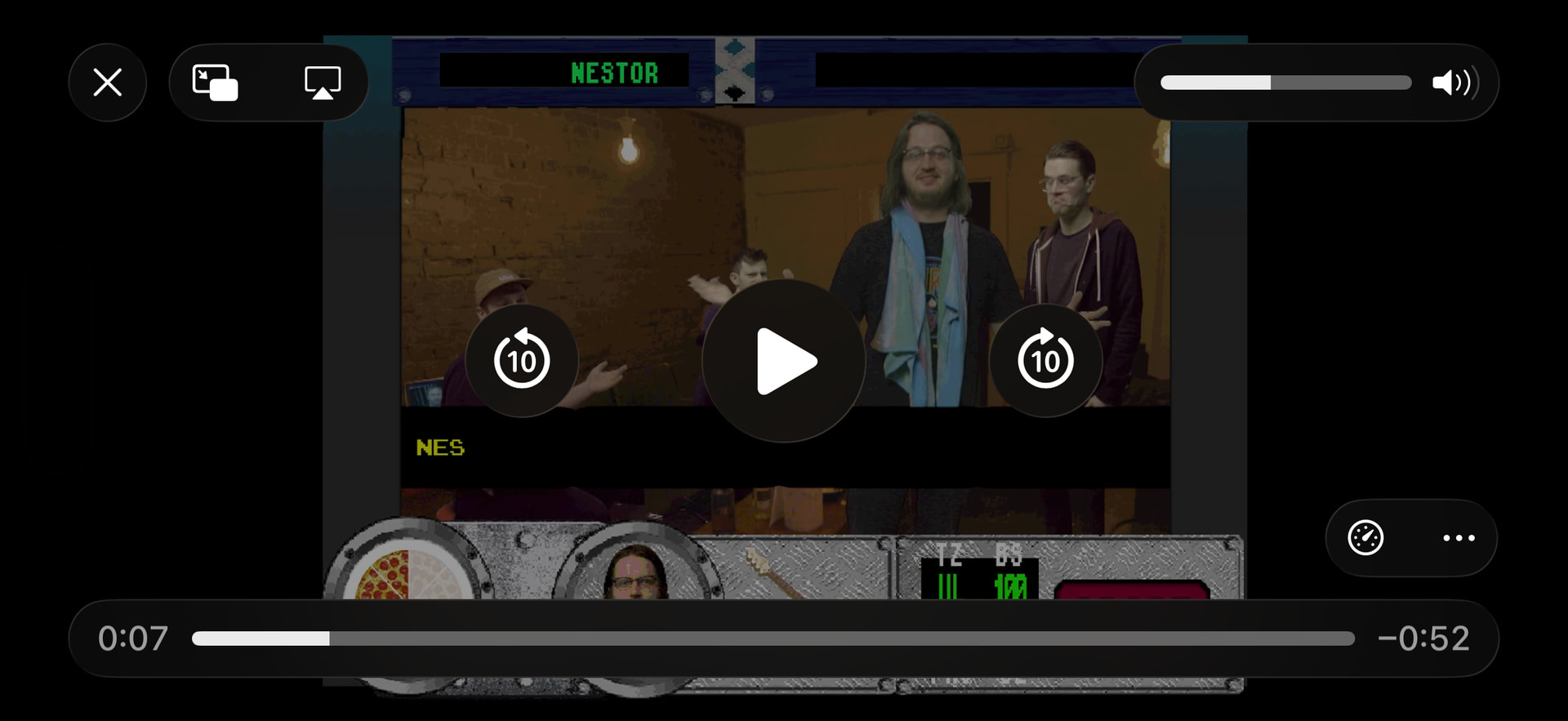
I’m trying to port a video game that heavily uses videos and touch screen controls to select different pathways. When I try to port it over to iOS, the native video controls take over and breaks all the functionality of my game. Is there a way to disable iOS video controls? I’ve gotten some advice on reddit about using Javascript code, so far that hasn’t worked either.
I don’t think gdevelop can do it by itself you will certainly need JavaScript. The issue is if other web examples may also be using html and css. Since they are coding for mobile device.
You might not be able to find a pure example of JavaScript doing it by itself.
Unfortunately I have little experience coding in JavaScript. On Reddit I was given two bits of codes, both which still had the native controls appear in my testing. The first one didn’t play any video and the second one played the video, but hid my Gdevelop game sprites until after the video played:
const videos = document.getElementsByTagName(‘video’); for (let i = 0; i < videos.length; i++) { videos[i].setAttribute(‘playsinline’, ‘true’); videos[i].setAttribute(‘webkit-playsinline’, ‘true’); videos[i].controls = false; }
const videoObjects = runtimeScene.getObjects(“Pup_OldWounds_Intro_720_EDIT_mp4”); if (videoObjects.length > 0) { const gameVideo = videoObjects[0].getInternalVideo && videoObjects[0].getInternalVideo(); if (gameVideo) { gameVideo.setAttribute(“playsinline”, “true”); gameVideo.setAttribute(“webkit-playsinline”, “true”); gameVideo.controls = false; } }
MyVideoObjectName Is your video. Replace it. You have to create an even to run at beginning of the scene no condition. Add the JavaScript but make sure the JavaScript entry is indented under the beginning of the scene event.
Take a full screen shot of this new event. Put it at the top of event list
//Hide iOS Video Controls
// Access the GDevelop video object
const videoObjects = runtimeScene.getObjects(“MyVideoObjectName”);if (videoObjects.length > 0) {
const videoInstance = videoObjects[0];const videoElement = videoInstance.getRendererObject(); if (videoElement) { // Force the video to stay within the app container videoElement.setAttribute('playsinline', ''); videoElement.setAttribute('webkit-playsinline', ''); // Remove native controls videoElement.removeAttribute('controls'); // Ensure muted (required for autoplay on iOS) videoElement.muted = true; }}
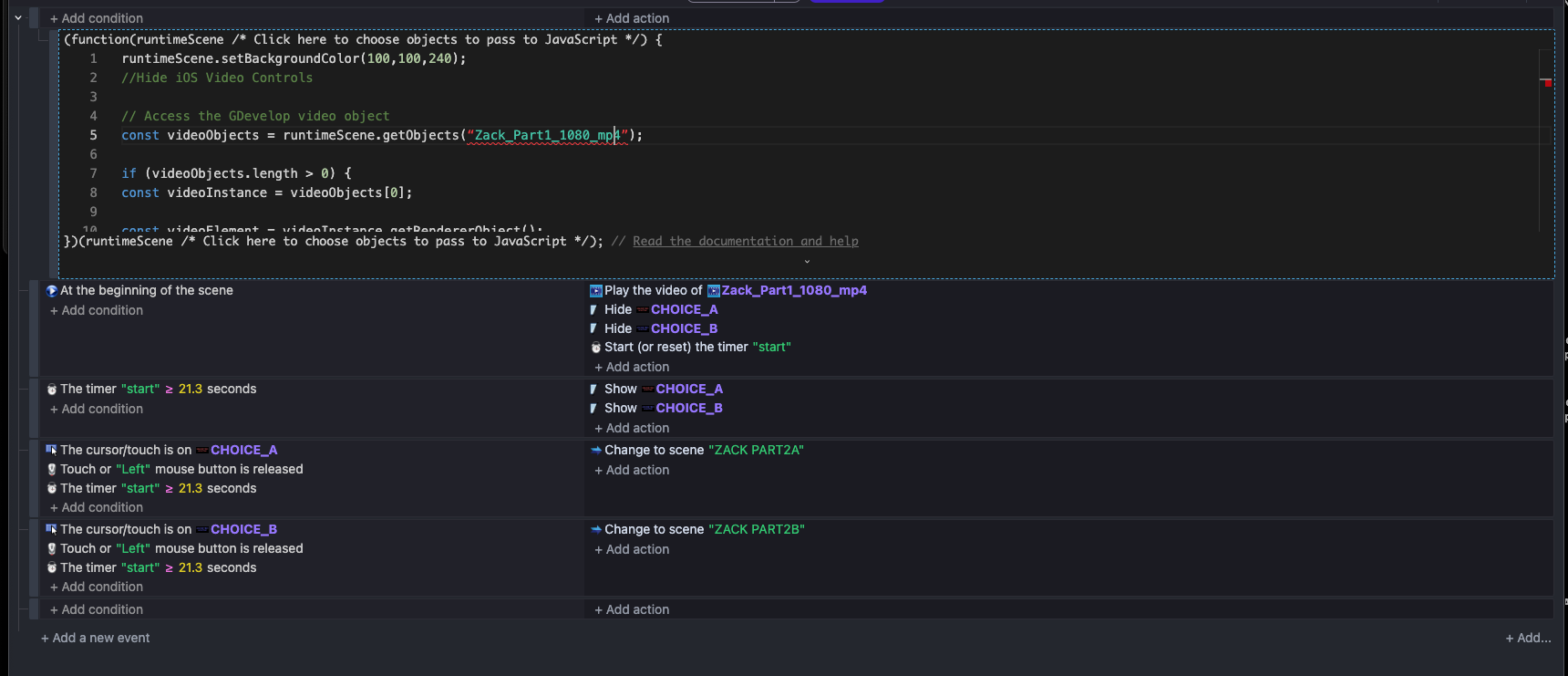
//Hide iOS Video Controls
// Access the GDevelop video object
const videoObjects = eventsFunctinContext.getObject("video");
if (videoObjects.length > 0) {
const videoInstance = videoObjects[0];
const videoElement = videoInstance.getRendererObject();

if (videoElement) {
    // Force the video to stay within the app container
    videoElement.setAttribute('playsinline', '');
    videoElement.setAttribute('webkit-playsinline', '');

    // Remove native controls
    videoElement.removeAttribute('controls');

    // Ensure muted (required for autoplay on iOS)
    videoElement.muted = true;
}
}
This will help if you create a function in the custom extension and add the “obj” - type video. parameter.
Note: There may be an error in the online version of the engine.
you need to change the condition on top of the code to runs at beginning of scene.
In the video the set background color is just what gets created as a temp. So delete that line.
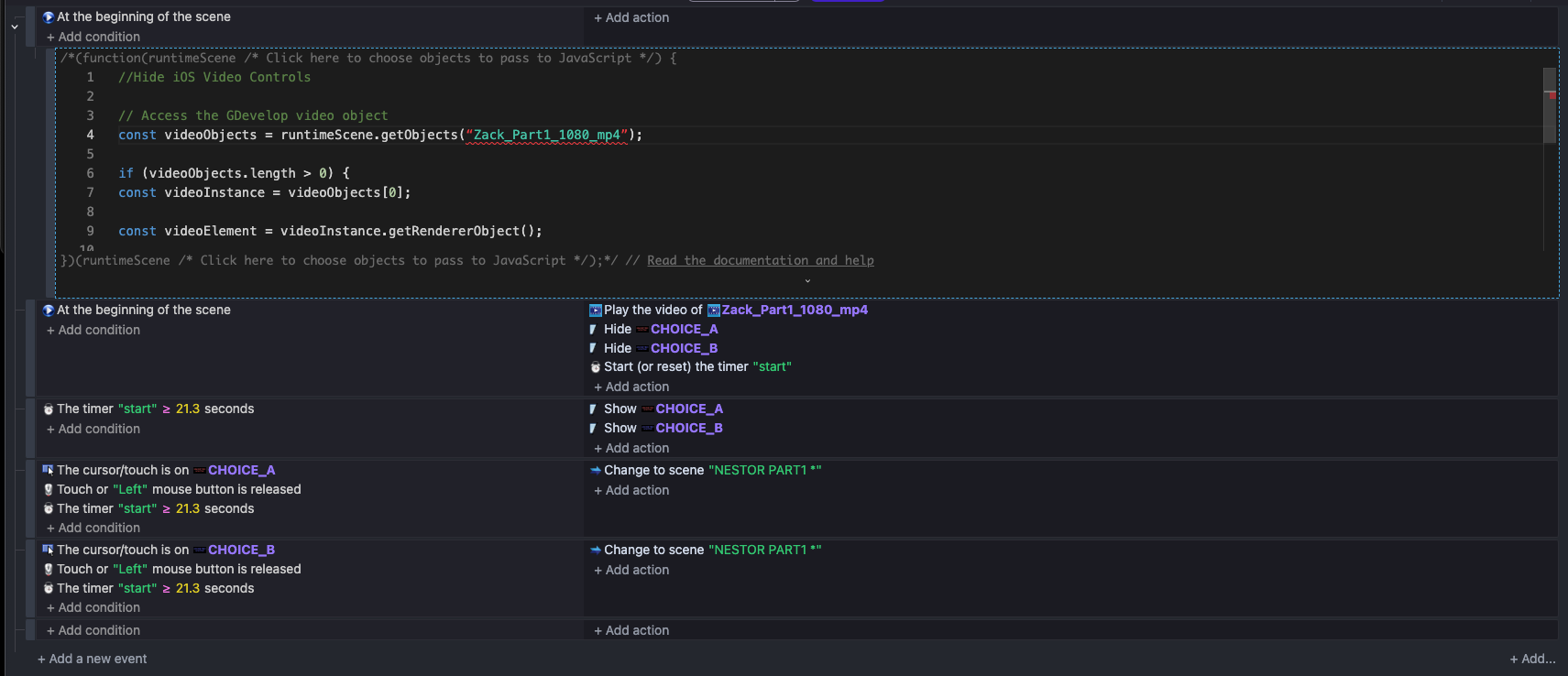
This code and the one @JimmysTheBestCop is wrong because it thinks videoInstance.getRendererObject() returns a video html element but it doesn’t and that’s why it crashes in the first frame. With a console.log you see that it isn’t a html element but a PIXI instance. I’ll check the source code to see how to get it as the VideoRuntimeObject | GDevelop JavaScript game engine shows an any type which doesn’t help.
After looking at the source code, but I am not sure if the engine would reset the values . Please @davy does the engine reset these values back:
const videoObjects = runtimeScene.getObjects("video");

if (videoObjects.length > 0) {
    const videoInstance = videoObjects[0];
    const videoRenderer = videoInstance._renderer;
    const videoElem = videoRenderer._getHTMLVideoElementSource()
    if (videoElem) {
        videoElem.setAttribute("disablePictureInPicture", "")
        videoElem.disablePictureInPicture = true //Just in case
        videoElem.setAttribute("disableremoteplayback", "")
        videoElem.disableRemotePlayback = true //Just in case
        videoElem.setAttribute("x-webkit-airplay","deny")
        //These may not be needed because I saw them on the console.log already set
        videoElem.setAttribute('playsinline', '');
        videoElem.setAttribute('webkit-playsinline', '');

        videoElem.removeAttribute('controls');
    }
}
Didn’t think this issue would be as difficult to solve! On reddit, I also got this suggestion. Do you think it’ll work?
"To completely bypass this engine limitation you can stop using the official gdevelop video object entirely and instead use a standard pixi js texture hook which forces the video to render directly inside the regular game canvas alongside your sprites rather than as an external floating webpage element. First create a normal blank sprite object in your gdevelop scene call it something like videodisplay and stretch it to fill your screen size this sprite will act as the flat digital canvas that draws your video frames in real time. Next replace your entire event sheet setup for that scene with a single javascript code block set to run at the beginning of the scene and use this script to manually load and bind the mp4 asset directly to that sprite canvas wrapper
const spriteLoader = runtimeScene.getObjects(“VideoDisplay”); if (spriteLoader.length > 0) { const targetSprite = spriteLoader[0].getRendererObject();
// create a native html5 video element completely bypassing gdevelops wrapper
const nativeVideo = document.createElement("video");
nativeVideo.src = "assets/Pup_OldWounds_Intro_720_EDIT_mp4.mp4";
nativeVideo.setAttribute("playsinline", "true");
nativeVideo.setAttribute("webkit-playsinline", "true");
nativeVideo.controls = false;
nativeVideo.autoplay = true;
nativeVideo.muted = false;

// force pixi to render the raw video element inside the standard sprite layer
const videoTexture = PIXI.Texture.from(nativeVideo);
targetSprite.texture = videoTexture;

// start playback manually
nativeVideo.play().catch(error => console.log("playback blocked:", error));

// create a global reference so you can check if it ended in your normal events
runtimeScene.getVariables().get("VideoElementEnded").setNumber(0);
nativeVideo.onended = function() {
    runtimeScene.getVariables().get("VideoElementEnded").setNumber(1);
};
Did it work? I really don’t why this is needed, You can use the one Gdevelop already provides:
const videoObjects = runtimeScene.getObjects("video");

if (videoObjects.length > 0) {
    const videoInstance = videoObjects[0];
    const videoRenderer = videoInstance._renderer;
    const videoElem = videoRenderer._getHTMLVideoElementSource()
    if (videoElem) {
        videoElem.setAttribute("disablePictureInPicture", "")
        videoElem.disablePictureInPicture = true //Just in case
        videoElem.setAttribute("disableremoteplayback", "")
        videoElem.disableRemotePlayback = true //Just in case
        videoElem.setAttribute("x-webkit-airplay","deny")
        //These may not be needed because I saw them on the console.log already set
        videoElem.setAttribute('playsinline', '');
        videoElem.setAttribute('webkit-playsinline', '');

        videoElem.removeAttribute('controls');
    }
}
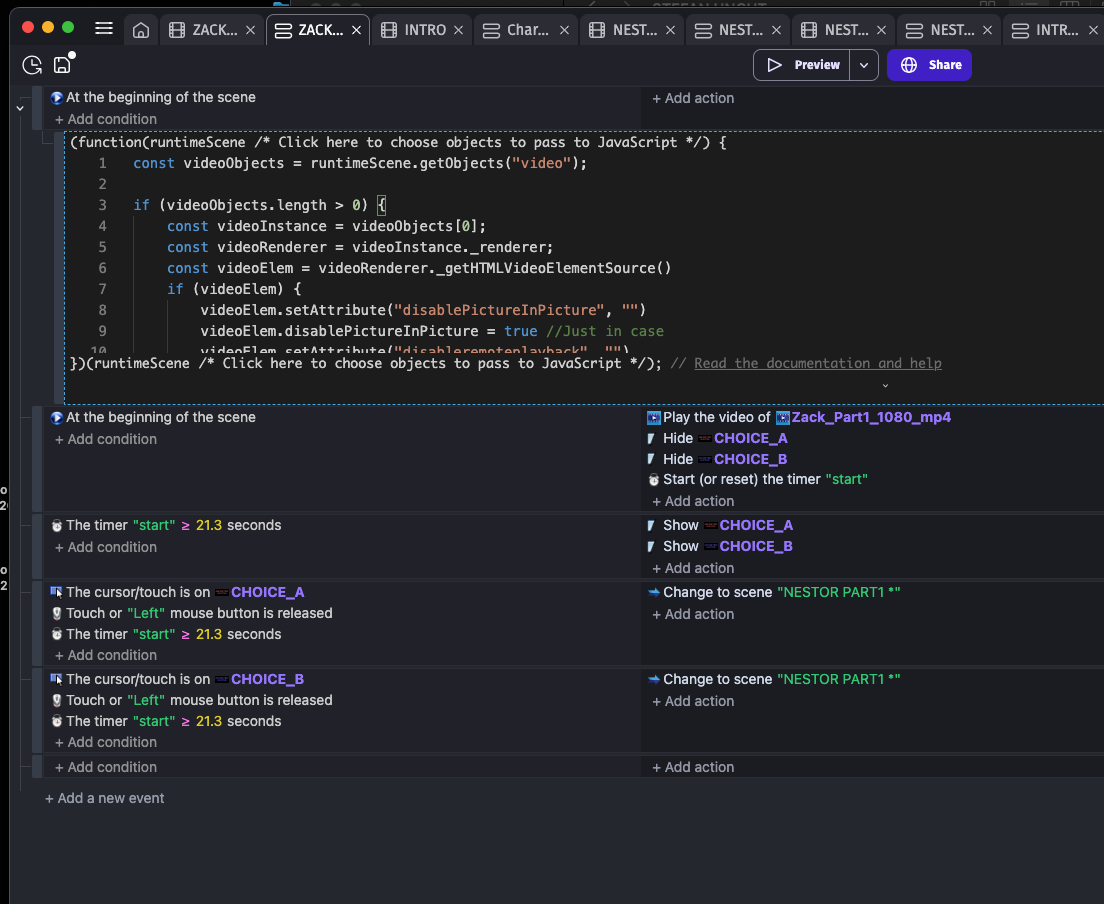
Damn maybe Gdevelop is resetting the object. Is the video at least playing? Try it without the at the beginning of the scene.