Hello, I am using the shapepainter to draw a line but i can only draw a line but not a dotted line how to do that.

What are you using the line for? If you need just 1 line then you could use a tiled or panel sprite with a seamless repeating image. You could just resize the line.
Otherwise, you might need to draw the line, one dash or dot at a time.
1 Like
I just tried masking a stripy patterned sprite with shape painter - its possible to do it but it’ll be a pain.
like Keith says above its better to use tiled sprite. If you want something complicated you could possibly put all the points in an array and create tiled sprites at each point and set angle of each to angle to next point and width of each to distance to the next point.
1 Like
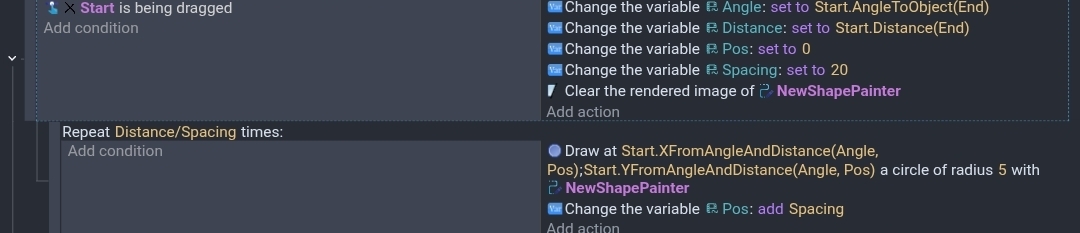
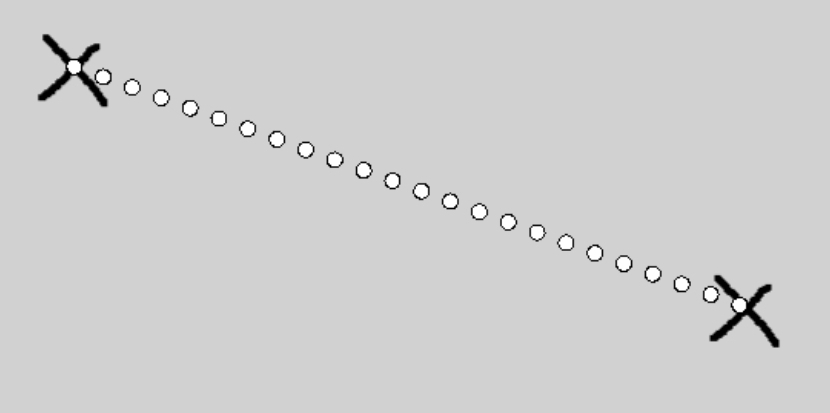
I wanted to see if I could draw a line. I used 2 objects for reference. Start and End. I added the drag behavior for testing.
This would work well as a function.
This formula came from Gemini. IDK how you would modify it so it created a dot at the exact beginning and end. It creates 1 at the beginning but the end can vary. Instead of adjusting the spacing, it might be better to adjust the end point. I guess the new position would be rounded up or down.
Anyway.
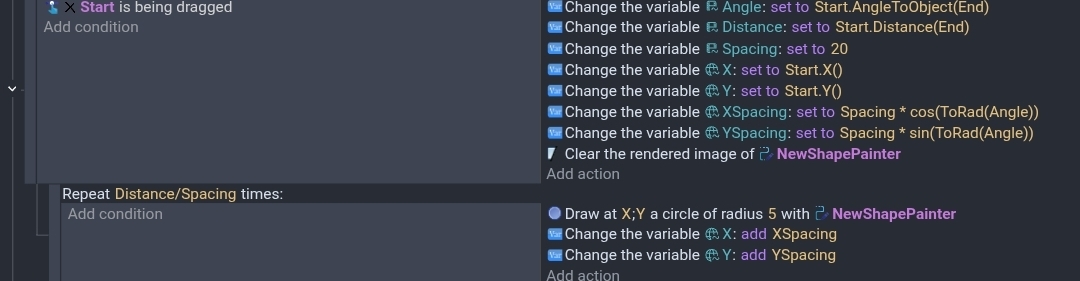
This was my original concept but I didn’t think the spacing was consistent regardless the angle. I think the 1st is more accurate. Although, I like the simplicity of the 2nd.
Output
1 Like