
What these events should do is make the two buttons NOT clicked tween offscreen after the variable reaches zero, but nothing happens. The variable is being written properly, and I waited a few seconds, but the buttons never leave.
I have rarely seen such a strong misunderstanding of “once” triggers and “wait”.
I recommend you to read or follow few official tutorials on Youtube or from the Learn tab in the engine, the documentation can help too.
How GDevelop reads your events:
It reads your whole event sheet from top to bottom, about near 60 times per second. Each of these passes is called a frame, inside one event, it checks the conditions one by one, from top to bottom. As soon as one condition is false, it stops right there and doesn’t even look at the conditions below it.
What “Trigger once” really does:
Most people read “Trigger once” as “do this once” and that’s it. That’s not quite what it does, what it really means is:
I’m true only if I was not checked on the previous frame.
So “Trigger once” doesn’t look at your other conditions at all. It only remembers whether GDevelop reached it on the frame before.
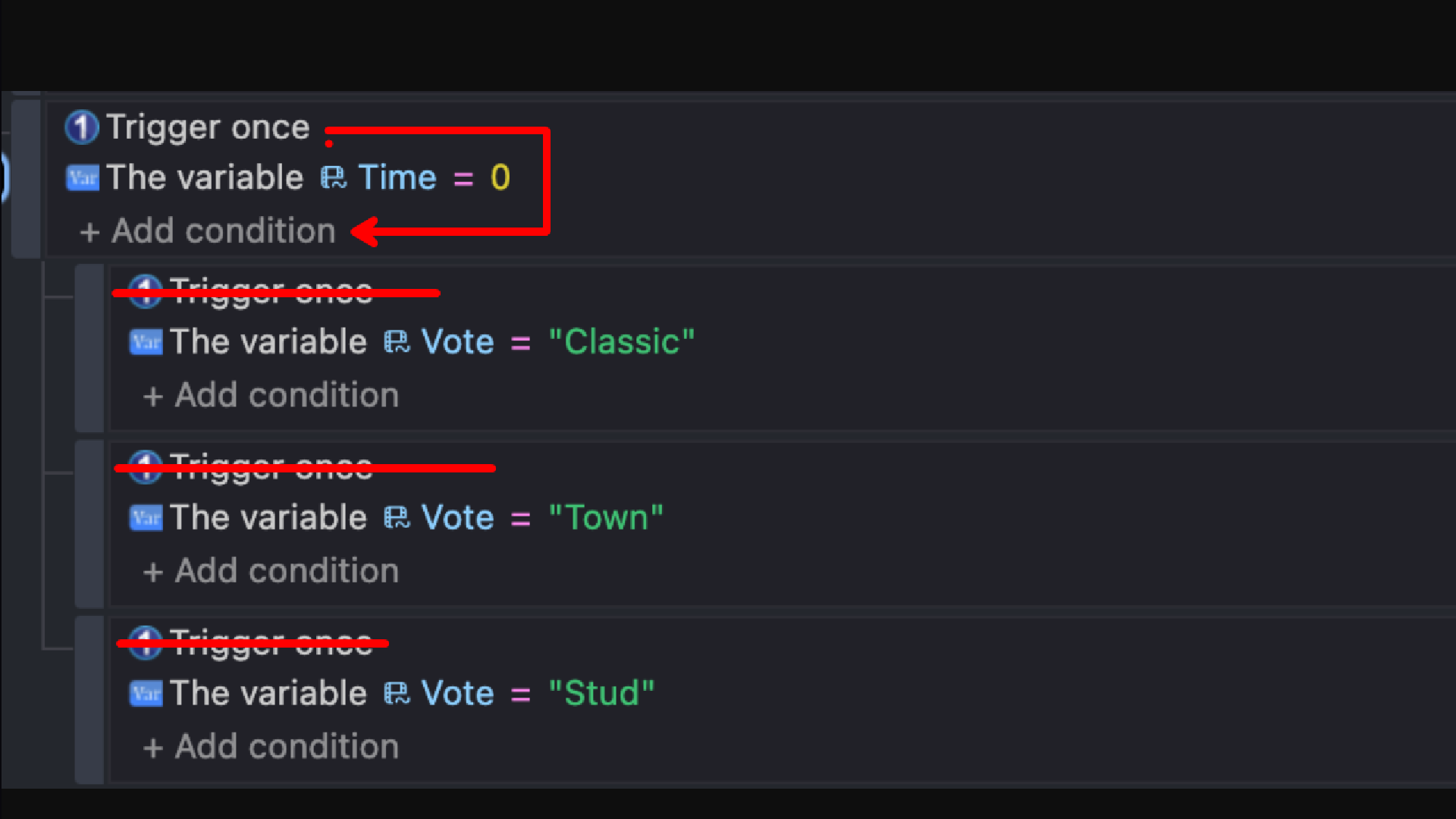
Your “Trigger once” is the first condition, so GDevelop reaches it on every single frame and trigger nothing..
| Frame | Trigger once | Time = 0 ? | Result |
|---|---|---|---|
| 1 (scene starts) |  true (first time it’s checked) |
 Time is 10 |
nothing |
| 2 | false (it was checked on frame 1) |
not even checked | nothing |
| 3 … | false, forever |
not even checked | nothing |
| Time reaches 0 | still false |
nothing! |
It “used up” its single chance on the first frame, while your timer was still running. That’s why the buttons never leave. The fix: put “Trigger once” LAST, like ZeroX4 showed you.
Now GDevelop only reaches “Trigger once” once all the conditions above it are already true:
| Frame | Time ≤ 0 ? | Trigger once | Result |
|---|---|---|---|
| Timer running | |
not checked | nothing |
| Time reaches 0 | |
true (not checked last frame) |
runs! |
| Next frames | |
false (checked last frame) |
nothing more |
Rule to remember: “Trigger once” always goes at the bottom of the conditions. AND
You don’t need “Trigger once” in the sub-events, It make nothing more there.
Use ≤ 0 instead of = 0
Why? Because an exact value is rare and may never happend. If your countdown removes TimeDelta() every frame, the timer goes through small decimal numbers like 0.016, then -0.0003. It skips right past exactly 0, so Time = 0 might never be true. Time ≤ 0 works every time.
Change StartFlag before the Wait. Right now StartFlag only becomes false 1.5 seconds later. If another event checks StartFlag during that time, it still sees the old value. Put the “set to false” action above the Wait so it happens right away. You could have done this wait before by needs, but I doubt of it, but it you want that this way why not it depend your needs.
Quick checklist if it still doesn’t work:
- Is
Votea text variable? The spelling must match exactly:classicis not the same asClassic. - Do
Town,ClassicandStudhave the Tween behavior? Without it, the tween actions silently do nothing
I hope this will help, and please use the right section next time, I moved the thread.
Have fun, and remember to watch officials tutorials about events, but you’ll learn more by searching about trigger once, wait, and FSM (Finite State Machine) on the documentation with the link on top of the forum.
I like to explain it tis way
Make event
Condition
K key is pressed
Action
Change text of TextObject ADD K
Now hold K
That is how it should work
You are spamming K and you will get KKKKKKKKKKKK
Now same event but with trigger once as last condition
Condition
K key is pressed
Trigger once
Action
Change text of TextObject ADD K
Now if you hold K and it will send only one K
Until you release it so trigger once made event run once and never again as long as conditions of that event are true
It needs to become false and then true again to kick in again
So release K and press it again to send another K
If you do
Condition
Trigger once
K key is pressed
Action
Change text of TextObject ADD K
Then on very first frame if you don’t have K pressed and press K on any other frame than first one
Event will do nothing and no K will be sent
Instead of sending K i suggest doing it with play sound action with volume of 100
That will quickly teach you when to use trigger once
Just pump up volume on your speakers so effect is better
Yeah I switched the conditions around and it started working