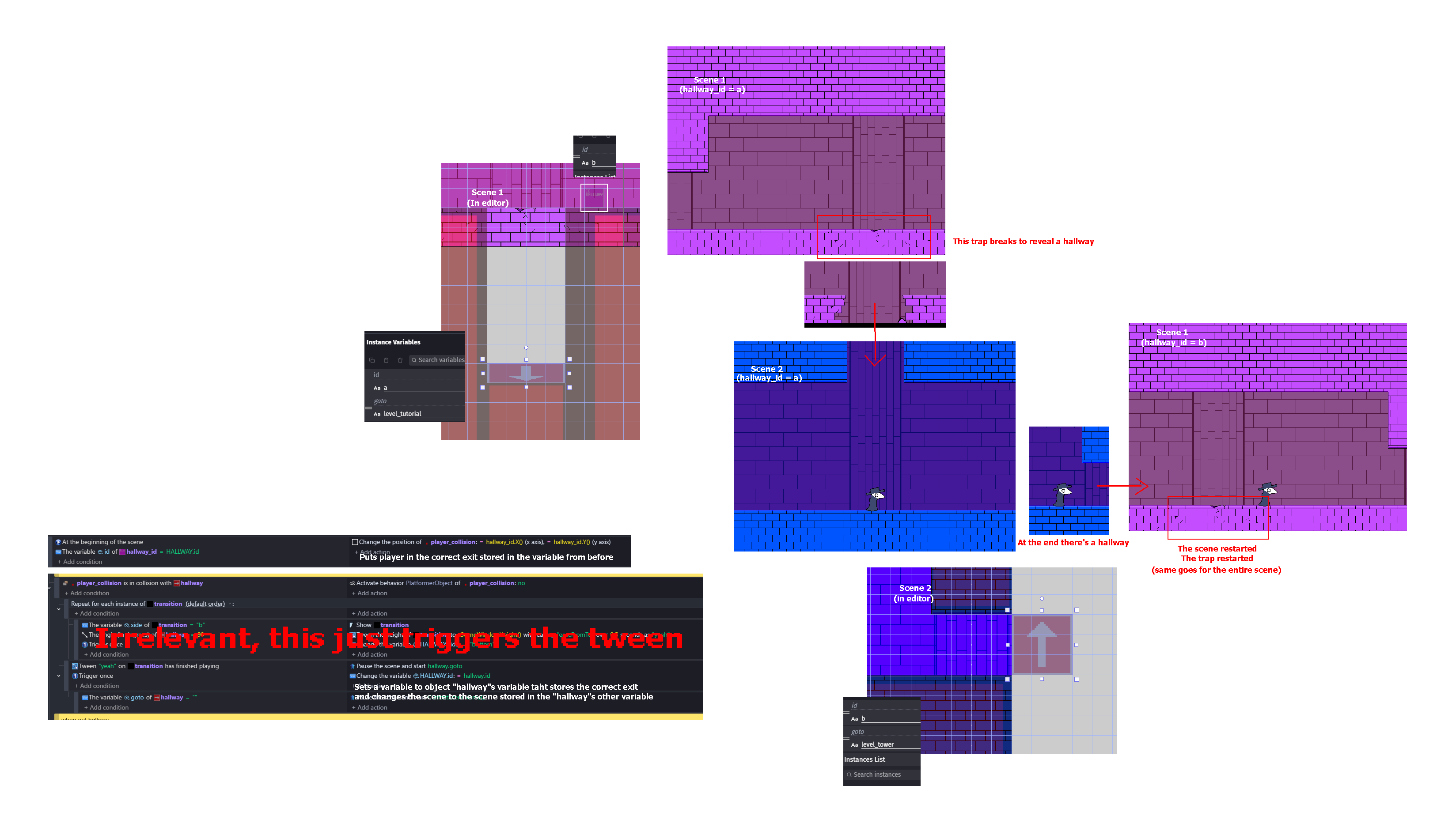
You must go to scene 2 first.
How about you store the scene you’re currently at and then follow it back at the beginning of the scene?
You could also just use the same scene but by moving cameras.
I can’t use room-based camera because I need to change inbetween scenes (and bc I already use it BUT I need to pause every object’s state)
I can’t go thru each single scene since the thing us like Pizza Tower’s where you touch an hallway object which puts you onto a specific, set in the hallway object, scene and a specific place also set there
What I have rn is a scene that’s a normal level, in it is a hole with a hallway object that puts you in another scene that’s a tutorial, after tutorial you don’t start at the same place as before, but instead somewhere else so I need it to loop properly
So scene1 is the hallway, scenen2 is the tutorial and scene3 is the actual next scene?
Then why not go from scene1 to scene3, and at the beginning of scene3 open scene2?
Then from scene2 you return to scene3, and from scene3 you can return to scene1.
Try deleting the storage of the game name. I’ve never used the save state extension, but I did see that on the forum. You could also overwrite it in you’re home menu.
You don’t need to save the entire scene for this. If you need to control the state of an object that needs to be maintained throughout the game, for example, use a global variable to control this and check this variable at the beginning of the room’s event sheet, determining the object’s status according to the variable’s value.
If you need to do the same thing for multiple objects at the same time, you can group them and perform the same validation using the group as a single object.
Using state control variables to manage objects outside of a scene is the simplest way to handle this problem. I can’t visualize why this wouldn’t work based on what you’ve shown us so far in the examples.
If you’d like to share a part of your project here on the forum, it might become clearer exactly what you intend to achieve, and we can help you better.
You can see it by just destroying the blocks at the start, getting into the hole, finishing the tutorial and just going back to the beginning
Best example of what I want is Pizza Tower, every room is a different scene and going from one room to another keeps all the previous states in-tack, stuff that’s dead/broken stays dead/broken
And I can’t use global variables, especially as “single object”
Storing every block’s variable as global would at some point tank the game because of the +100 things that would need to be stored (collectables, enemies, breakables, other junk) and doing it as single one would just… delete all of them
I don’t think you have many options, unfortunately. If you have 100 different objects that need to have their states controlled independently, each of those objects needs its own control variable. You could create that variable within the object itself, by the way, and use it for that purpose.
Creating a specific functionality in the engine to save the current state of a scene wouldn’t be much different from that.
Okay. I did try extending the capabilities a little to support: Deletion, Duplication and Checking. https://files.catbox.moe/sxcri3.json
You can save the json and try it in a demo project.