It’s pretty late here, so I’m going to sign off for now. Thanks for trying to help.
But the ID is displayed in the debugText box. This suggested there is no PlayerCreature with an ID that matches the first ID in TurnOrder.
But now you’re saying the PlayerCreatures do move? I’m a bit confused, can you elaborate on where things are at?
Sure. I was saying, with the condition that checks if the playercreature ID matches CurrentActiveCreatureID, nothing moves.
If, as a test, I remove that condition, all the creatures move at the same time.
As a different test, if I keep the condition, but hardcode the creature ID to check for (instead of looking for a match to CurrentActiveCreatureID), only the creature whose ID I hardcoded, moves correctly.
So the surrounding code for movement and taking turns does seem to work, but the condition for checking for a match between playercreature ID and CurrentActiveCreature ID just won’t work to identify the creature that is supposed to move each turn.
That’s where we are for now. Have a good night. I’ll resume tomorrow if you’re available, I’ll check back here.
Yes, because it’s an unconditional event and so every PlayerCreature is in scope.
This to me suggests there’s a mismatch between the PlayerCreature ID and the CurrentActiveCreature ID. Which is weird because you populate the TurnOrder array with each PlayerCreature’s ID at the start.
So unless you create new PlayerCreature objects after the scene starts, It’s a bitr of a head scratcher.
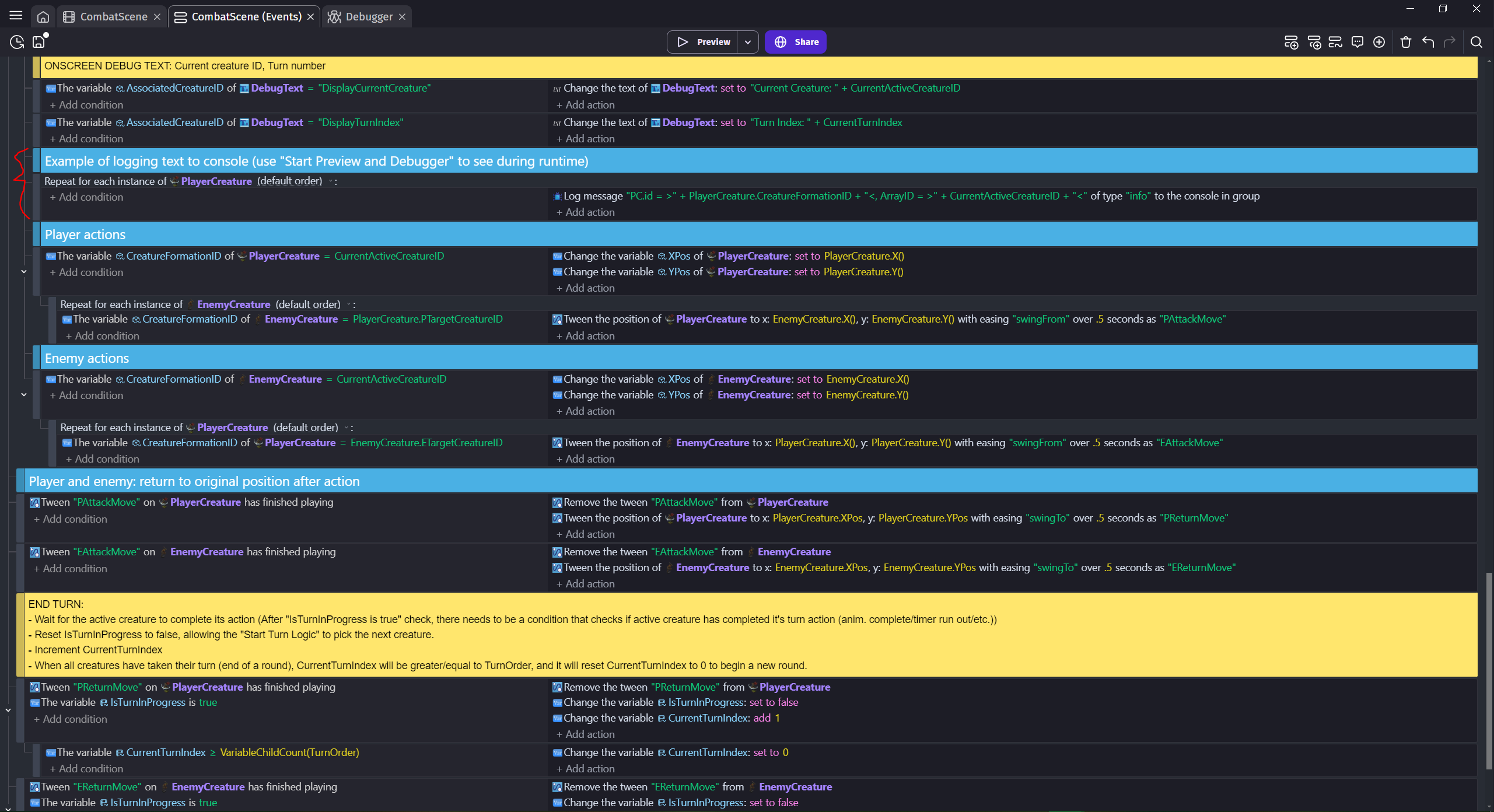
To check the IDs match, you could add a separate Repeat for each PlayerCreature object event before the event that checks the IDs (don’t make it a parent event, just a stand-alone one)? As it’s only action, use “Debug- write to console” and make the parameter "PC.id = >" + PlayerCreature.CreatureFormationID + "<, ArrayID = >" + CurrentActiveCreatureID + "<".
Then run the preview in debug mode and check the console output. You’re looking for 2 the same IDs, each within the greater/less than symbols, on an output line. If you start with 2-3 PlayerCreatures then the list will be short and easy to check. If the output keeps scrolling, pause the game (top right of the debugger console).
THAT HELPED ME SOLVE IT, THANK YOU!
See underlines in the image, there’s a mismatch in all cases. That “EB4” in the ArrayID of each log entry is the ID of the first creature in the TurnOrder array, so it seems that CurrentActiveCreatureID wasn’t updating or something. Solution details further below.
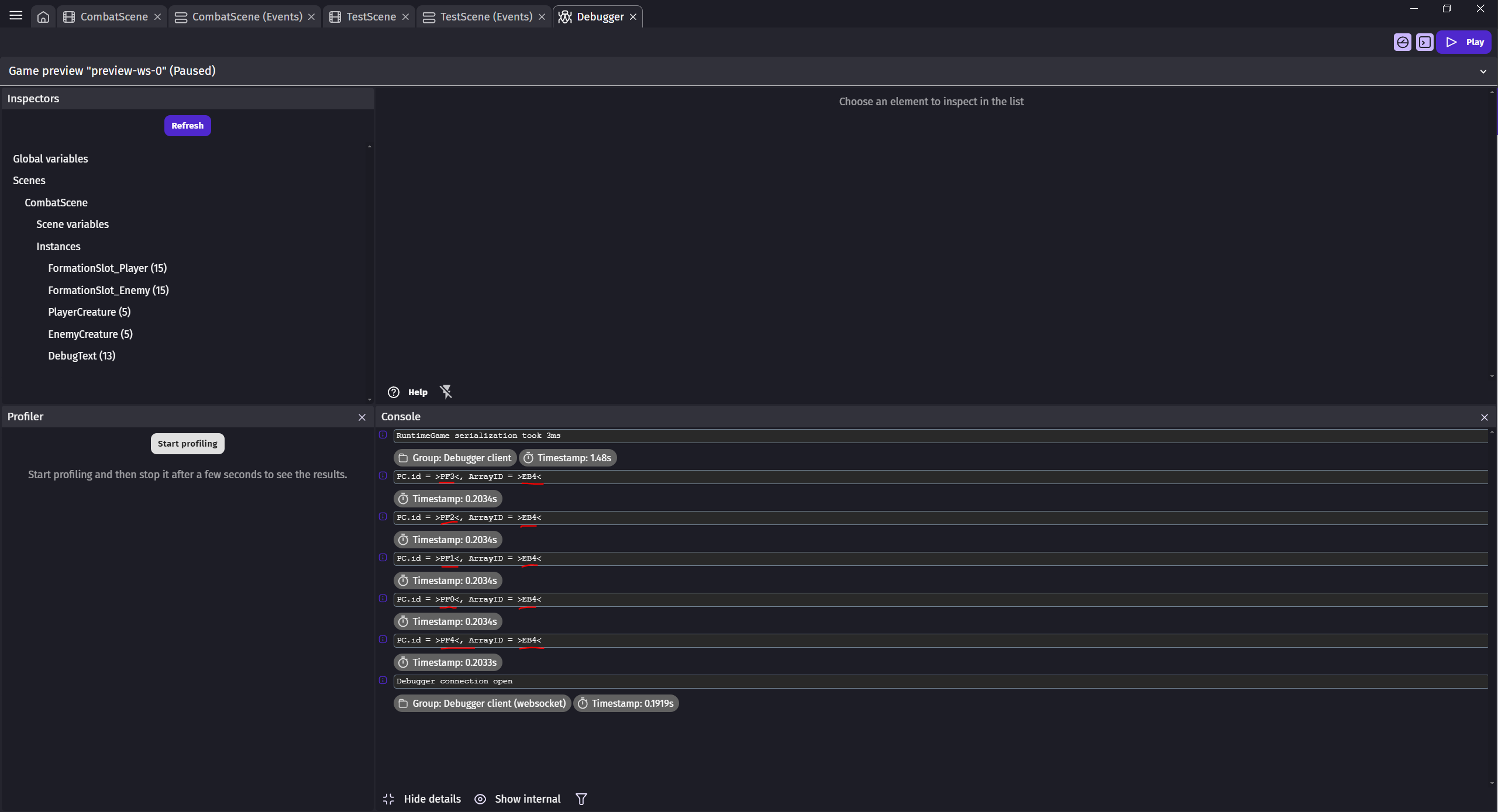
Hopefully this isn’t too long, but you’ve put in so much effort I wanted you to have the full info on the solution. Ok, so I’ve got 10 creatures, 5 on a player team (playercreatures) with IDs that start with “P”, and 5 on an enemy team (enemycreatures) with IDs that start with “E”. But I toss them all in the TurnOrder array to sort by their Speed stat to determine the order they take their turn each round. Arbitrarily, I had hardcoded their Speed values as numbers 1 through 10, with the enemy creatures getting the values of 6-10. So, in the TurnOrder array which was sorted to process highest speed first, the 5 enemy creatures were the first 5 creatures in the array, hence CurrentActiveCreatureID always showing “EB4”, the ID of the enemycreature with the highest speed.
Problem is, after the above logic was implemented, I next tried to implement the logic to move them their turn, but I only did it for the player creatures. I’d planned to get it working for the playercreatures first, then just copy the working logic to the enemycreatures and tweak. So, the enemycreatures had no logic for turn action, but they were first in TurnOrder, so the whole thing just got stuck.
Thank God for the clarity of mind that can come from stepping away from something, when I saw the output of your debug log suggestion today, I realized what was going on, and reversed the sort to “lowest to highest” (playercreatures first). Sure enough, they each move on their turn, one after another.
I’ve since added the enemy movement logic, and now everything’s moving properly.
Thanks also for an example of how to see values in the debugger; I’ve been looking for an easier way to check values than putting everything in text object instances onscreen.
YOU’RE THE BEST! Thank you!
1 Like
Glad MrMen could help. It’s true that he’s very strong.
Having never used the debugging console and created associated events, could you please show me your events where you request the console display?
Thank you in advance.
A+
Xierra
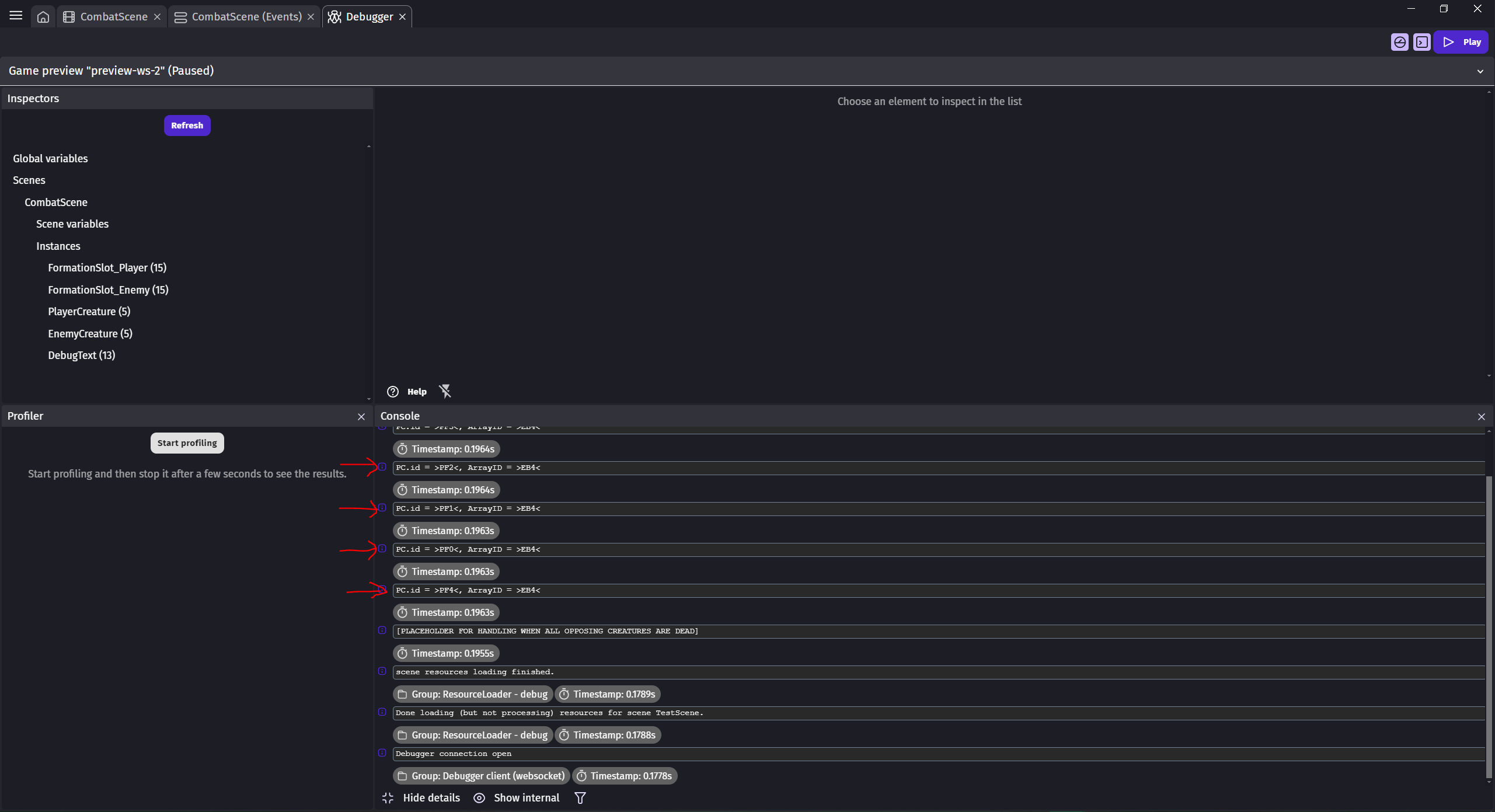
Sure. First pic is the line of code that writes to the console, second pic is from the console during runtime, accessed by using the “Start Preview and Debugger” option in the Preview drop-down, then clicking the Pause button at the top right of the Debugger window during runtime.
Because the code runs multiple times/sec as Mr.Men said, it shows up multiple times in the log.
Code:
Console at runtime:
Hello
Thanks
A+
Xierra