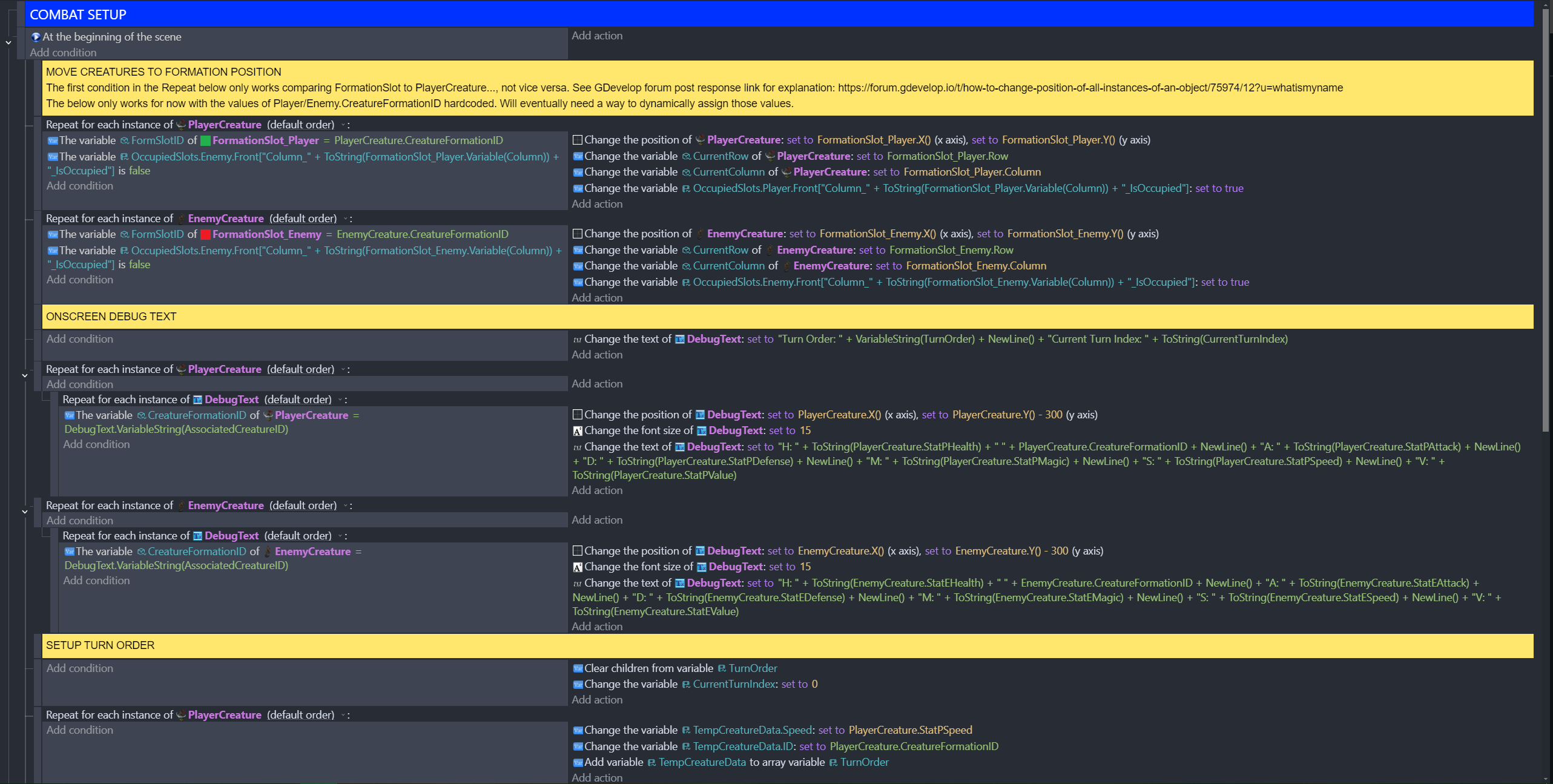
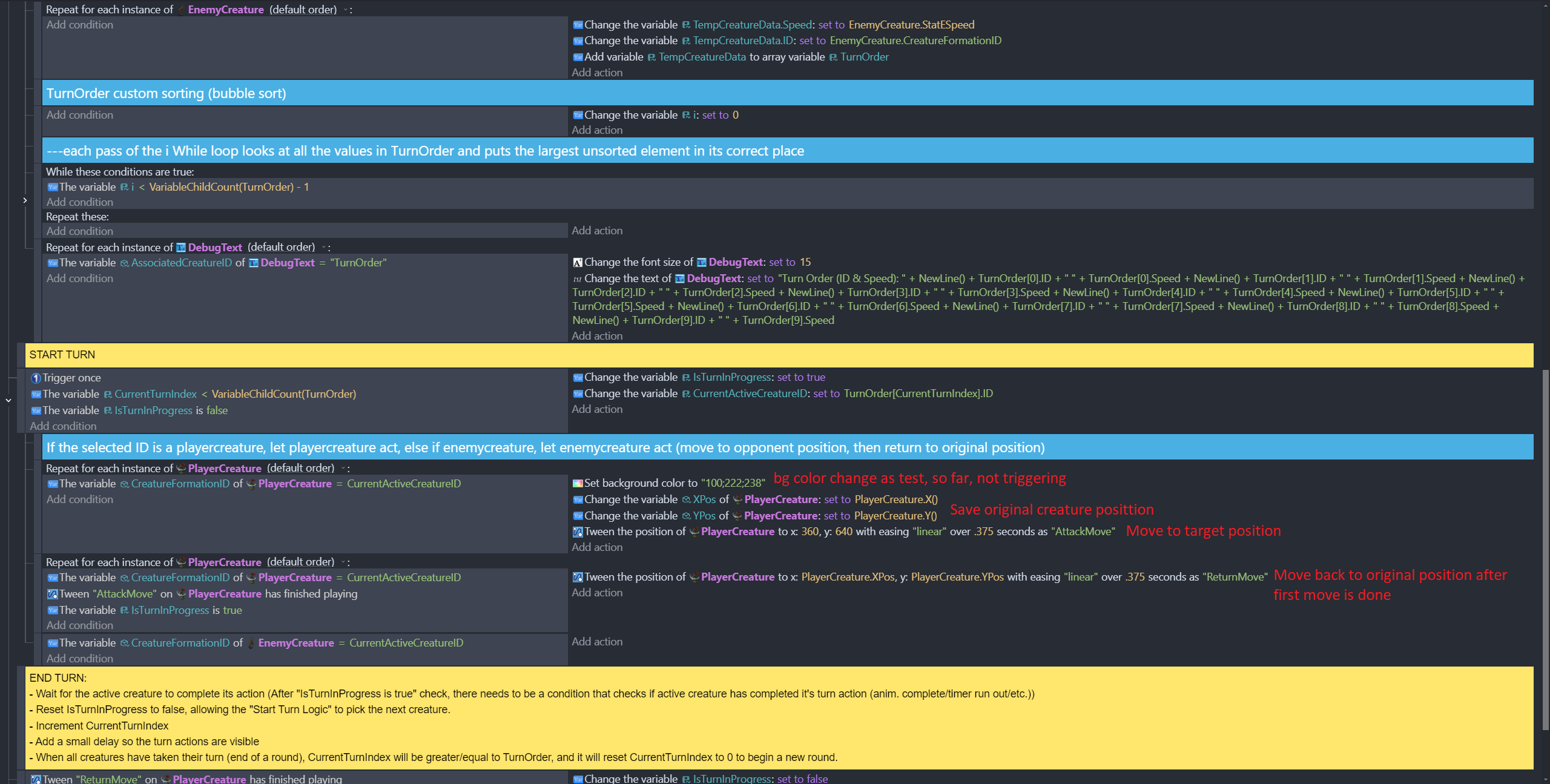
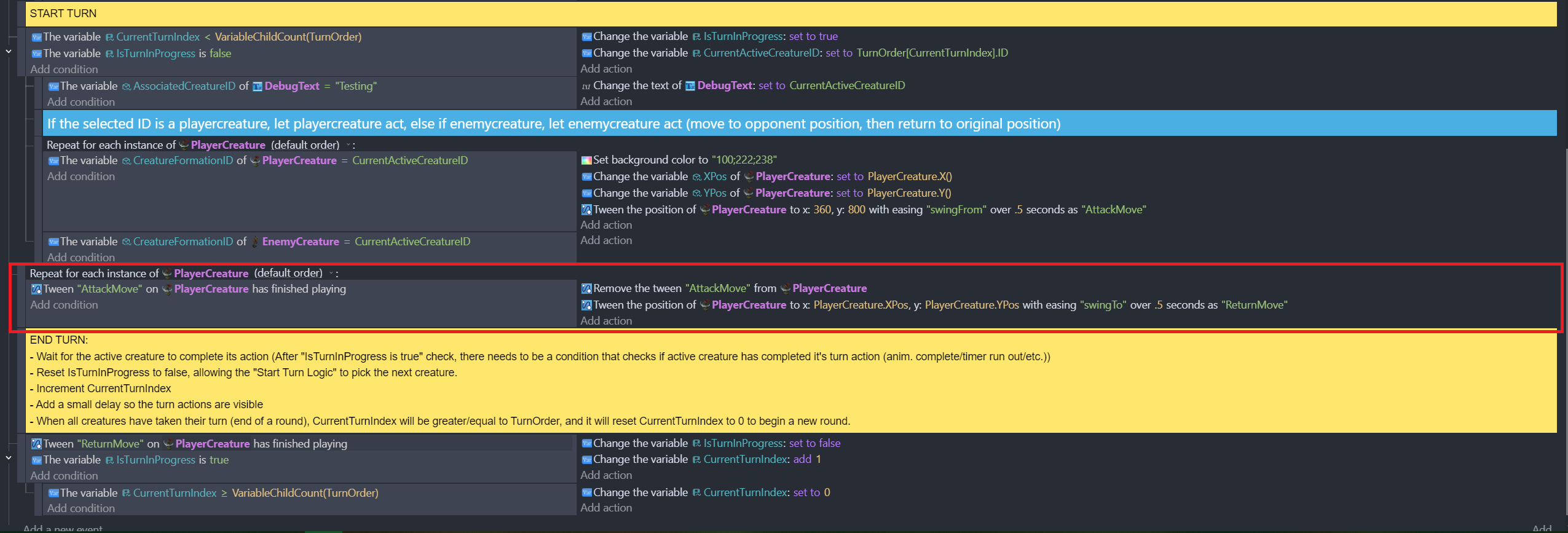
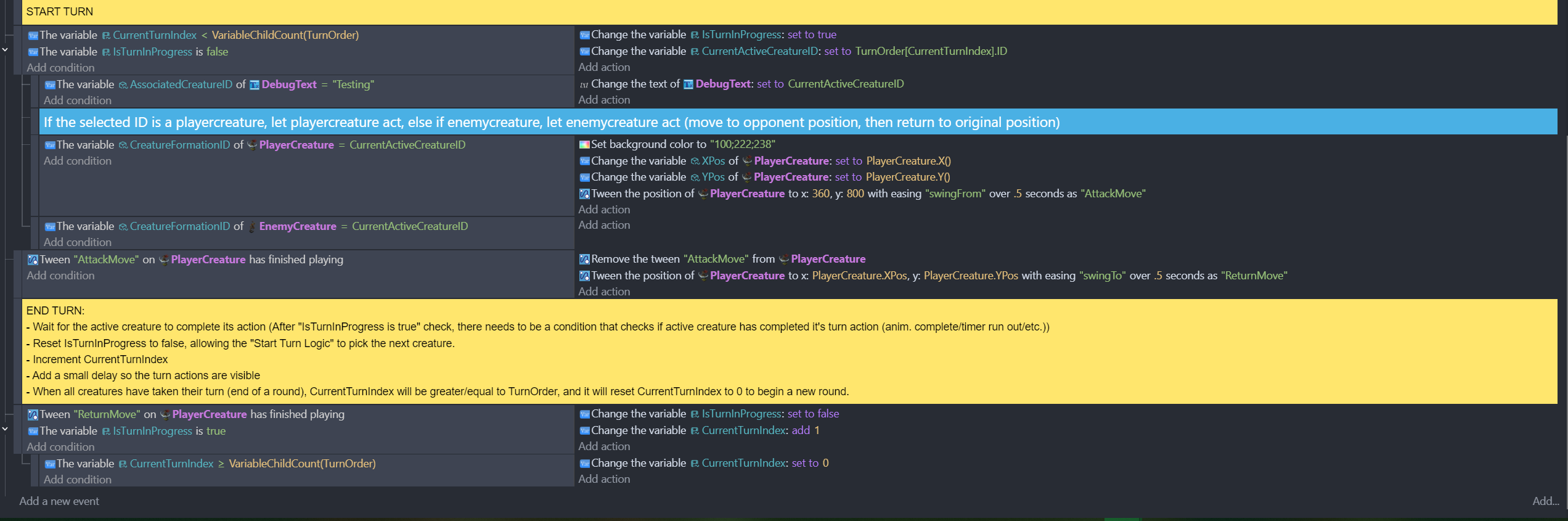
I included screenshots of the whole event sheet, since it’s not super long, and in case context is needed. Logic for movement is in the second screenshot, see red text. Appreciate any help, thanks.
How do I…
Loop through instances of objects in a predetermined order, move each one to a specified position, then back to its original position.
What is the expected result
See above.
What is the actual result
No movement. Background color change action not triggering tells me that loop conditions aren’t met, but debug during preview shows the condition variable has a value, so not sure what the issue is.
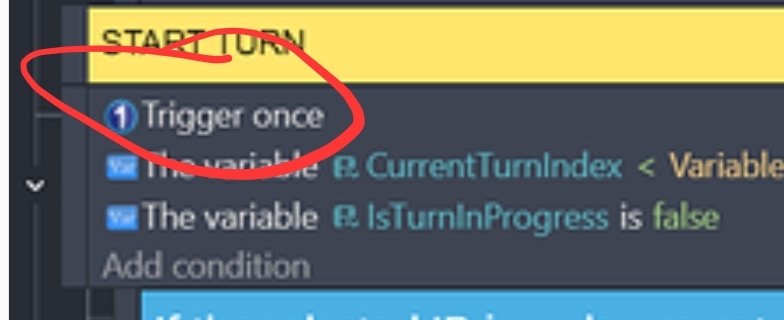
I didn’t study the entire setup but this stands out. The trigger once is the first condition. So, the event and all of the subevents will only ever trigger once. Try moving the trigger once to the last position in that event.
The trigger once watches the preceeding conditions for changes from true to false and back to true. Without any previous conditions there’s nothing to retrigger it.
Removing the trigger once won’t fix the issue, though it’s an unnecessary condition; the variable IsTunInProgress is immediately set to true, preventing the events from firing immediately after it’s just run.
The issue with the position of event 2 in the image below:
It needs to be outside the Start Turn set of events, like the event with the Tween "ReturnMove" of PlayingCreature has finished playing condition that’s peeking out at the bottom of your screen shot. Event 1 only run once and that prevents event 2 from continuously being checked.
Also, don’t repeat over each object and then check each objects condition. Narrow down the set of objects first, then repeat over them. It’ll be less processor intensive if you ever get to larger numbers of objects.
So check for PlayerCreatures with tween “AttackMove” that just finished playing, and add a repeat for each PlayingCreature as a subevent.
Moved it to end of the pictured event; still nothing. Didn’t know what you said about Trigger once, though, so thanks. I left it at the end while I continue to troubleshoot.
Thanks. Still didn’t work with event 2 moved outside of Start Turn, but I’m still trying to figure it out. When you say to narrow by checking for a playercreature with “AttackMove”, is there another way to do that besides putting that condition in a for each loop? If not, then isn’t that the same as what I’m currently doing, resource-wise?
I haven’t really done much permanently; I try things, and when they don’t work I undo back to the original state, and try something else, so there’s nothing for me to screenshot that is different from the original post’s pictures.
IsTurnInProgress defaults to false, and the first time it’s set is in the Start Turn section, right under the yellow “START TURN” comment, where I set it to true (see second original screenshot at top).
I did temporarily remove the “The variable CreatureFormationID of PlayerCreature = CurrentActiveCreatureID” condition from the my sprite movement event, and it works fine, except that it moves all the instances simultaneously. So, the error appears to be here, just don’t know how to get it to work, so the overall logic can have sprites take turns moving.
Sure. Linking to my second previous comment to you in case you didn’t see it, as I think it has the most to do with the issue:
Now,
See below screenshot for most recent changes. Didn’t include the upper half of the logic as this section is what has to do with moving the sprites and taking turns, but I can add the rest if you want, let me know.
This event’s only purpose is to move those PlayerCreatures that have finished their “AttackMove” tween. You don’t care if the ID matches with whatever variable or if IsTurnInProgress is true. Those are conditions that prevent the event from actioning.
Replace that event with one that has:
Condition: Tween "AttackMove" of PlayerCreature" has finished playing.
Action: Remove Tween "AttackMove" from PlayerCreature Tween the position of PlayerCreature to ..... as "ReturnMove"
I think that should work.
And again, can more than 1 PlayerCreature have the same CreatureFormationID?
Also, it’s a good idea to remove a tween if it’s finished and the finished state is used in condition.
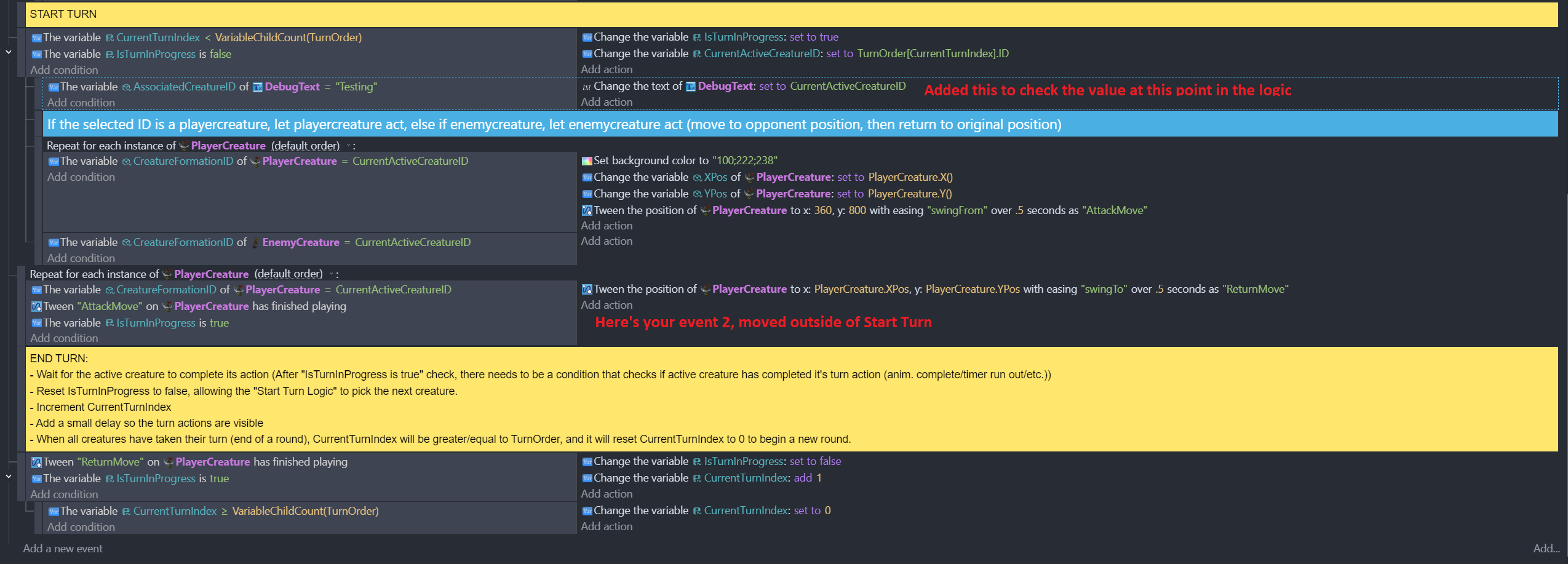
Tried it; no good, see pic. I actually tried a variation of this, disabled the entire event you just talked to me about, didn’t help. In any case, that event comes after AttackMove, so I’ve been more focused on getting the event with AttackMove in it working. I figure if I get the event with AttackMove to work, then getting this event working shouldn’t be hard to do.
Also, removing tweens, and the reasons for doing it/effects of doing it is new to me, thanks for telling me. I’m new to Gdevelop, so can’t say I understand why it’s good to remove a tween (even if it’s going to be used again on that object next round?) but I’ll keep it in mind.
Sorry forgot your other question: no, PlayerCreature identifiers are unique.
The condition PlayerCreature.CreatureFormationID = CurrentActiveCreatureID will result in only 1 PlayerCreature being selected. Repeatedly going over all of them and checking their id is pointless.
Those repeats have been there the whole time; they predate our conversation, I didn’t put them there because of anything you said. Removed them. Still doesn’t work. Updated screenshot:
If a tween is finished, and not removed, then it stays in the finished state. If an event has the condition checking if the event has finished, that condition will be true and the actions are performed. Over and over again.
Does the DebugText text box display the active creature ID?
Ah, that makes sense, about the tween removal. Since I’m removing it, if I want to use it again on a subsequent turn, do I need to “Add” it back or something?
DebugText shows the ID of the first creature in the array of creatures, yes.
No, just use the tween method. Think of it like the first tween that is actioned on the object. You don’t need to add that, it just gets applied. The same will happen if you remove a tween and then tween it again.
Does the first creature move for the attack and does the background change colour?
Do any subsequent creature id get displayed?
With all the things we’ve tried, no movement at all, no bg color change, DebugText shows ID of first creature in array.
Additional info, if it helps at all:
When I remove the condition from the AttackMove event, bg color changes, all 5 instances of playercreature make the appropriate movement simultaneously, and the CurrentActiveCreatureID DebugText shows the ID of the first creature in the array during the movement, then after the ReturnMove completes, that DebugText starts cycling rapidly through the creature IDs.
If I include the condition for the AttackMove event, but hardcode a creature ID instead of checking if it’s equal to CurrentActiveCreatureID, bg color changes, then only that creature moves, and the DebugText shows first creature ID until movement is over, then it cycles through the IDs.
Quick sidebar, I added a remove tween for ReturnMove, too. Then tested by removing the condition on the AttackMove event, and now it works better: the DebugText stays on one creature ID while the sprites move, then goes to another ID and the sprites move again. Before, when I tested this way, DebugText was changing IDs every frame independent of sprite movement.
So teaching me about remove tween defintely helped, thanks. Whole thing still doesn’t work with the original condition, though, unfortunately.