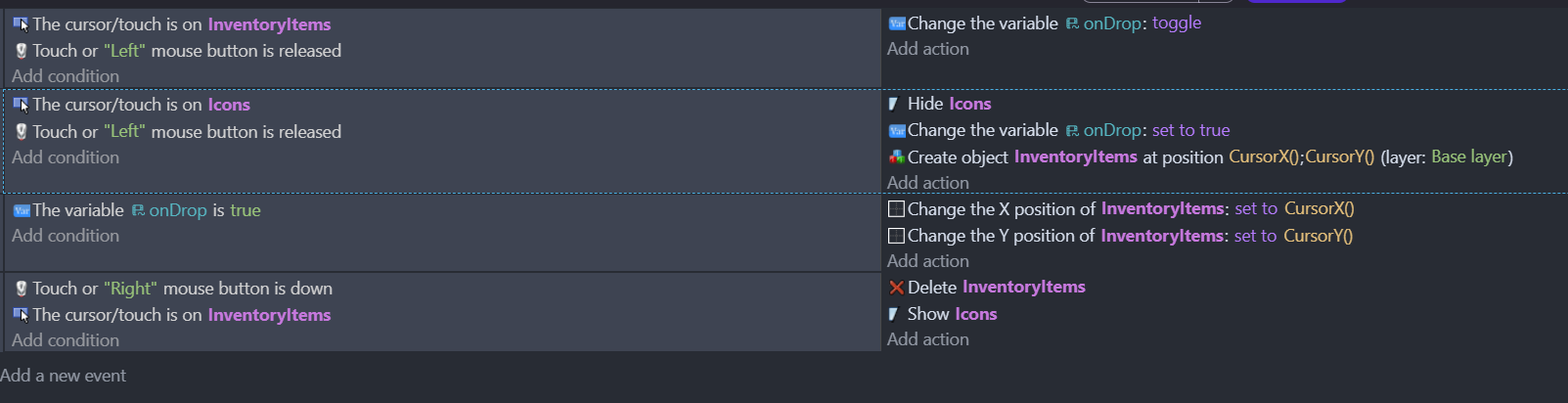
Hello everyone. I need: drag-n-drop, so that when you left-click on an icon, the item appears on the stage and follows the mouse, and the image from the icon disappears. With another left-click, it should be placed on the stage, and accordingly, with the next click, it can be moved again. And then, with the right-click it should disappear from the stage and the icon should show.
Now I can left-click on it and it’s follows the mouse and I can put it down with another click. But when I try to pick up another object from an icon, the first one disappears and appears again on the mouse. Also when I delete it with RMB all icons show up.
I think there should be a connection between icons and items, but I just can’t figure it out.
Please help!