How can I implement water mechanics in GDevelop—something that looks high-quality and functions flawlessly, similar to the water systems in Terraria or *Lost Miner*? I haven’t been able to find an extension for this, nor have I found a detailed tutorial video. Could you perhaps create a comprehensive video on this topic? That would be incredibly helpful. Alternatively, if there’s an existing, realistic, and well-made extension, that would also work. Specifically, I need the water to flow—left, right, and downward. Additionally, the player should be able to swim in it, with a mechanic that causes them to sink deeper over time. It also needs to be performant, ensuring it doesn’t cause a drop in FPS. I’ve been working on it, but I haven’t quite managed to get the result I’m looking for. Thanks in advance! (By the way, I’m developing this for a 2D game.)
This one is shorter

Although both of them focus on platformer type
But it 2d
I am referring to fluid dynamics—I am already aware of these videos and basic water ripples—but what I am looking for is a realistic water mechanic, similar to that found in Terraria, where water moves laterally or downward between blocks.
Oh yh then idk. You could check itch.io for extensions. Maybe there smth
Did you check the answers to you post asking about water physics?
Yes, I checked, but I didn’t get the result I was looking for. While some people have suggested various techniques, they are all very complicated; it’s not feasible for me to learn new extensions, watch complex videos, or master other external tools just to implement this. Some have shared their own games, but I can only see the end result—I have no idea what the underlying code looks like. I honestly don’t understand how GDevelop could lack such a mechanic, or why no one else seems to need it. In any case, I’m still struggling to figure this out on my own. If anyone could provide a detailed, step-by-step solution, I would be very grateful. Thanks in advance!
Hi @oyunkurucu
How have you set your project up? Are you using tilemaps? Have you got your world in an array? Are you using an object culling system? If you’ve just got you world as objects on the editor and are looking to implement dynamic water using thousands of water objects without object culling then sadly i don’t think it’s going to perform very well in a large world. I tried it three ways, firstly using object pick list logic and point inside object checks. There were simple rules used, repeating for each object and checking what other objects were around it. This works fine on its own but inside a full terraria style game will be a real drain on performance. Secondly i tried the same logic but using an array, which for me seemed much simpler. I can’t remember exactly the rules were but it was based on Empty cell=0 and wall=1 and water=2 and checking the array every .2s. Thirdly i did the same thing using a tilemap linked to an array and kotiks did it too. Kotiks logic was very similar to mine and he posted his events. Then i realised that you could just use a tilemap without an array and just check the tilemap for water tiles and alter the tilemap based on the tiles around each watertile but i think you’d need two tile maps, a ‘before’ and ‘after’ tilemap.
A magic bullet extension for this would be great but it would need to work alongside what you’ve already got in your project and work really efficiently. I could turn the first experiment in the other thread into a behaviour but it wouldn’t function well in a large terraria style project. The second method requires your entire world to be set in an array and your array to be set up as I did it. If you’re using tile maps you could probably vibe-code a JavaScript extension based on checking the cells of tile maps for water tiles
I’ve probably still got the project if you need the events that I used.
Could you describe more about the way your project is set up and what you’re looking to achieve.
Thank you for your comment. I am using a tile map; however, I had been treating water elements as standard objects, as I assumed that incorporating them into the tile map would significantly slow down performance. It would be very helpful if you could share the methods you use. I am currently conducting my tests in a world that is smaller in scale than a typical Terraria world. Furthermore, I plan to implement optimizations—such as those for water—by ensuring that only the areas near the player are rendered or processed.
I’ll have a think tomorrow morning. An object culling system would be ideal but that really would need to be the backbone of the project. Have you used arrays before?
I just looked at the first attempt that i created in the other thread using water objects 20 by 20 pix. Its really quite complicated and this is mainly to get around self referencing pick list stuff - storing id’s and x y
I’m a bit tired but what it looks like i did in that one was use another object called ‘water test’ with 4 custom points on it to check up down left and right.
Firstly I stored the x y of all the water objects.
Then for each child in the array i moved the test object to the saved x y and did point inside object checks on surrounding objects. It looks overly complicated to me now - I would definitely re-work it! - i wouldn’t think it was a great idea to apply that one to your project.
I’ll look at it again tomorrow, as the other methods i tried using arrays were much simpler
Thanks. I’ll look into how I can use the concept of arrays as well.
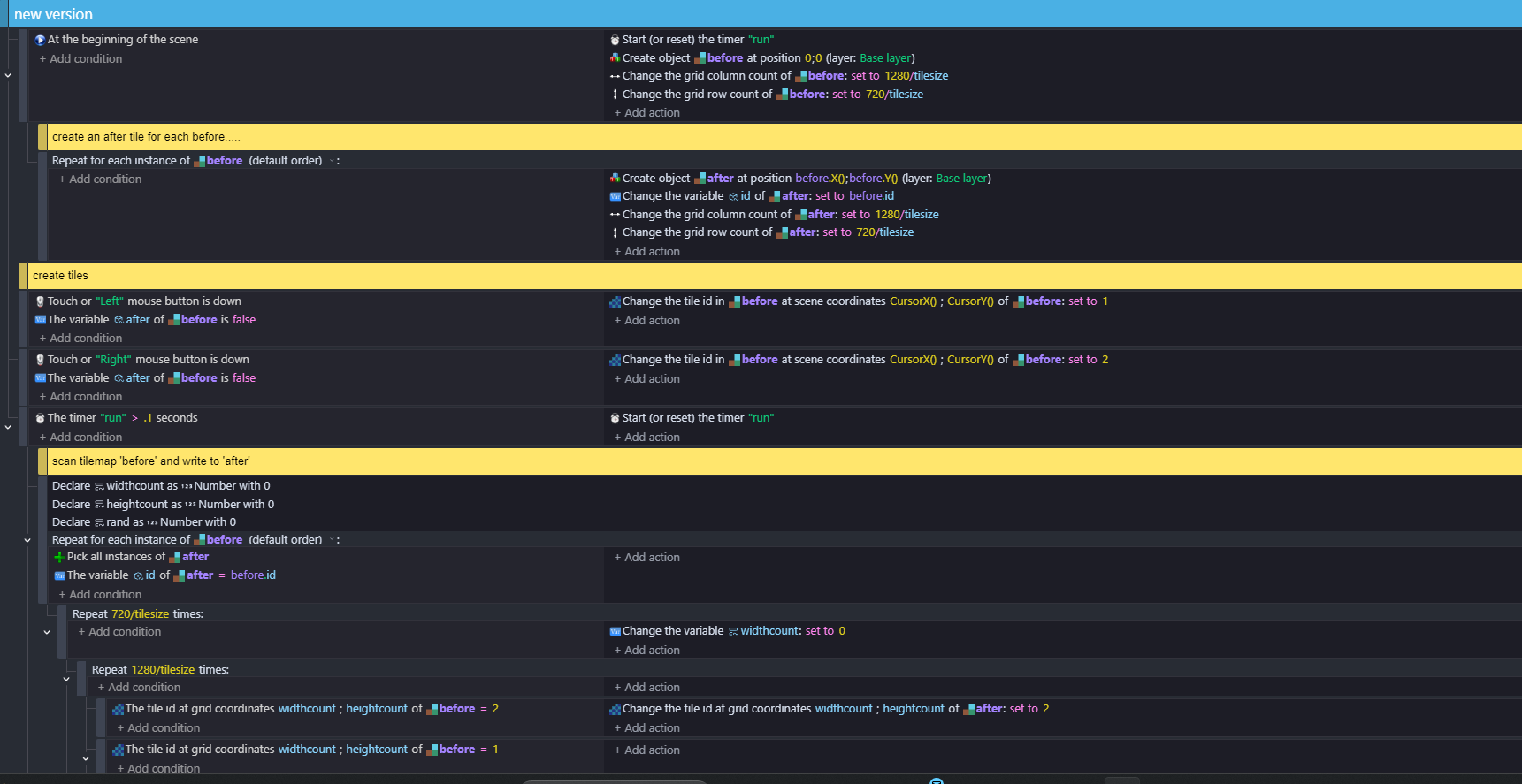
Hi - If you’re not used to using an array and you’re using tilemaps - This is the same thing but using a ‘before’ and ‘after’ tilemap (duplicated and renamed)
I simplified the rules that i was using before.
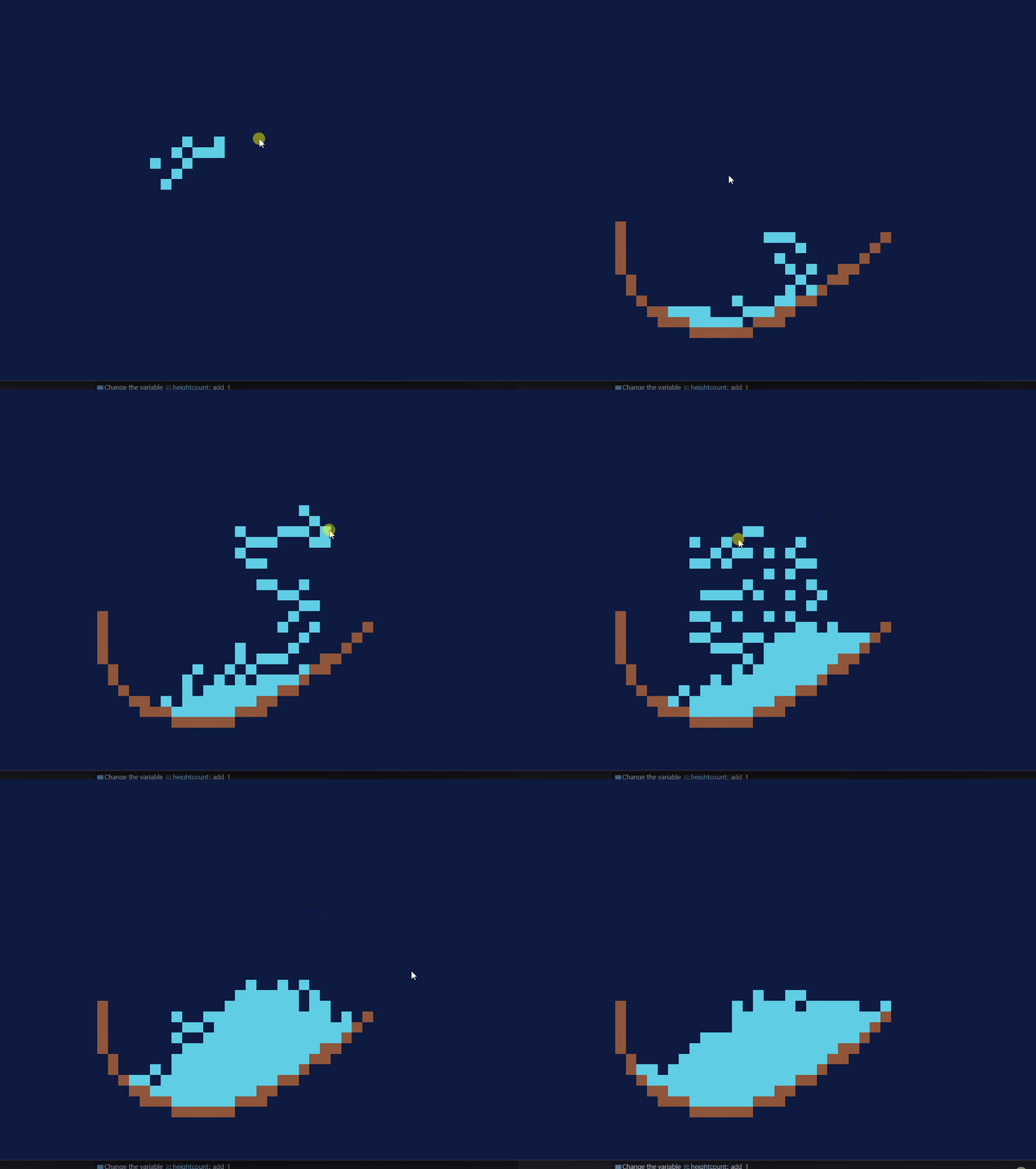
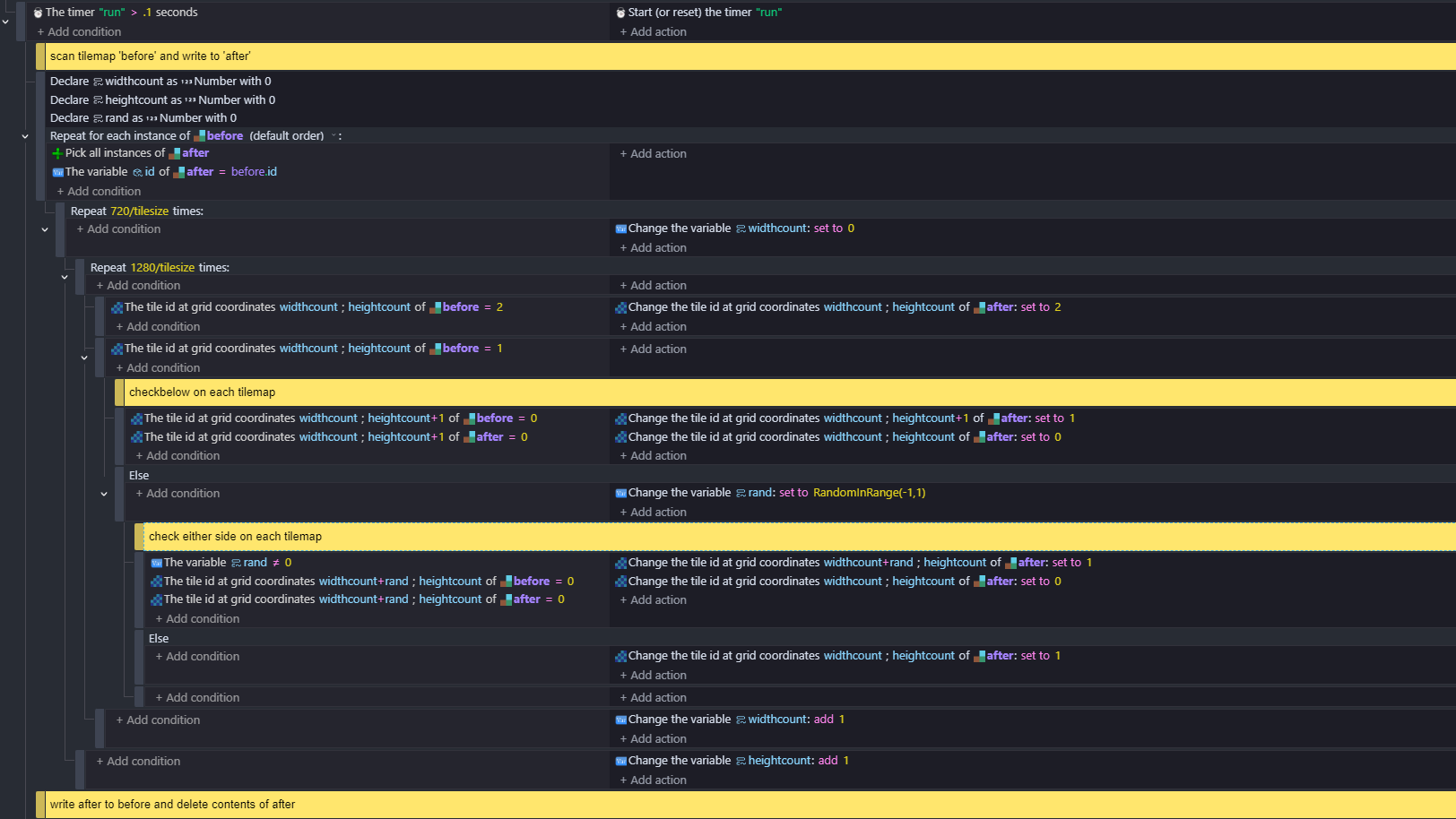
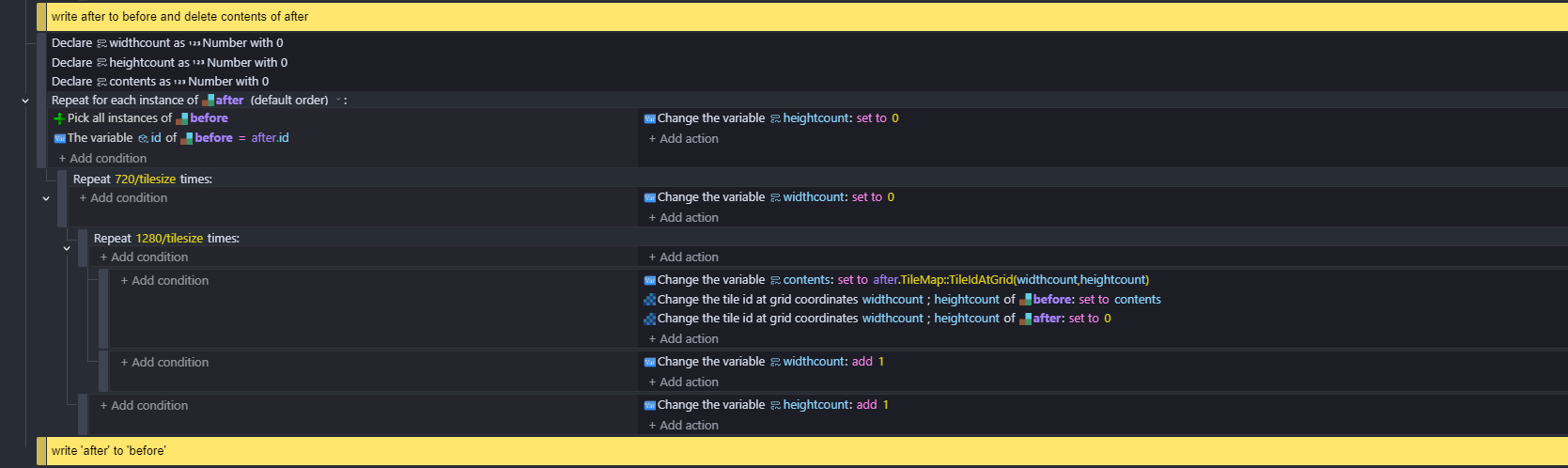
perhaps you could use a grid of tilemaps and run it on the tilemaps that are local to the player x,y. You’ll notice that water collects at the bottom though - so you’d have to then check neighbouring tilemaps and you’d get pick list problems here.
Alternatively you could use one large tilemap and check only the local area of it
edit - if you’re just using 1 before tilemap and 1 after then you don’t need the id var
Thanks for sharing the codes.
ive just noticed something - ignore the variable ‘after’ of the tilemap object ‘before’ (i know this bit is a little confusing and that’ll get amplified when you translate this!)
 ha! its like a riddle!
this variable is only there as when i started it i was going to do it with one tilemap object and then i realised it would just make it more complicated and duplicated the tilemap and named it ‘before’ - hence the after or before being false!!
That is the most confusing object variable ive ever seen ToT
It’s when the after of before was true that things got really confusing!
I posted it without realising that was still in there - I confuse myself most of the time, and so when it comes to explaining my hair-brained, convoluted logic to others, there really isn’t much chance that things will end very well.
Hmm, okay, thanks again.
Great discussion, everyone. The idea of treating water as a zone with slower movement and reduced gravity feels really intuitive, and the tips about adding bubbles and a gentle current are lovely touches. Thanks for sharing so many practical ideas!
I forgot that I did swimming mechanics in this game. So its adjusting the platform mechanics if inside water tile. but there’s other things going on with an oscillating water force on the player
its a bit weird the way its done as its shape painter anis
fall down to the right after Lloyds intro.
I did this, this morning using three tilemaps. two tilemaps for the water (before and after) and one for the ground ‘ground’. Checking only local area (80x40 tiles where tiles are 20x20pixels. There’s a console error though Invalid tile definition index: -1 and im not sure why yet. the profiler was 4.3ms which might be too high. I remember getting much better using an array linked to objects.
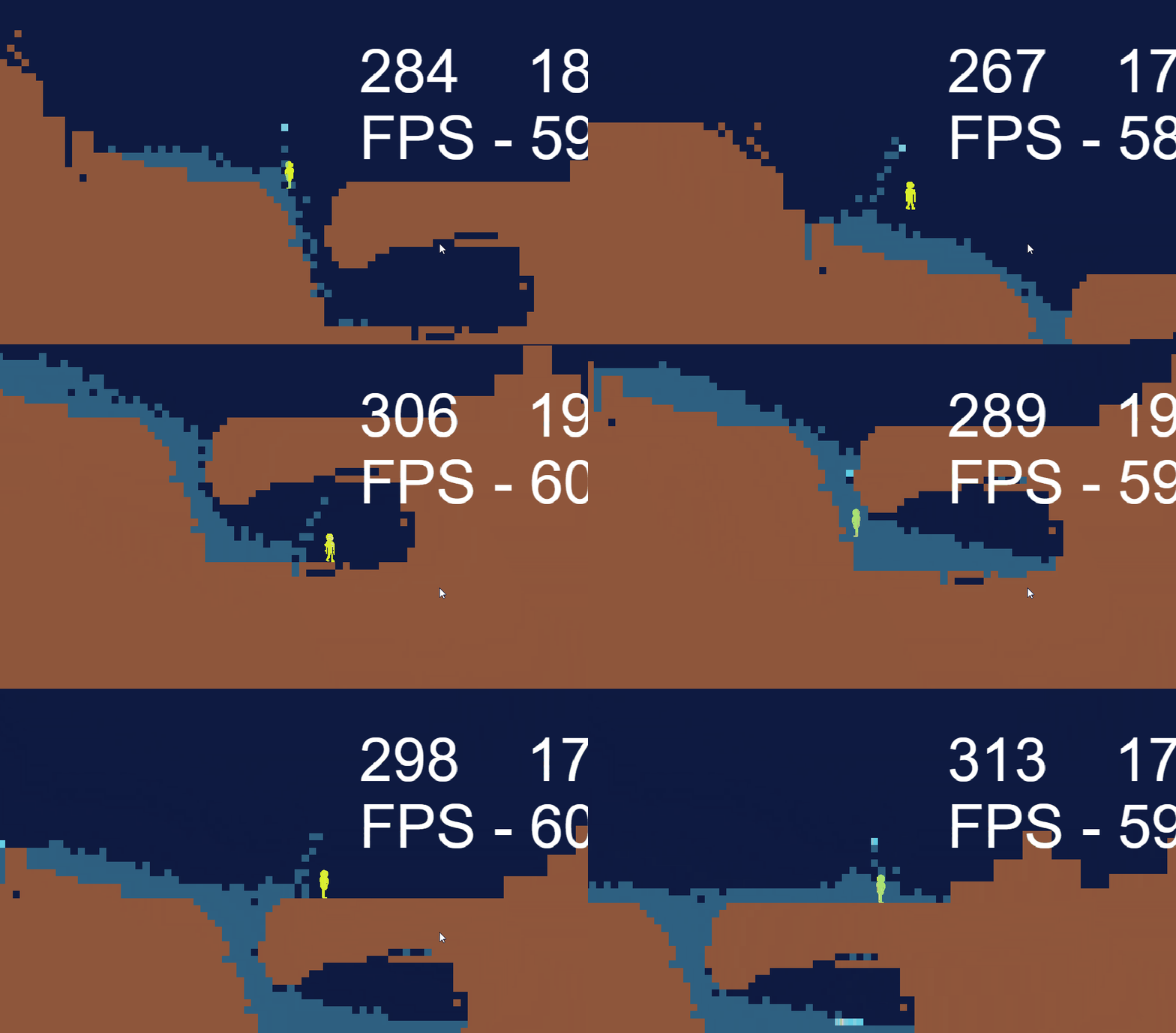
edit - sorted the error
here’s events - ‘ground’ has platform behaviour
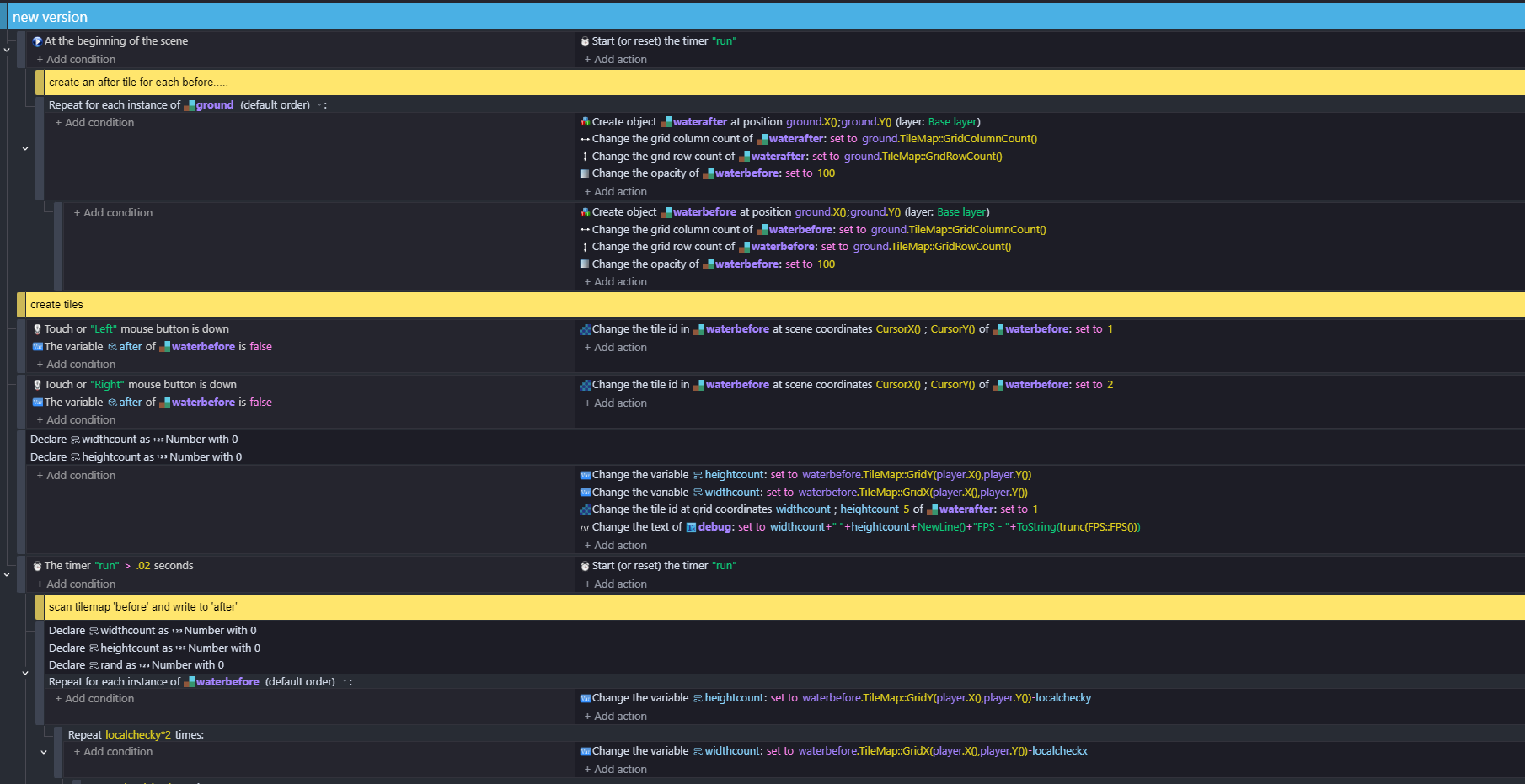
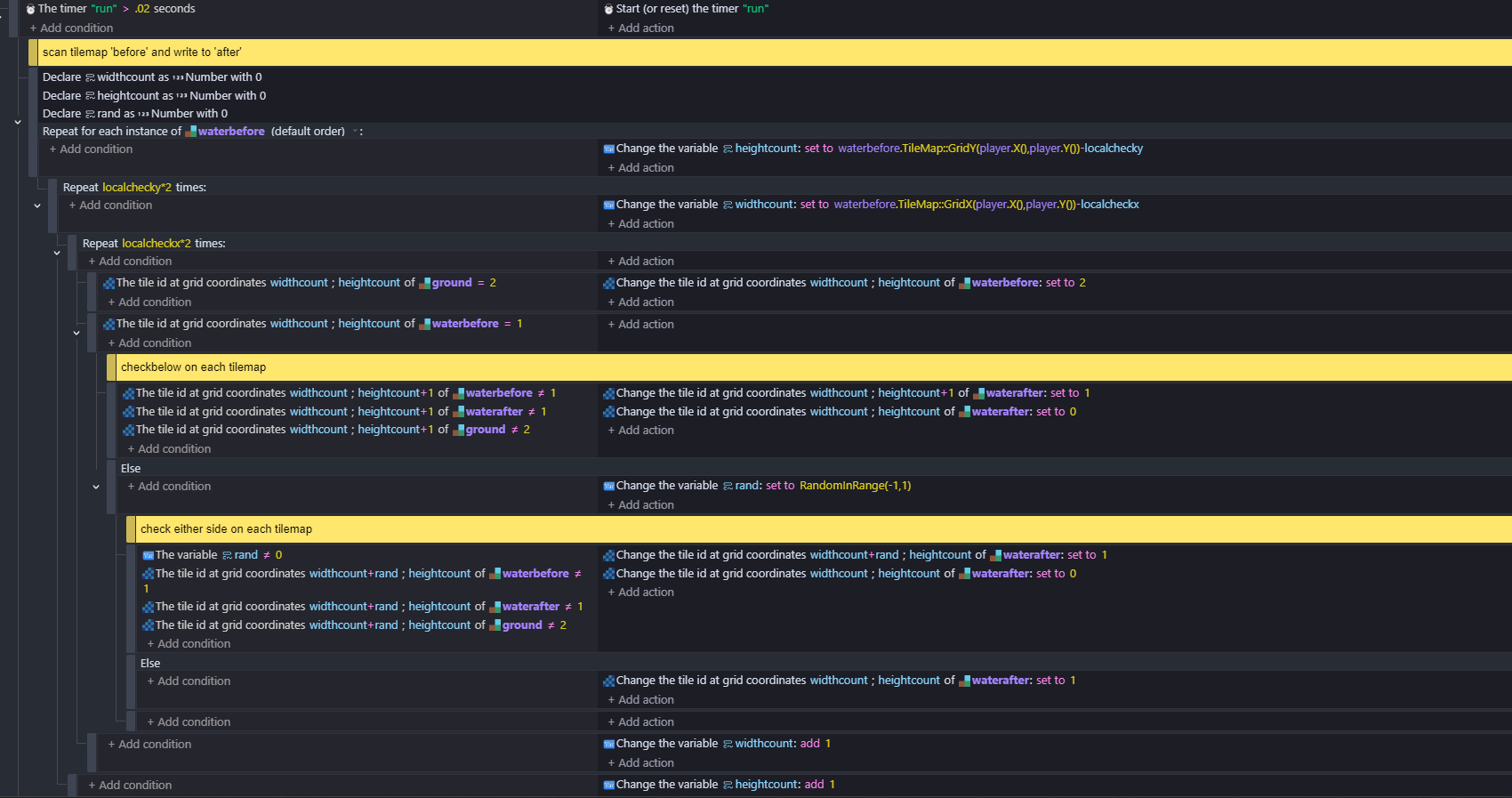
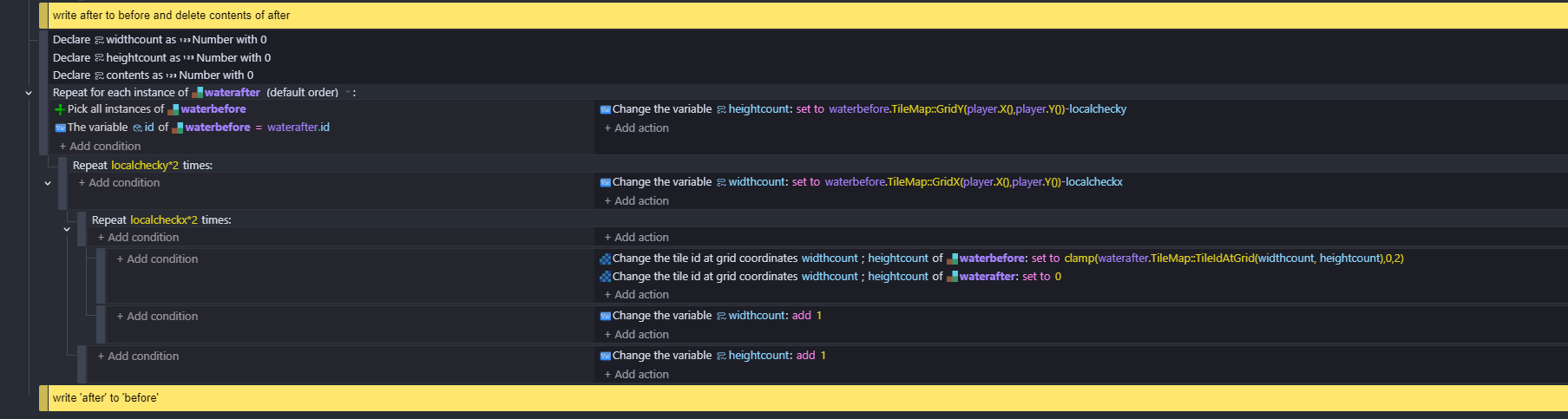
once again - ignore the variable ‘after’ of the object ‘before’. And note that although ‘after’ is created before ‘before’ …it doesnt need to be!
okay, thanks again