Im trying to have a platformer character transform into an object, have that object perform an animation, and then tranform it back into the platformer character after the animation ends. would anyone kno how to set this up?
Hi, in Gdevelop objects are the elements that you can add to your scene such as sprites, text objects, tiled sprites etc. The ‘platformer character’- behavior is something that you would add to your player sprite.
The sprite-object with the ‘platformer character’-behavior can do all the animations you have prepared for it.
If you want to disable the ‘platformer character’-behavior for some reasons, you can do that by changing the parameters in the events.

hi drona, thank you for the reply. im actually aware of the sprite options and animations for the player character (im still a bit of a newbie but i understand assigning animations through events to some degree) but for this situation, i specifically need to figure out how to transform 1 object into another object (for example: i press a button and the object A turns into object B). is there a specific event prompt that would make that happen?
What kind of object do you mean, different sprites?
The easiest way to do that would be to store the coordinates of object A, delete it and create object B at the stored position of object A.
Another way would be to have different animations (with your object A and B) for the same sprite and change the animation you need in the events.
Yea, i meant 2 different sprites. Srry if i didn’t make that clear enough. Your first suggestion sounds like the answer i was looking for tho. I’ll give it a shot. thank u for your help.
Just in case you would like to try the animation-method, you can check this in the ‘retro space shooter’ - example GDevelop 5 There is a space ship that changes to a mech on button press.
Hi Drona, how are you?
Four years later, I have a question about this. I opened the ship and mecha project and saw that the transformation uses a “player animation” behavior, but I can’t find that behavior in my personal project. Is there another way nowadays to transform the object?
I’d like to make it so that pressing the “F” key changes my character to another image. Both are inside the character’s sprite sheet, but I’m not sure how to do it while keeping everything consistent.
For example, when pressing “F” the human turns into an animal, and when pressing “F” again it switches back to human.
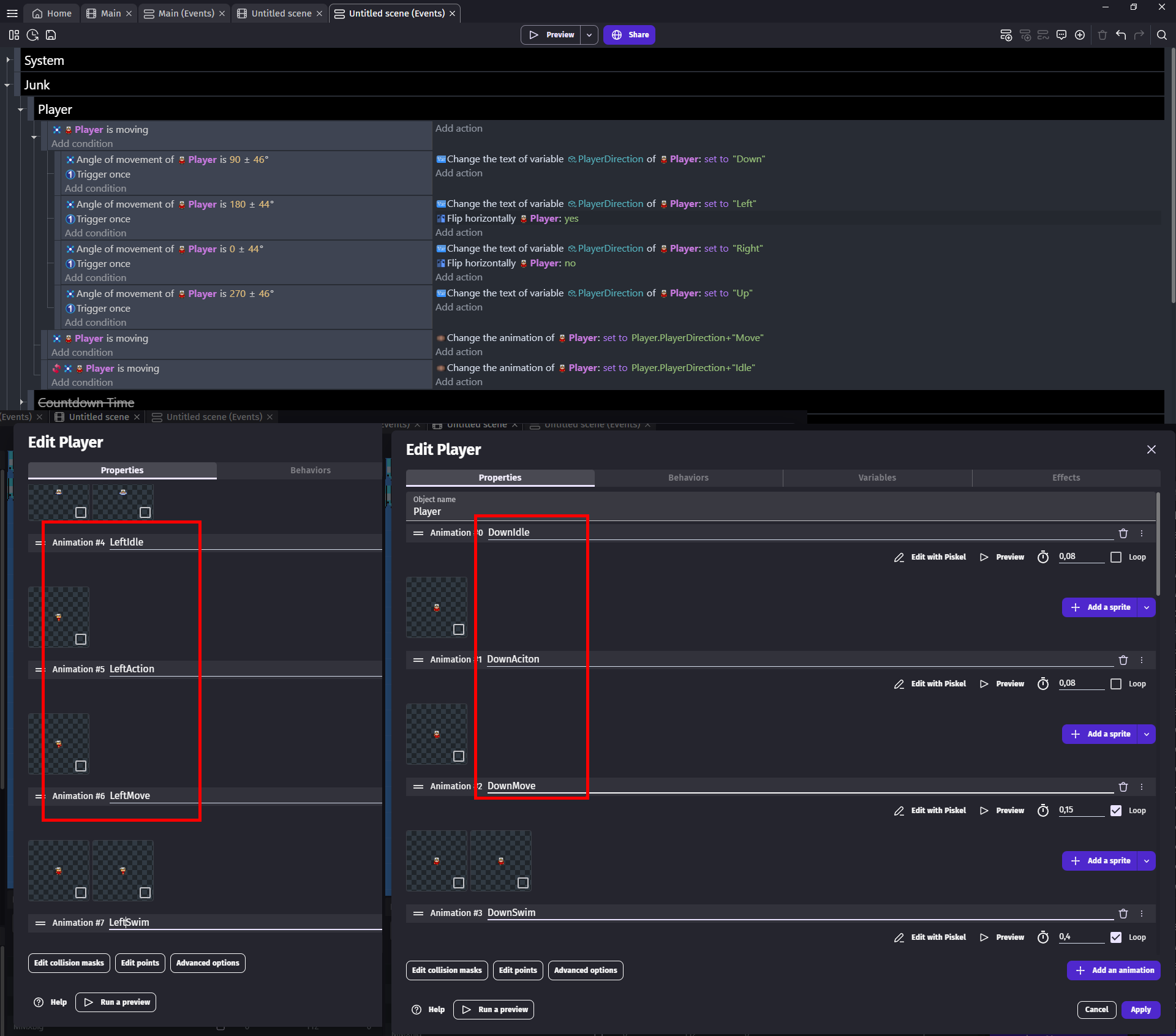
Look at image below
Its not exactly what you need but at the same time it is exactly what you need
I added ALL my animations to one sprite object
And properly made them since its top down game i have
DownIdle
DownAction
DownMove
In events you see i am using angle of movement to set Direction variable to some text which is up/down/left/right
And then i change animation name of player to variable+state
And this way i need only these much events for it to work
Now imagine i want to add 2nd player
Would i make new object?
Nah i would simply add all animations to same sprite with same names
But for player 1 i would name my animations
Down1Idle
Down1Action
Down1Move
And then
Down2Idle
Down2Action
Down2Move
And now i would change animation to
Player.Direction+ToString(Player.Number)+“Move”
Where Player.Number variable i would set either to 1 or to 2
Depending which player i want to be
And to toggle it you would
Change Player variable Number SET TO max(mod(Player.Number+1,3),1)
If you still don’t get it
Then imagine my player 2 could be exactly the same as 1 just looking like animal
Hi Wiilgeiseir,
If Zero’s reply already put you in the right direction, my remarks are not so important but there are a few things to clarify.
Spritesheets are not supported. You need to cut each frame out of the spritesheet and import the frames for your animations (like in Zero’s screenshots).
Edit: Spritesheets can be used through an extension as linked below by ZeroX4.
This is just a minor thing but it can be important to use the right terms to avoid misunderstandings. There are conditions and actions. Sprite-object actions for animations are:
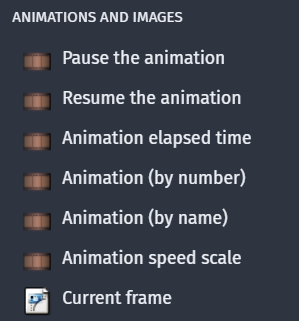
Behaviors can be attached to objects and they are often made of a number of different conditions and actions. There is no “player animation” behavior.
After you have both animations in your sprite-object, you could do it like:

I have taken this from the " Change sprite animation"-example: Change sprite animation - a game example from the GDevelop game making app | GDevelop
They are by extension
https://wiki.gdevelop.io/gdevelop5/extensions/sprite-sheet/
But i would say in most cases its not worth the trouble
NOT cause extension is bad
But cause how you will need to manage it
If you have final product like you want add new frames or delete existing ones
Then it is something to consider
But when you are still in phase you don’t know what you will add in future then i would avoid it