How do I check mouse is on an object of a group?

How do I…

Simply use the trigger “the mouse/cursor is on” with a group of an object?

What is the expected result

I expect the event to activate when pointing on an object belonging to a group. The whole group is made of 2D sprites.

What is the actual result

It only works with single object call, and not with group call.

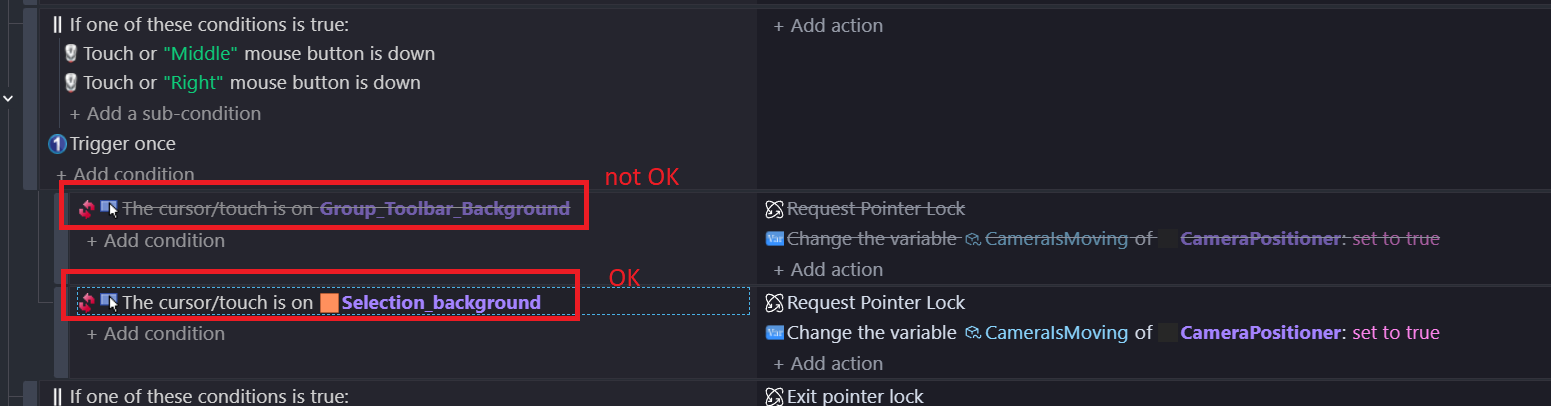
Related screenshots

Why are the events inverted? You’re events are saying:

NOT [ The cursor/touch is on Seclection_background ]

I suggest you remove the inversion (You can use Ctrl+J or right-click the event) excepts you actually want it to be there.

And also you are asking why it isn’t calling as a group. Well the group condition is both inverted and disabled. To get what you’re doing to work:

  1. Undisable the event block for the group toolbar
  2. Remove all the invert from both blocks
  3. Ensure what you want is actually in the group.
    Is selection_background part of the group as well?

Its just J, not Ctrl+J. at least on desktop

I think that was intentional.


My understanding of that disabled red box event is it’s checking if the cursor is not on a Group_Toolbar_Background object. The thing is, if there are 2 or more group objects in the scene, and the mouse is over one of them, then it’s not over the other one, and so the condition is true.

What you’re after is the NOT condition, and use the “Cursor is on a Group_Toolbar_Background object” as it’s subcondition:

This way if the cursor is over any of the group objects it returns false, and if it’s over none it returns true.

Thank you very much.

Yes this was intentional, this comes from the gdevelop pre-build example of the citybuilder, and the aim is to be able to rotate the camera if the cursor is NOT on a toolbar in the original example.

I now understand the explanation, even if I thought the cursor/touch event is active on any object being covered. No I have applied your solution and it works.

Thank you very much.