Before proceeding, please use the forum search feature at the top of the page to check if your question has already been answered.
How do I…
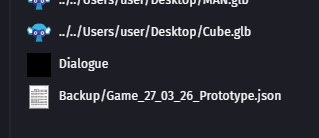
How do I create a .json / .txt resource or make that the .json / . txt will be included in the export process?
What is the expected result
The .json resource should be visible in the “Resources” list (like any other resource) and would therefore be included in the export process. A Google search provides a solution that doesn’t work.
What is the actual result
I keep the map data (Tiled) .json files into the local project folder. Unfortunately anything not listed in the “Resources” tab won’t be included in the export.
My workaround at this time is to copy the .json data into a global text variable. Suboptimal…
you cannot add it through the gdevelop program. you have to close gdevelop project. open the projects json file and manually add your json in that file as a resource.
no idea why we cant add it through the app but this is the only way i found to get it work and it is super annoying