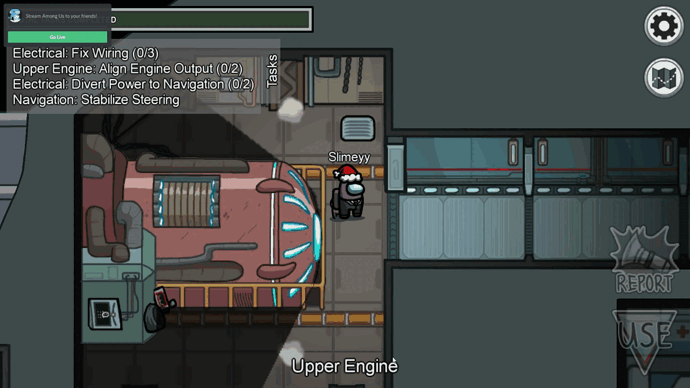
How do I hide objects that are not in the light, similarly to among us?

How would I make something like this work in GDevelop?

Use a raycast from player to each enemy/other player, and check whether they’re obscured.

Set “z” value of your shadow sprite higher than the object.

Eh? When using a light object, the shadow is not a sprite.

What shadow sprite? I just have a light that follows my player around.

How would I go about doing that?

In my game the shadows cover the enemy players, but doesn’t actually hide them like I’m trying to do:

Oh yeah sorry, I got the question wrong. Btw I don’t have light objects in my gdevelop, how do I add them?

To add a light click ‘add a new object’ then select ‘light’

Check out this older post on how to raycast

.

For an alternate option:

  1. Install the Sprite Mask extension.
  2. Edit it to change the object parameter from “Sprite” to “Any Object”
  3. Add all of the objects you want hideable to an object group, like “CanBeHidden” or whatever you prefer.
  4. Mask those objects with your light object. They will only be visible when they are lit up.

Yeah, I kinda figured that out but I don’t have light in my objects.

Nevemind, I uninstalled and reinstalled Gdevelop, I have my light object now :slight_smile:

“change it from “sprite” to “any object” bro? Where? How?”

Very late, but what you need to do is:

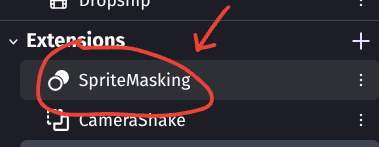
Double click Sprite masking in the extension area

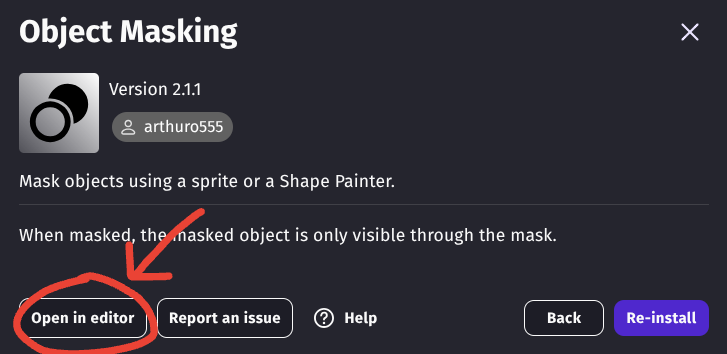
Click “Open in editor” in the popup

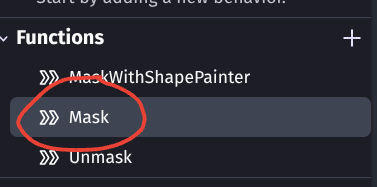
Click on the “Mask” action

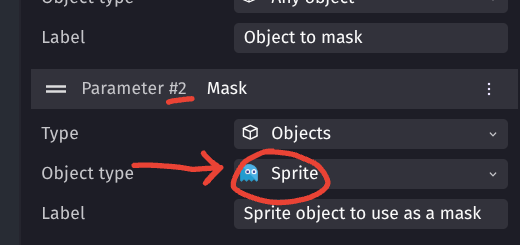
On parameter 2, change the “Object type” from Sprite to Any Object

I am using the web version in case they are different but they probably aren’t

thanks for replying, but no bumping old posts please <3