How do i make 3d cables

How do i make 3d or perhaps 2.5d cables for a factory-building simulator, that could react to physics or at least would look like they are reacting to physics?
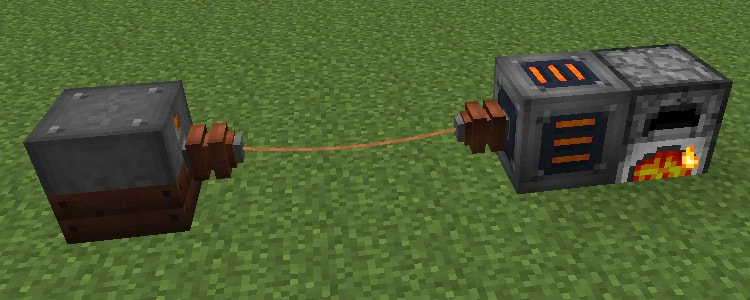
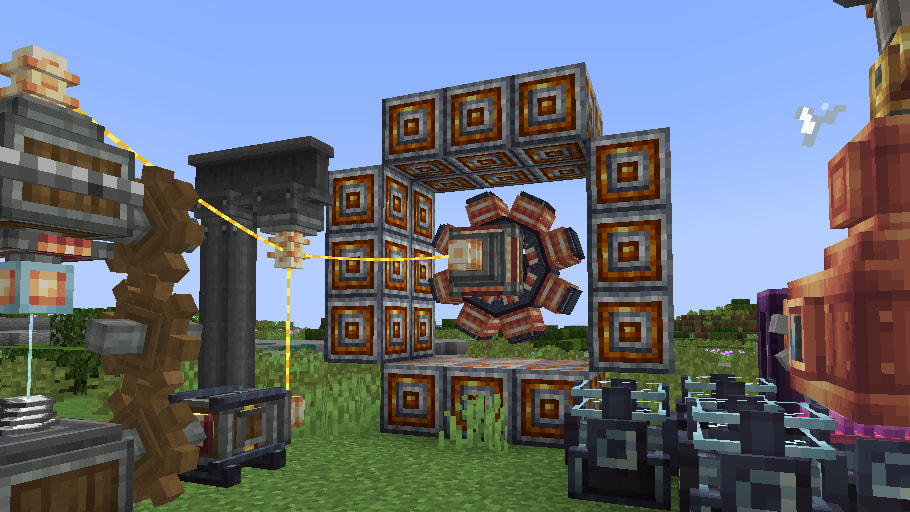
The easiest explanation of the thing that i am trying to make would be showing the wires from Immersive Engineering or Create: New Age (screenshots below)

I did try using constraint3d i found on github but i have an issue due to which i cant just make infinite amount of cables, they would just clamp into one big singularity(looked cool tho)

Project files

the project

You can create 2 objects link1 and link2:
link2 Select the nearest link1 — link2 create a joint with link1.
link1 Select the nearest link2 — link1 create a joint with link2.

Hi - this will be difficult - in 2d here’s @MrMen 's example project here…

Rope physics - a game example from the GDevelop game making app | GDevelop

but…in 3d physics …you can’t add joints or refer to points. Looking at the options in physics 3d behaviour its difficult to see how you’d effectively create a 3d rope. maybe you could fake it a bit. maybe if instead of joints you refer to their id in turn within a repeat event and describe forces towards neighbours, but the force applied would need a complicated formular that would require a great deal of trial and error. Maybe this is one for an AI generated extension!

maybe if instead of joints you refer to their id in turn within a repeat event and describe forces towards neighbours

Wait, i can use object IDs to differentiate them?
I do have a way to connect 3d objects like a rope via a community extension called Constraint3d but i had a problem that if there are 3 or more objects they connect to each other defeating gravity and flying into outer space
Is it possible to somehow choose an object by its UUID in a condition and then use it in actions(Similarly to “Select any object” condition)?
Yes pick an object by it’s id …when you create the rope objects do it in a repeat event and give them a unique id there.

The difficult bit will be getting the force between them right …I’ll have a think later!

Getting the force is by far the easiest part
For over 2 weeks i cant figure out:
How exactly do I assign Unique IDs to 2 objects(Or use the built-in engine ones if there are any) and refer to them both in a singular condition?
if there was a “pick an object by objectUUID” condition or something it would be easy but i dont see any “pick an object with a certain variable content” condition either
I can not use “pick the nearest Object” because it just wont work if 2 wires were intersecting each other
i might just be stupid and the answer might be right in front of my face this whole time but i geniunely dont know if there is an actual way to do that

Are the objects on the editor at the start…if so create a number variable ‘id’ and click on each object and in it’s properties change id to a unique number

In conditions use object variable ‘id’ is 2 to pick that object

If you’re in a sub event after referring to another object you need to use pick all first then the variable condition.

Sometimes you need to use ‘repeat for each’

You can ‘link’ objects and use ‘take into account’ …for things like getting enemy guns to attach to each enemy

Or you can do this with the ‘id’ variable

When you create them

Beginning of scene

Set a number variable ‘count’ to 1

Repeat number of enemies needed times

…create enemy

…set id to ‘count’

…create gun

…Set id to ‘count’

…count add 1

Game runtime

For each enemy

Pick all gun

Gun id equal to enemy id

Gun position set to enemy position

Or use ‘take into account’ after linking them

Sorry when I responded there I hadn’t realised which thread it was …the rope cable one…I did have a quick go at it a couple of weeks ago trying first to do it in 2d first without using custom points …I think I was trying to reference points using x and y from angle and distance but I struggled to get the force right. The chain was created as above in a repeat event and numbering them sequencially and getting id 2 to link to 3 etc afterwards…I’ll look again at it tomorrow

I. Checked what id done. Basically click to start rope creation and click to end. There’s issues with it which could take me a couple of hours to sort and I’ve not got time to at the moment…I’ll look again later and see if I can spot the problem (one of which was the two ends go to 0,0 and the rope hangs down like a springy necklace) the force was linked to distance from the end of the next section but only if distance was greater than 5. I might try distance squared to make it less springy. I had it so you could create multiple ropes .I think I used …array.structure.array.structure

The idea was id get it working 2d then try 2d …Im calculating points using x from angle and distance