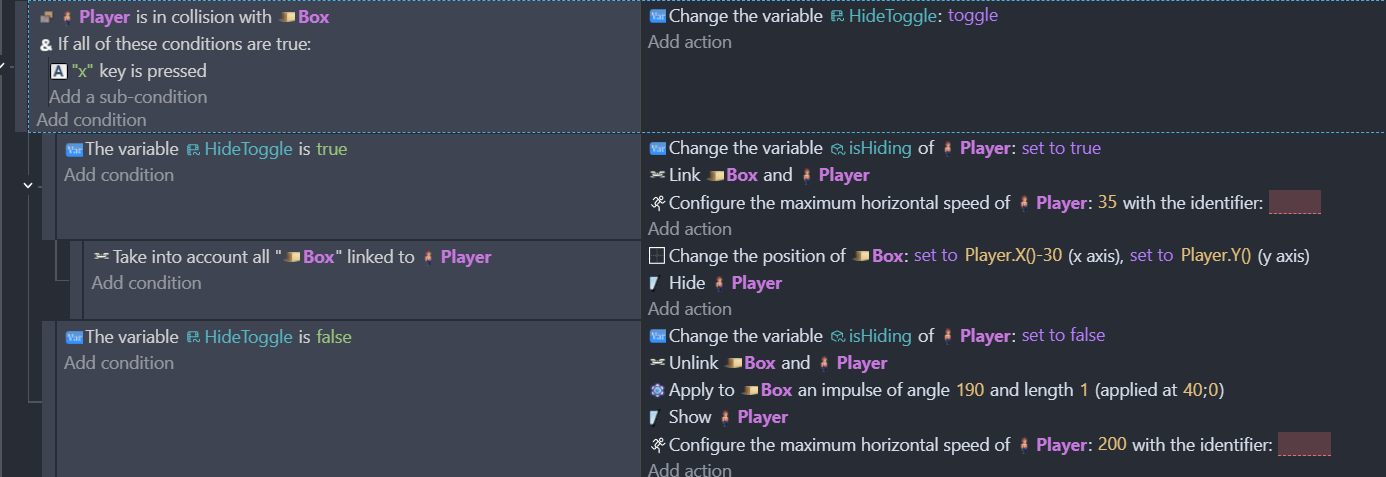
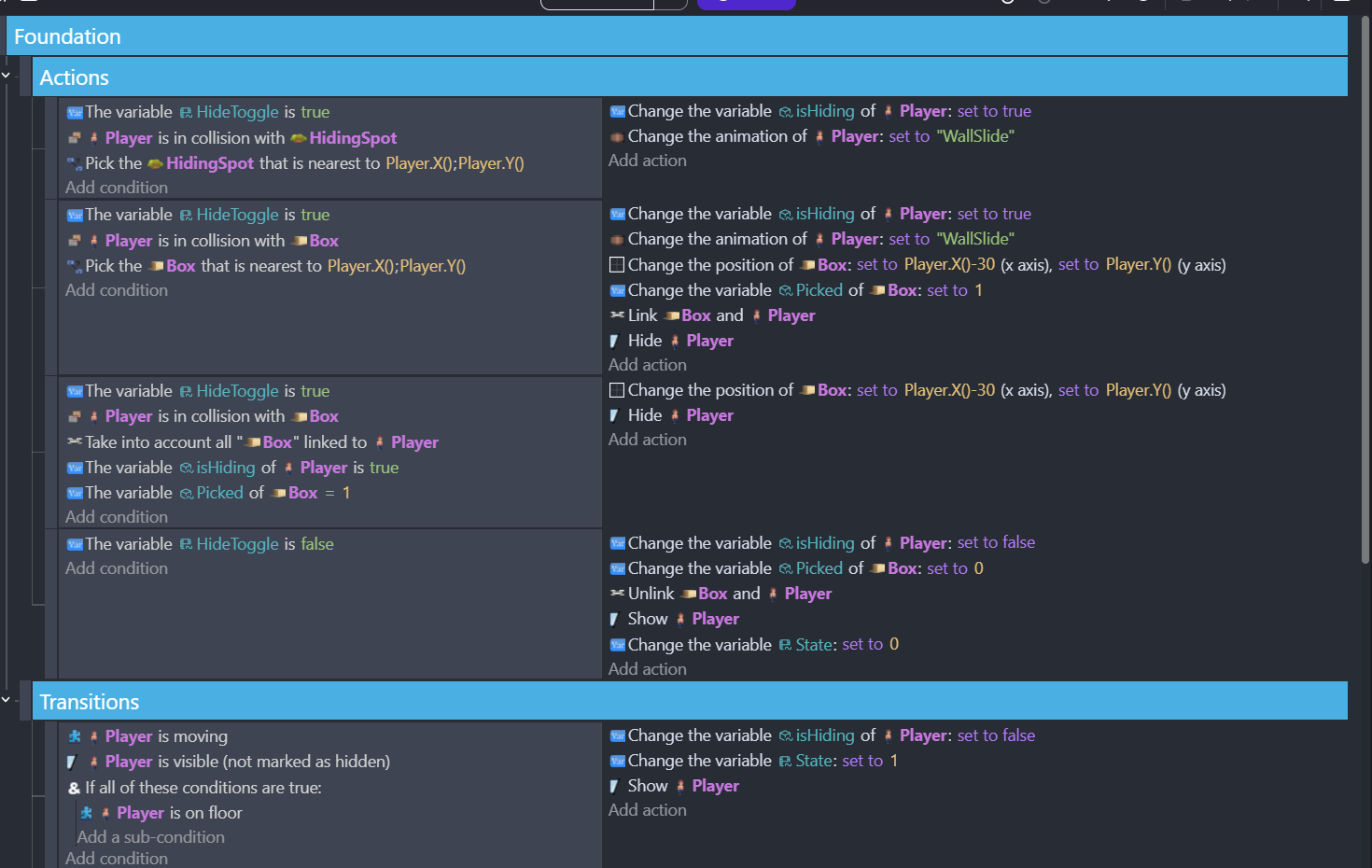
So I have the player character using the ‘x’ key to hide in a box sprite when he’s near it. And then move as the box. I have this part working, but I want to have the ‘x’ also toggle unhiding from the box. I’ve been able to trigger it by doing other actions (jump, shoot) but want to have the x be a toggle.
I’ve tried changing the condition and adding sub-conditions, all that happens is the hiding no longer works because the player is colliding with the box both to hide and unhide so it’s trying to do both at the same time.
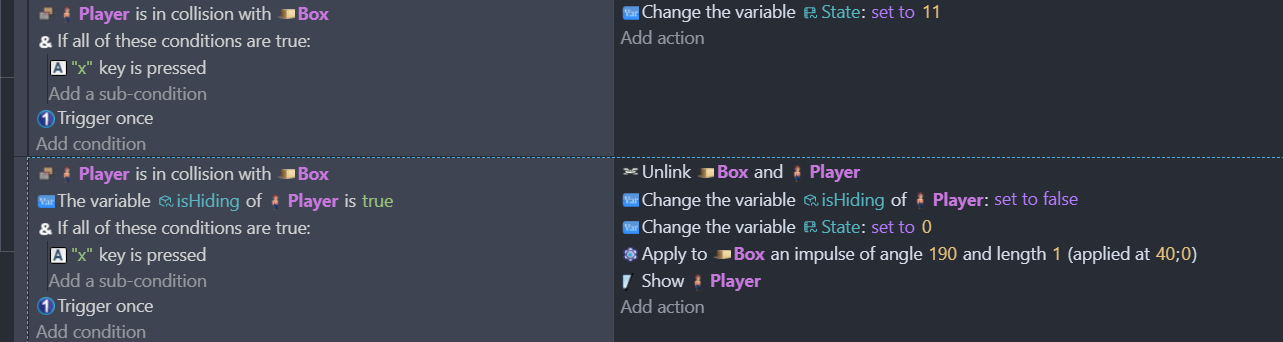
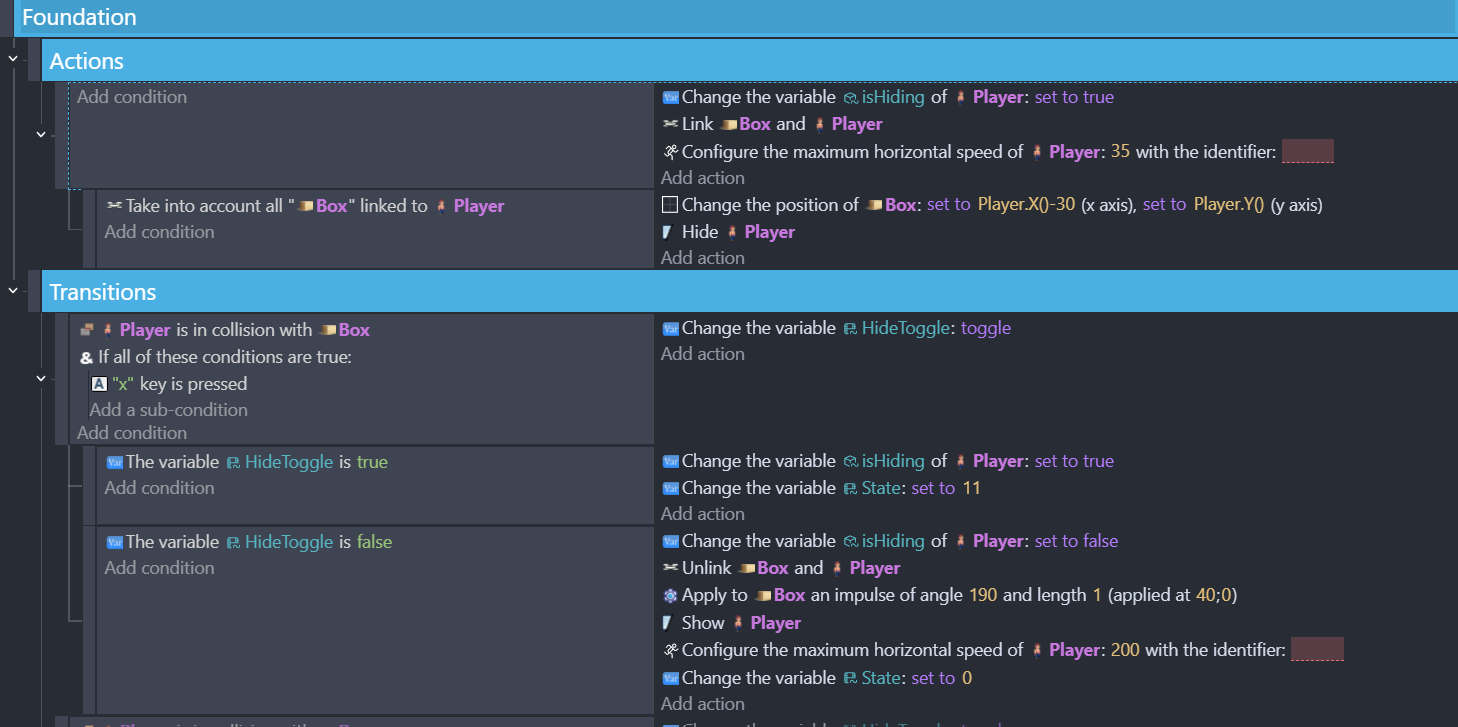
Below are the events for it. Also, to clarify I’m using a Finite State Machine to handle player actions.
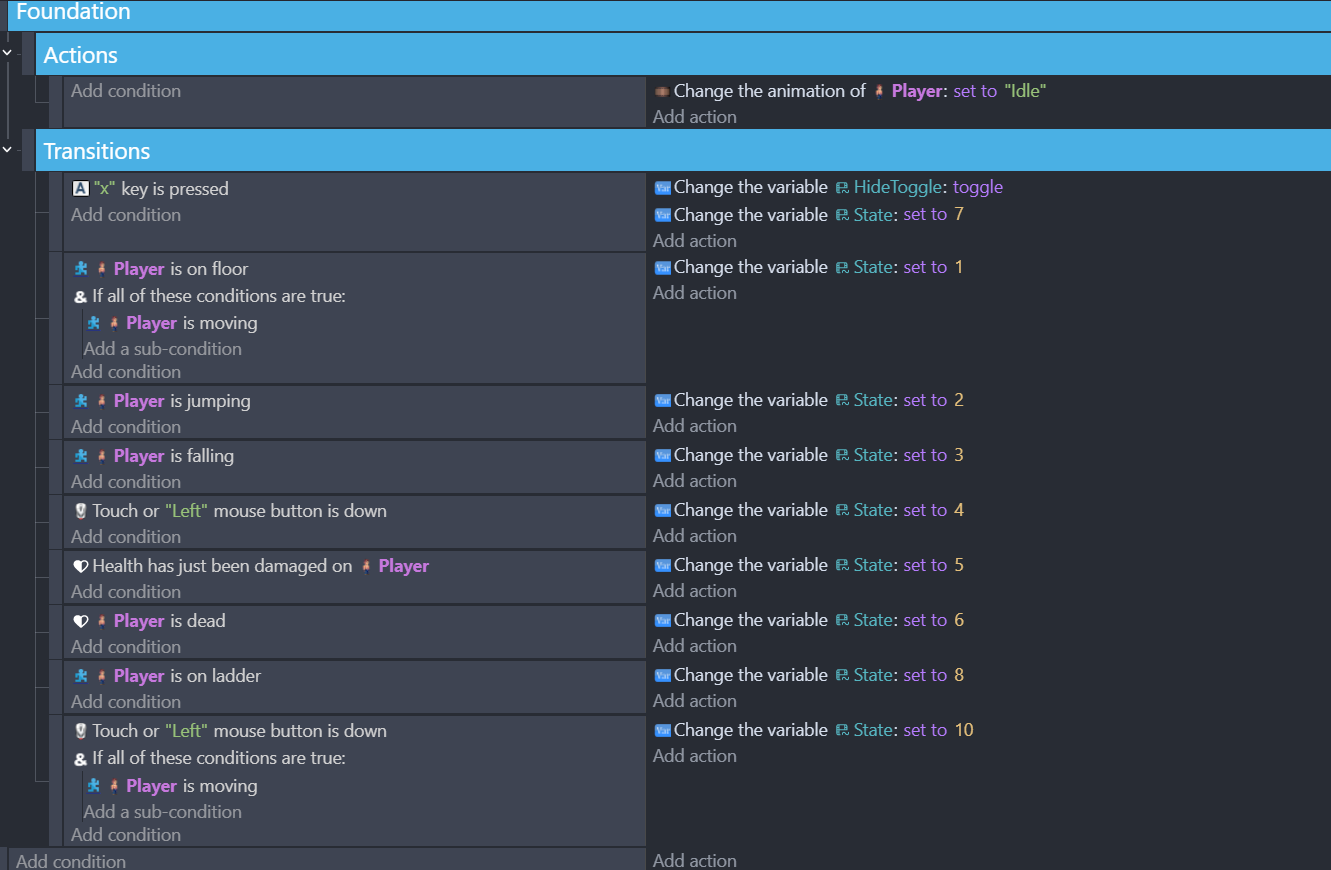
This is from the player ‘Idle’ state:
I’ve also put the toggle as a transition condition in the ‘Box/11’ state, this again same result. The player no longer can hide in the box, it just moves a few pixels from the action.
Appreciate any suggestions.
Thank you! This mostly worked. If I don’t try to move the box with the player movement, it works perfectly. However, if I try to have a sub event to link the player’s movement to the box. It doesn’t work
I was able to use this elsewhere for hiding to turn on and off the player from detection. But adding movement and linking a sprite with it doesn’t appear to work.
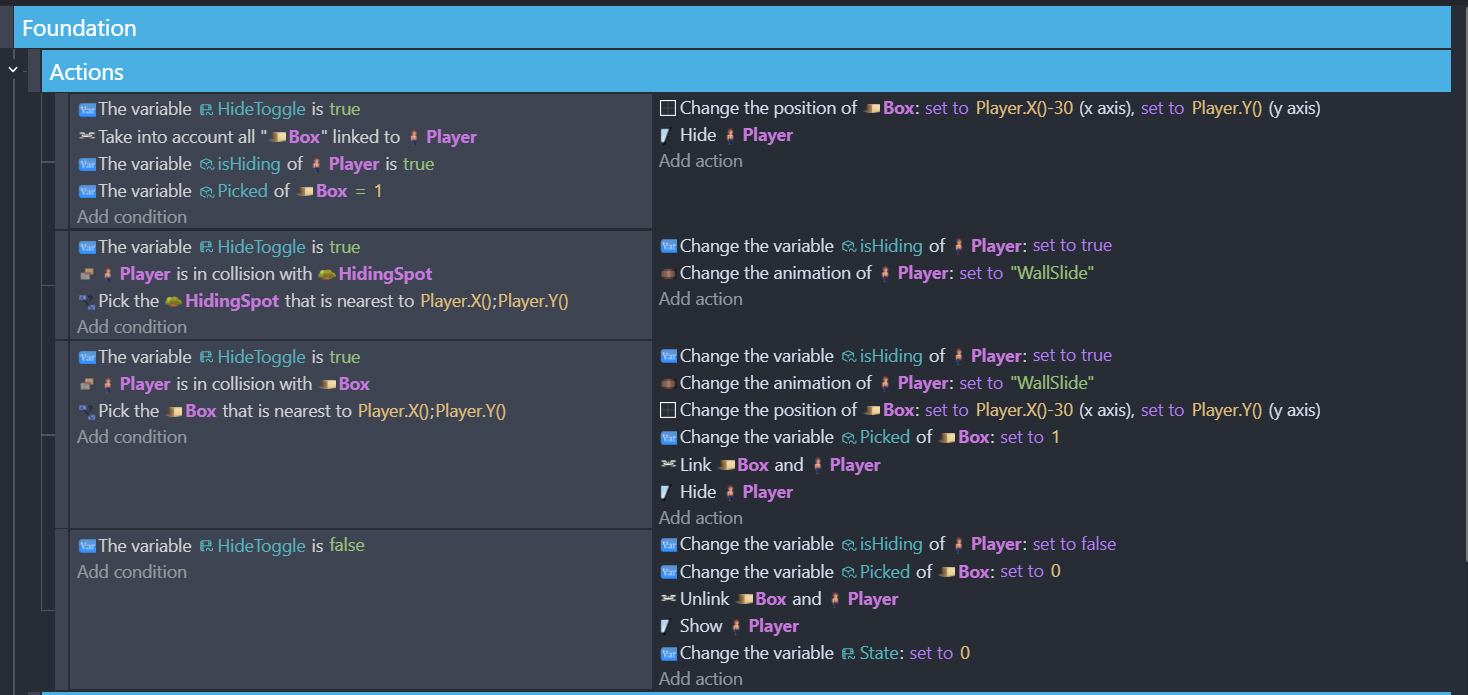
I also tried having the action trigger the state event for box and for idle and that yielded the same result. Here’s what I have now which is inconsistently hiding the player when colliding with the box:
I did try adding this to each state that uses it and have the variable change to either box or idle if it was true or false. That moves the box properly but he won’t ‘unhide’. He shows for a second but then goes back to the box.
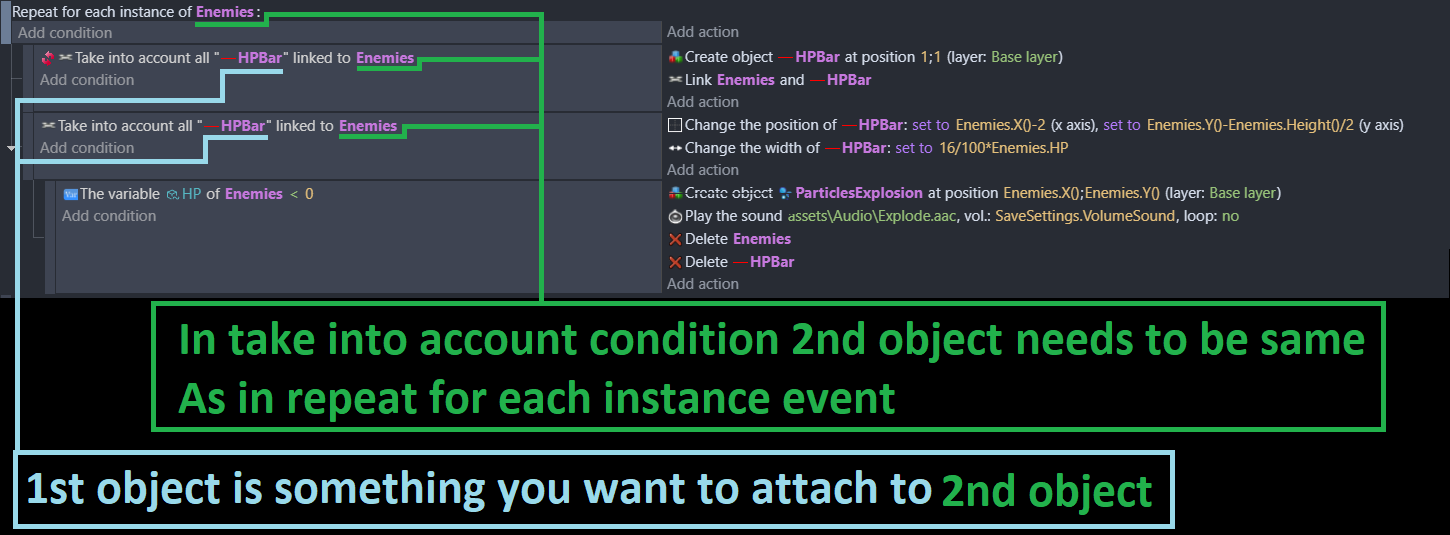
IDK if you gonna need repeat for each or not
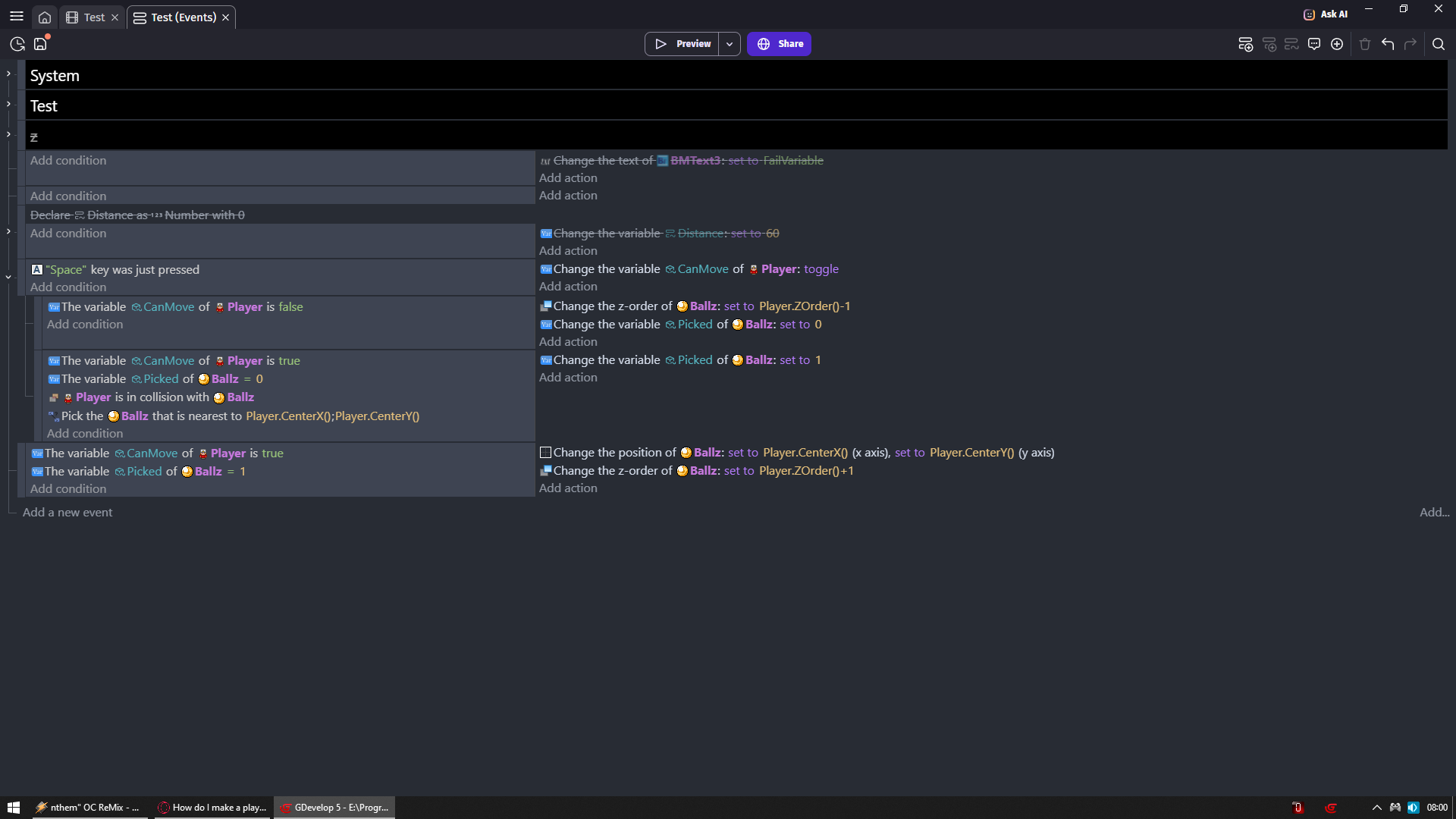
But look how in SEPARATE event i am looking if enemies and bars are linked
And if so i change bar pos to enemy pos with some offset
Same thing you should do
Changing position and checking link should be in SEPARATE event and not right under toggle switch
That should only control state
Why you are using If all of these conditions are true?
Why when i tell you to use SEPARATE event you go with it as sub event?
Why you try to link constantly same thing even so you are not targeting it?
So if I don’t include the ‘are true’ with the key. The key doesn’t work at all
I have tried pulling the link ‘take into account’ out of the sub event. What that does is the player moves invisibly but the box does not move.
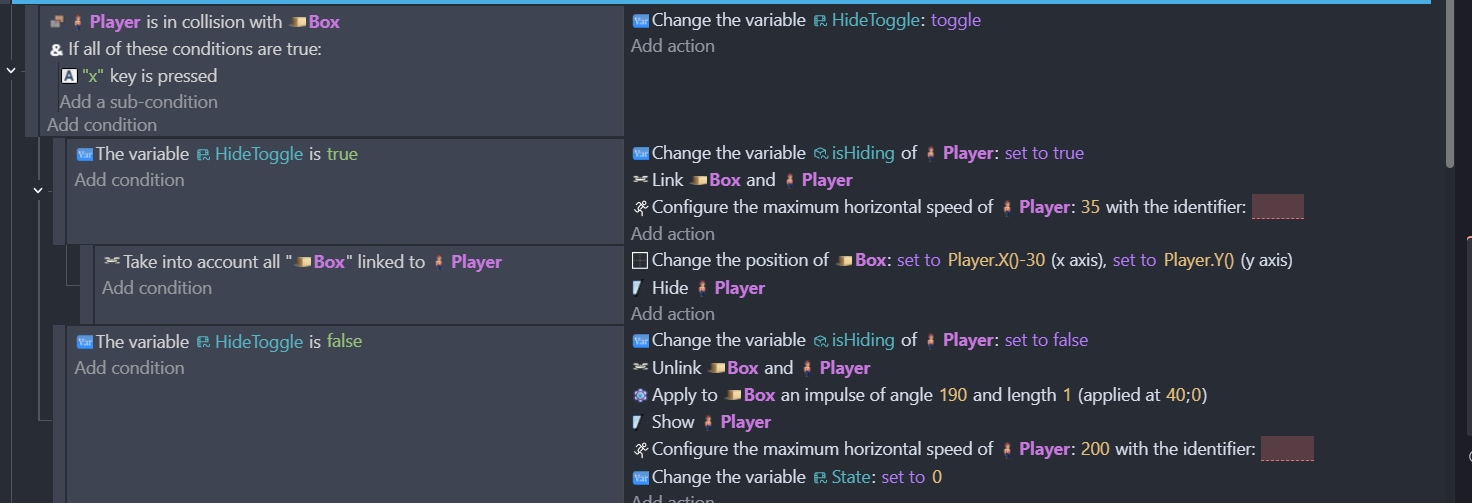
I’m not seeing where I’m linking to the object multiple times. The screenshots I was showing before were two different approaches I tried. I wasn’t having both active. Here’s what I have right now that allows me to have the player move as the box with the X key. But it doesn’t let me toggle with the X. When I try to toggle, the player is visible for a second and then he’s in the box again.
However I am able to jump or shoot out of the box state and return to normal (since doing this changes the state).
Just a note what’s shown here is the Player ‘Box’ state which is state ‘11’. State ‘0’ is the Player ‘Idle’ state which has the exact same conditions shown.
I asked you these questions cause i am trying to understand what makes sense for ppl who don’t know what to do
As you see you don’t even need linking
You don’t need if ALL cause your logic will run perfectly without it
(Side note all your conditions in events are AND by default so you are forcing a check that is already meant to happen
Think of it like you would want to check if Space key is pressed
But just to be sure you added above it if any key is pressed
Which makes no sense)
Linking multiple times
Each action runs each frame unless you are limiting it
You have NOTHING to limit constantly linking same object WHEN
Its in collision with player
X key is pressed
(i am at least using inverted condition to check if object is already linked
So i exclude ones that are)
You do not want your logic to be under anything (sub event wise)
It should be stand alone event that just runs if all conditions are true for it
In my case player var bool var is true
And ball var is 1
So basically i just check if player should have a object at its position
And i check if that object should be at player position
If both condition are true in separate event i am changing constantly position of object to player position
Now i could use same exact event to block myself from shooting breathing or even living
And look at this just so you can understand what you are doing
This means ALWAYS EACH FRAME change player var hiding to true
Link box with player (ok but which? all of them?)
Change player speed to 35
BTW there is action to change POSITION of object which we both are using
But there is also action change CENTER POSITION of object
Which may have more sense to you
Bottom line i think i get where your confusion came from
You should play around with text object and variables
Like print your vars to text object to see their values
And you could deduce what is going on
Some of us just tint objects or play sound to check if event is even kicking in
Thank you for the insight! When I first setup the Finite state system I was following an example that had open conditions (usually just an animation for action). I can see now that whatever the action is will check every frame, so I’ll need to review other states.
Btw. I did pull the sub event out and added a variable (as you did in your example) to the object. And I specified the box nearest to the Player instead of ‘any’ box. Atm the scene only had one box but that would be problematic if there were multiple ones in a level.
Also thanks for the center position tip!
I haven’t really used text objects yet, but I’ll have to look at that and see if I can print my vars. I have a bunch of other bugs and perhaps that will help me understand what’s going on.
But this did solve the issue changing similar to what you screenshotted. I was able to work it into my Finite state machine.
NOTE: I am using the ‘x’ key to control any ‘hiding’ state. So for example, there are other objects the player can hide in that don’t move (unlike the box). But I was able to get it to work by putting the ‘x’ condition in the idle state that brings it to the Sneak state (state 7). Here’s the Idle state ‘X’ key condition:
Having it in this Sneak state allows for the player to jump, shoot, be shot, etc… to get out of the box and still have it toggle to use elsewhere (in this case a hidingspot).
If I can print my vars to help me debug I’m up for it. I feel I get lost on what’s impacting the current conditions. I’ve had a few instances where there are multiple same references that break what I’ve done.
I appreciate this help, hopefully I can figure out other debugging helpers.
You want to check
Even if you are sure you should NOT trust yourself or others
Always check
So for example to imagine you have variable MyHPVar
And other MyAmmoVar
So you would put into text object
MyHpVar+"
"+MyAmmoVar
To display them both
Or
"Hp "+MyHpVar+"
Ammo "+MyAmmoVar
This is how you add text before them to know which is which
When it comes to object variables
And you want to check it for specific object
Where there are multiliple objects
Then you want to put that text object in event which would target that object
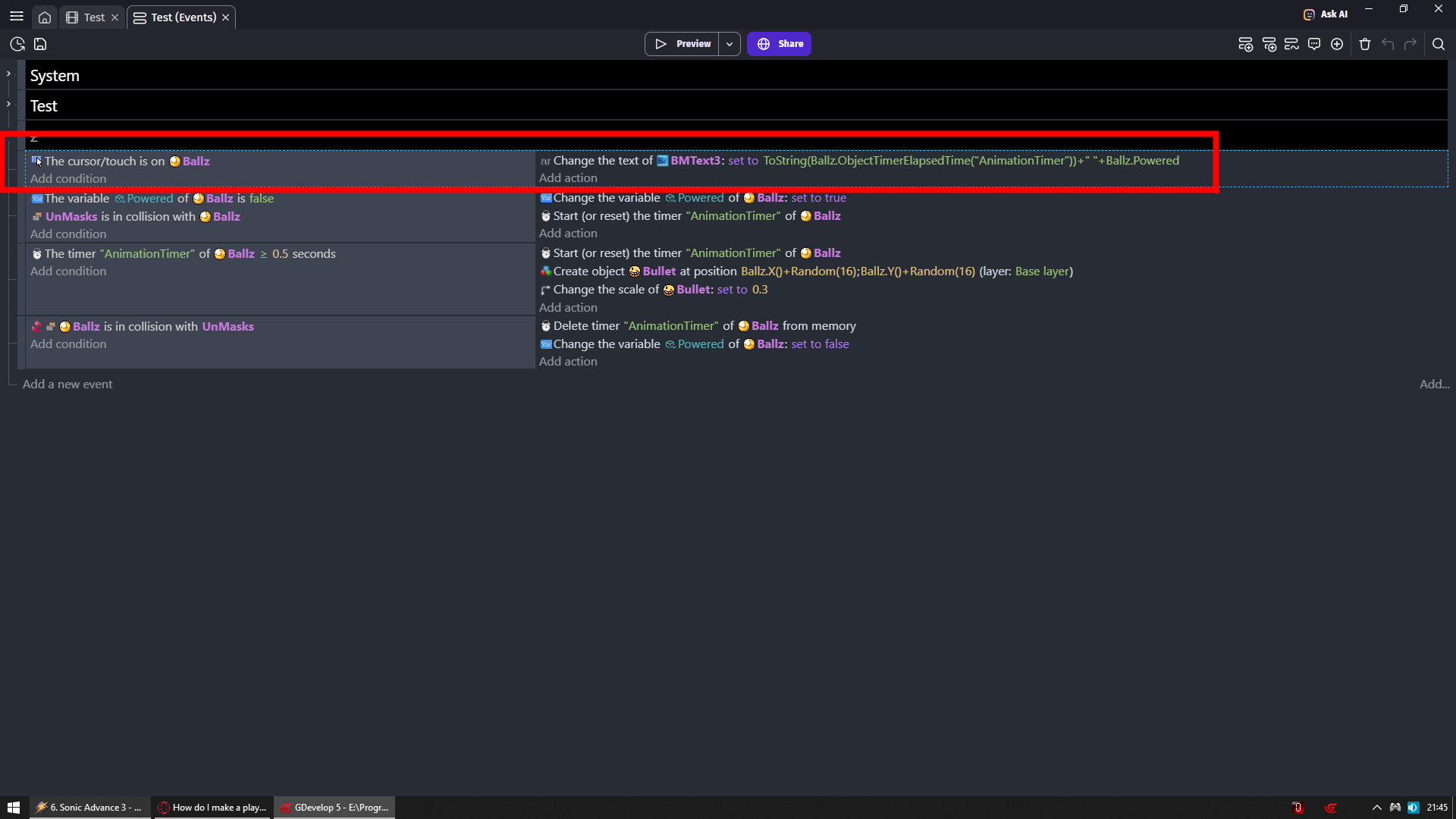
For example i want to check timer and variable of my ballz
So i made event that if cursor is on them then i change text to values of that object
Great advice. I’ll need to try and do that with a bunch of these to get better clarity on what’s going on.
I thought I had this problem solved but after I cleaned up some states now it’s not working again The player is now moving as the box when I hit X over it and he’s also remaining ‘hidden’ when I press X when he’s near the hidingspot.
But the X isn’t toggling the box on and off. I can still exit the box with jumping, shooting. So something is off. I want to have it so enemies will spot the Player if you’re moving as the box in their detection collision and won’t if you’re standing still.
Here’s the ‘Sneak’ state:
I don’t currently have the ‘x’ key condition anywhere else than in the Idle transition.
Also is it bad to have conditions that are empty?
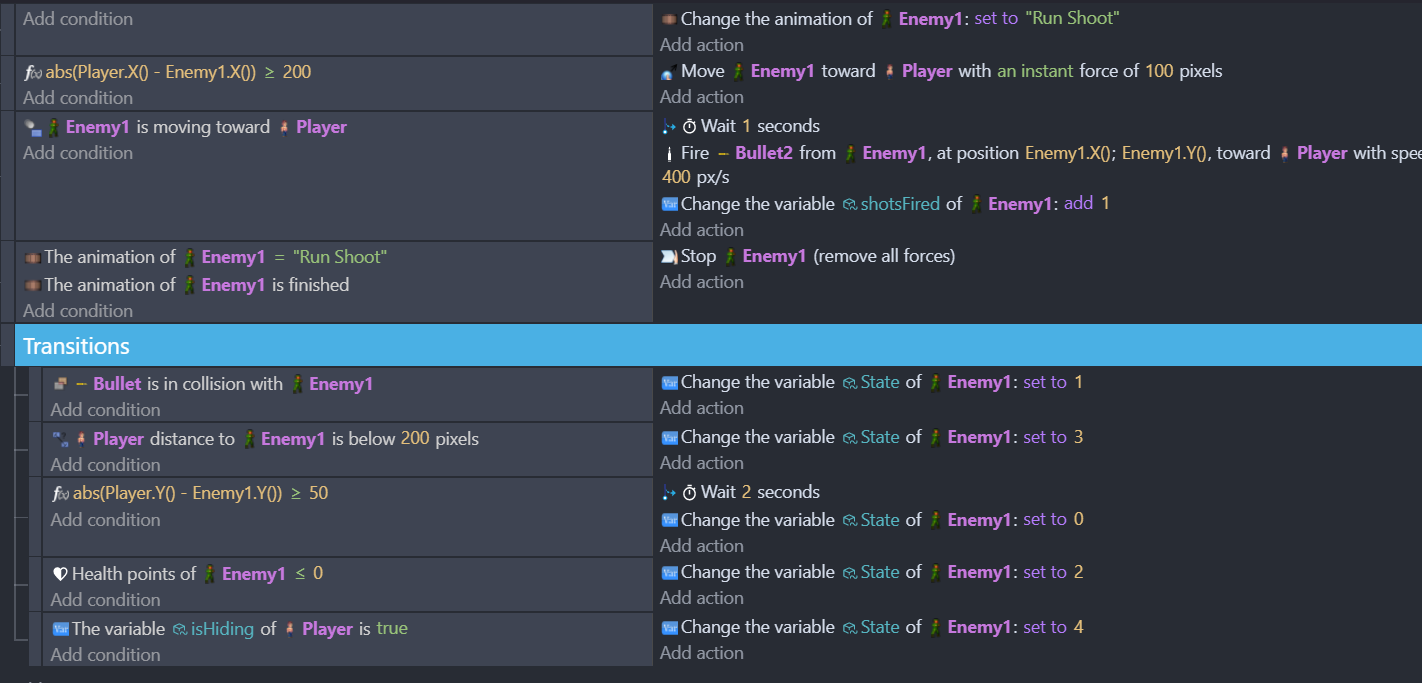
Majority that I have are just animations to play. But on the ‘Enemyshoot’ state it’s an empty condition:
Sorry if I’m asking too much. I’m really trying to learn the ‘do’s’ and ‘don’ts’. Like I still don’t understand when to use sub-events and when not to.
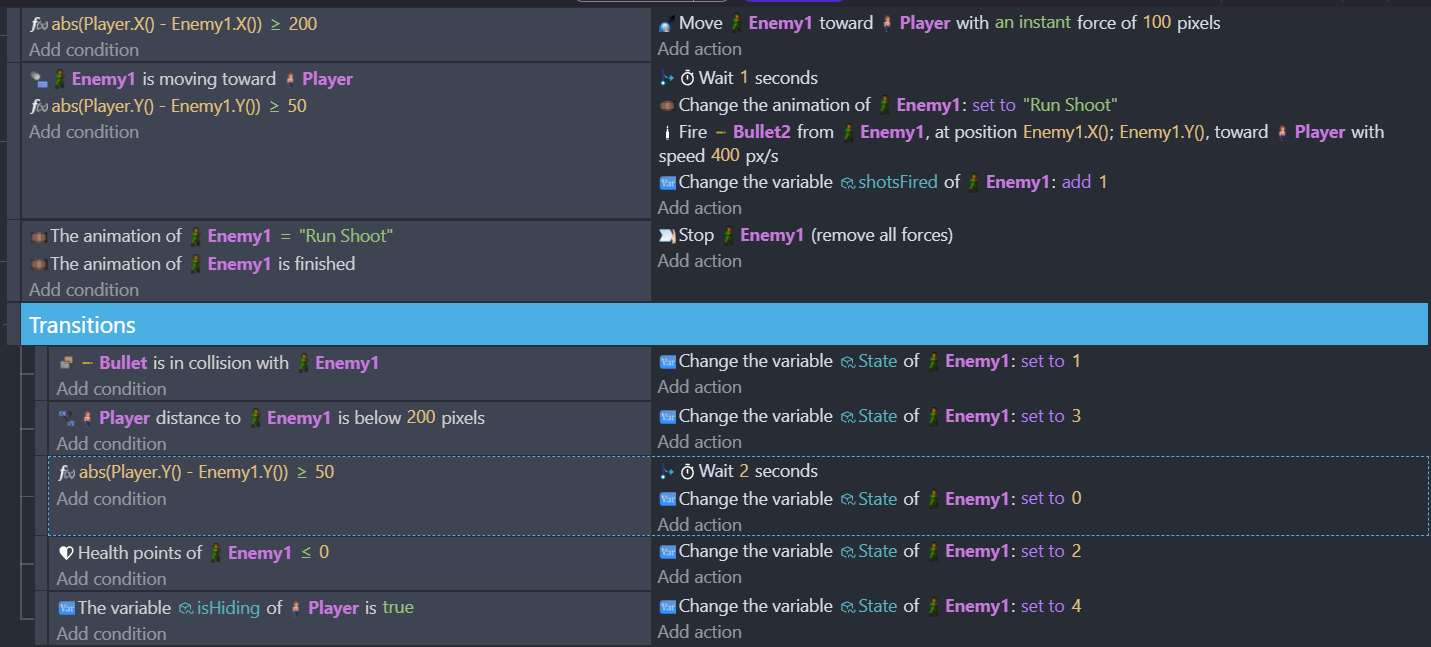
1 - abs means if you have number with minus then remove minus
For example imagine you have number that goes
3 2 1 0 -1 -2 -3
If you put that number inside abs
It will go
3 2 1 0 1 2 3
So why you are using it?
Then why you are not putting enemy Y inside abs?
I don’t understand it
You need to start debugging your stuff and checking
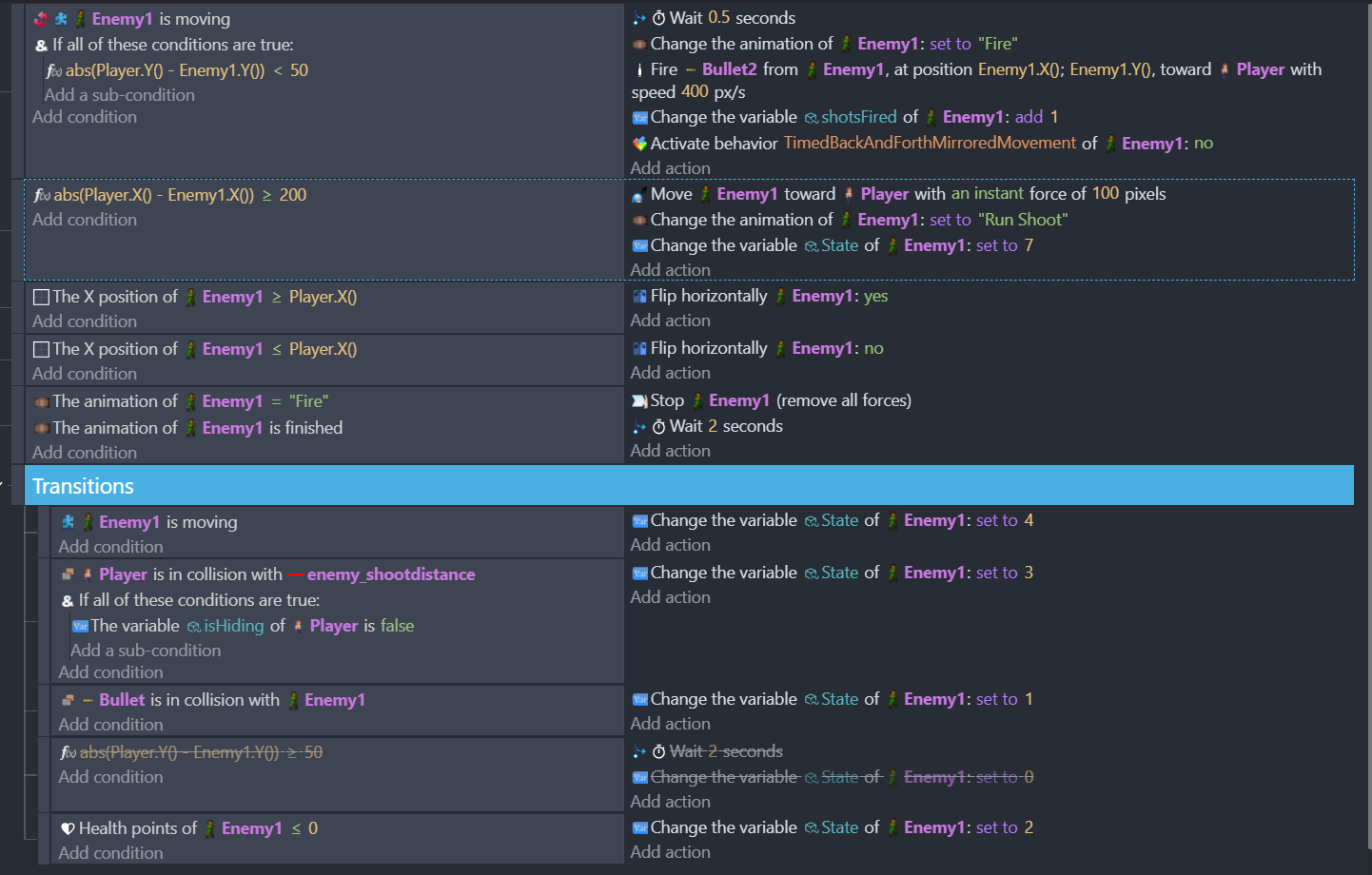
Where this that wait action there makes it
As long as its true wait 2 seconds EACH frame
And then execute following action
Put there play sound action and you will get what i mean
You are spamming it
Where this
Each frame you are changing enemy1 animation to run shoot
Again you need to start debugging your stuff and even more important thing is to start checking does it work properly when you add it
IDK why you went for using FSM if you don’t know how to use it
Until you learn how to use FSM you should just make normal logic with restricting something from happening when you don’t want it to happen
Cause as you see right now you are making A LOT mistakes
This does not mean when enemy is moving toward player
Wait 1 sec then fire a bullet
Then wait another second and fire another bullet
NO
What it means is
As soon as enemy is moving toward player
Wait 1 sec and fire a bullet
And repeat each frame
So each frame you cue same action to be executed with delay of 1 sec
You don’t understand what i just wrote?
Add play sound action there and set volume to 100
You will quickly understand
So I’ve been using AND statements because when I don’t the actions break. So I’m putting conditions for each of the animations so they don’t play every frame for everything.
I’m using so the enemy isn’t attempting to shoot until he’s under 200 pixels to the player. I do a similar action to the Y position so the enemy isn’t going into behavior/actions if the Player is above or below 50 pixels in height to them.
I don’t know of a better way to have the enemy actions trigger only at set distances within visual range. I have these ‘enemy_viewdistance’ and ‘enemy_shootdistance’ collision objects setup on each enemy to help control when they will ‘detect’ the player and when they will stop within range to shoot.
The FSM seemed the best choice for enemies and the player to switch actions and make them more dynamic. You’re right it’s above my knowledge level but I’d like to learn and get better at this.
I’m still not certain how to resolve the shooting logic to make it less spammy.
If there’s a good place for me to learn more about FSM and how to debug my events, I’d be excited to use it. Right now all my sources are either videos from GDevelop (which only go into very basic AI logic), using the GDevelop ‘Ask AI’ helper, finding info on the internet, or asking questions here in the forums.
Which btw you and the other people have been the most helpful on enlightening me on what’s going on.
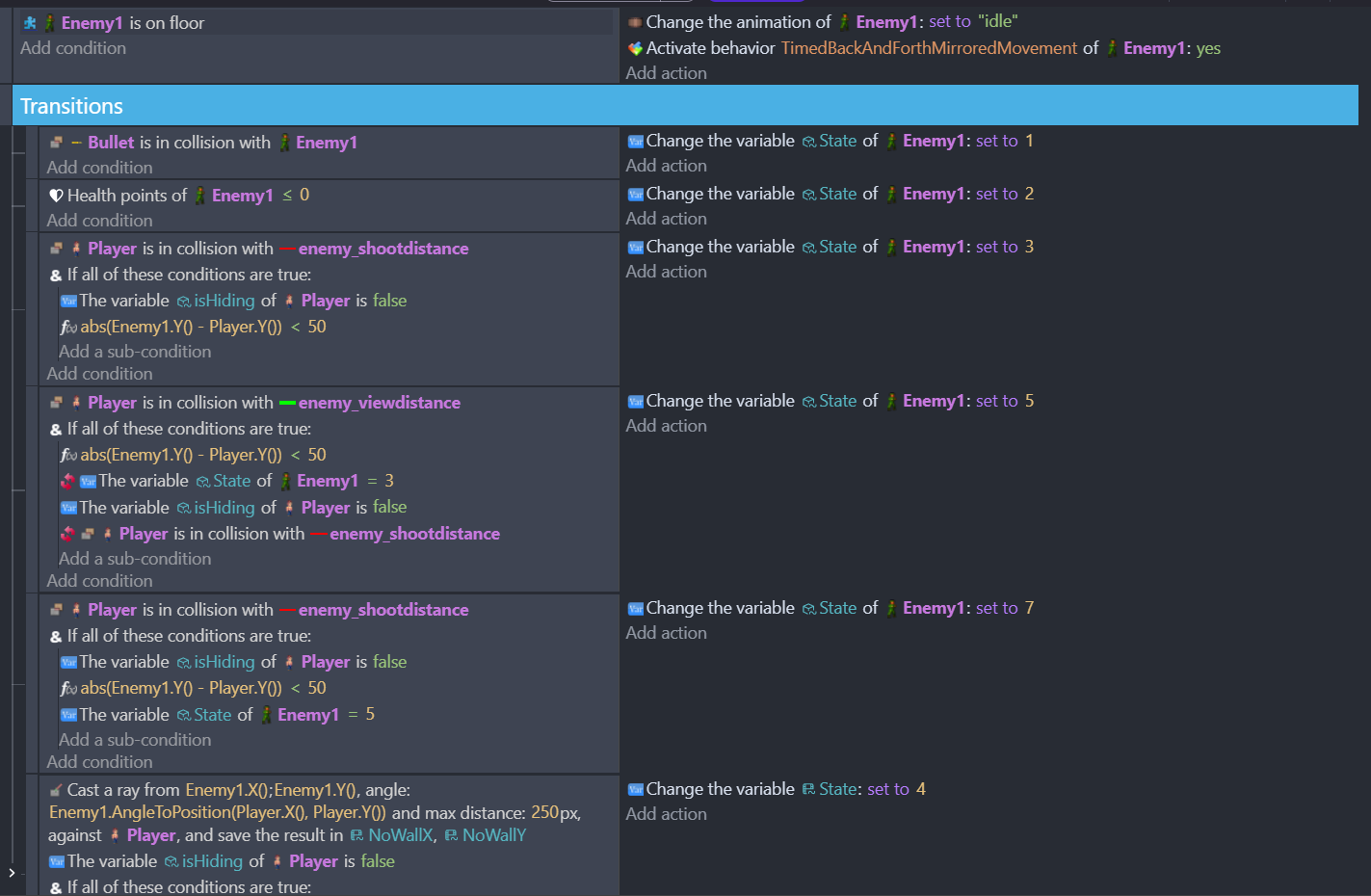
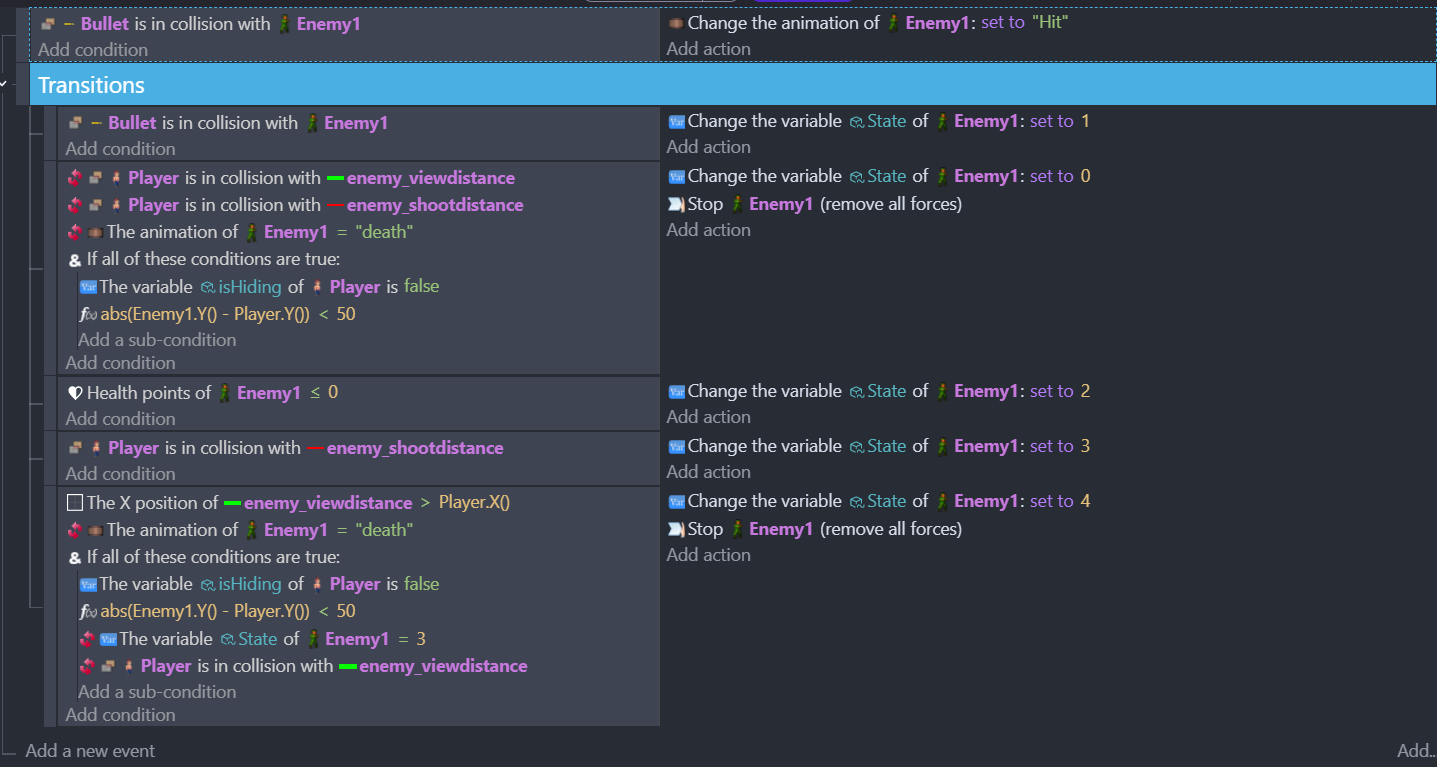
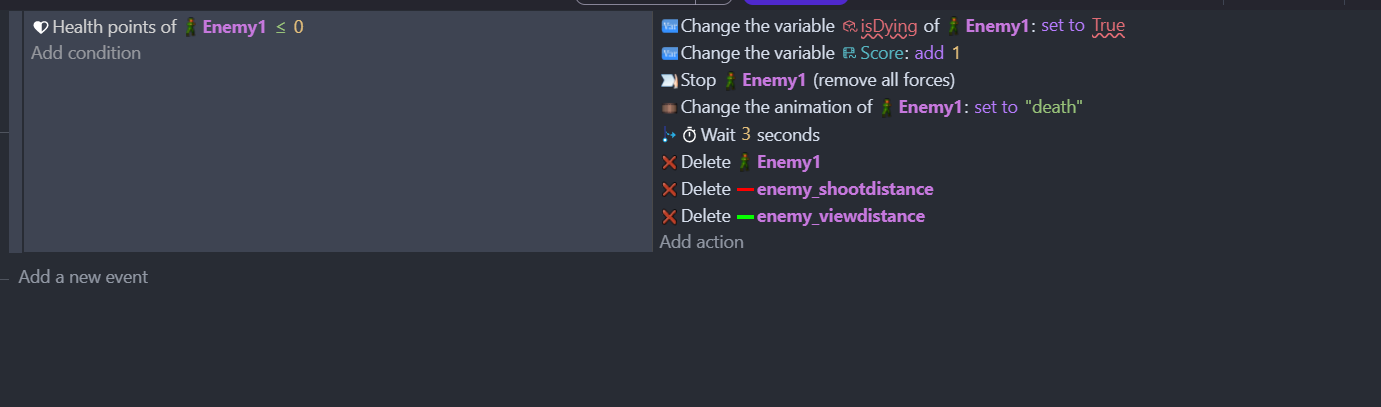
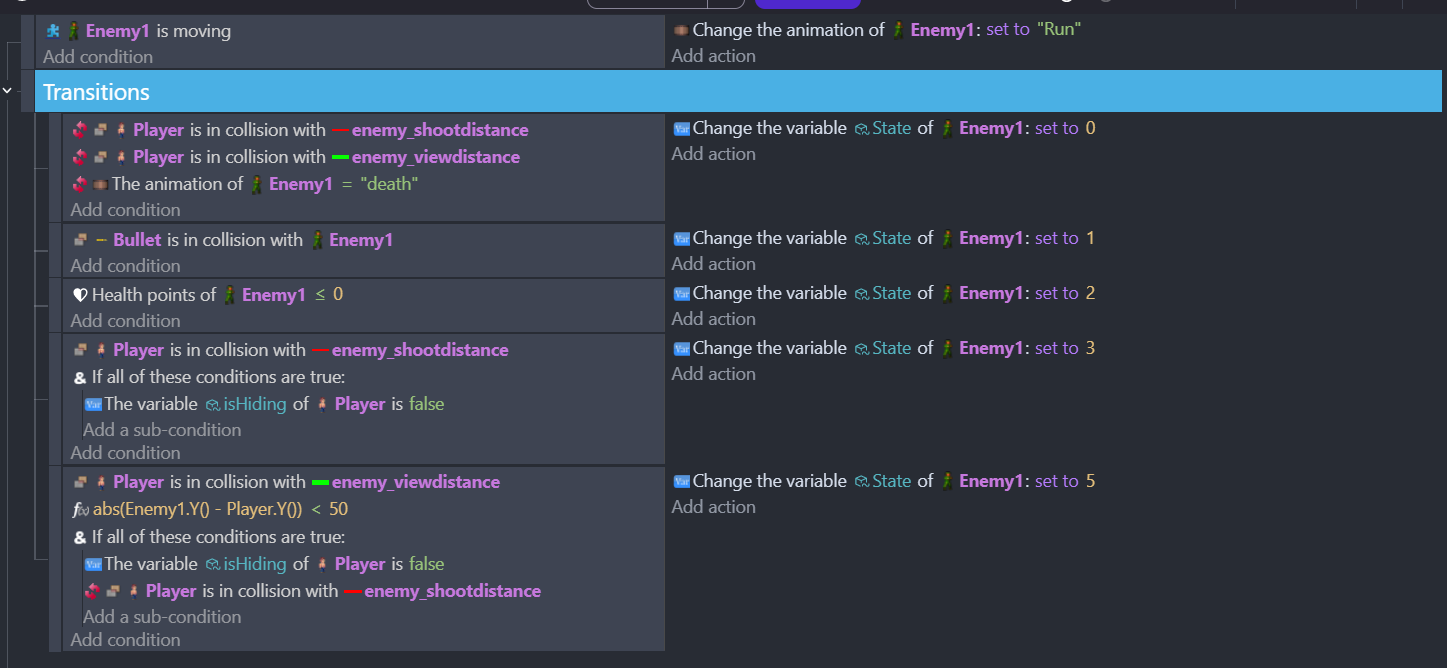
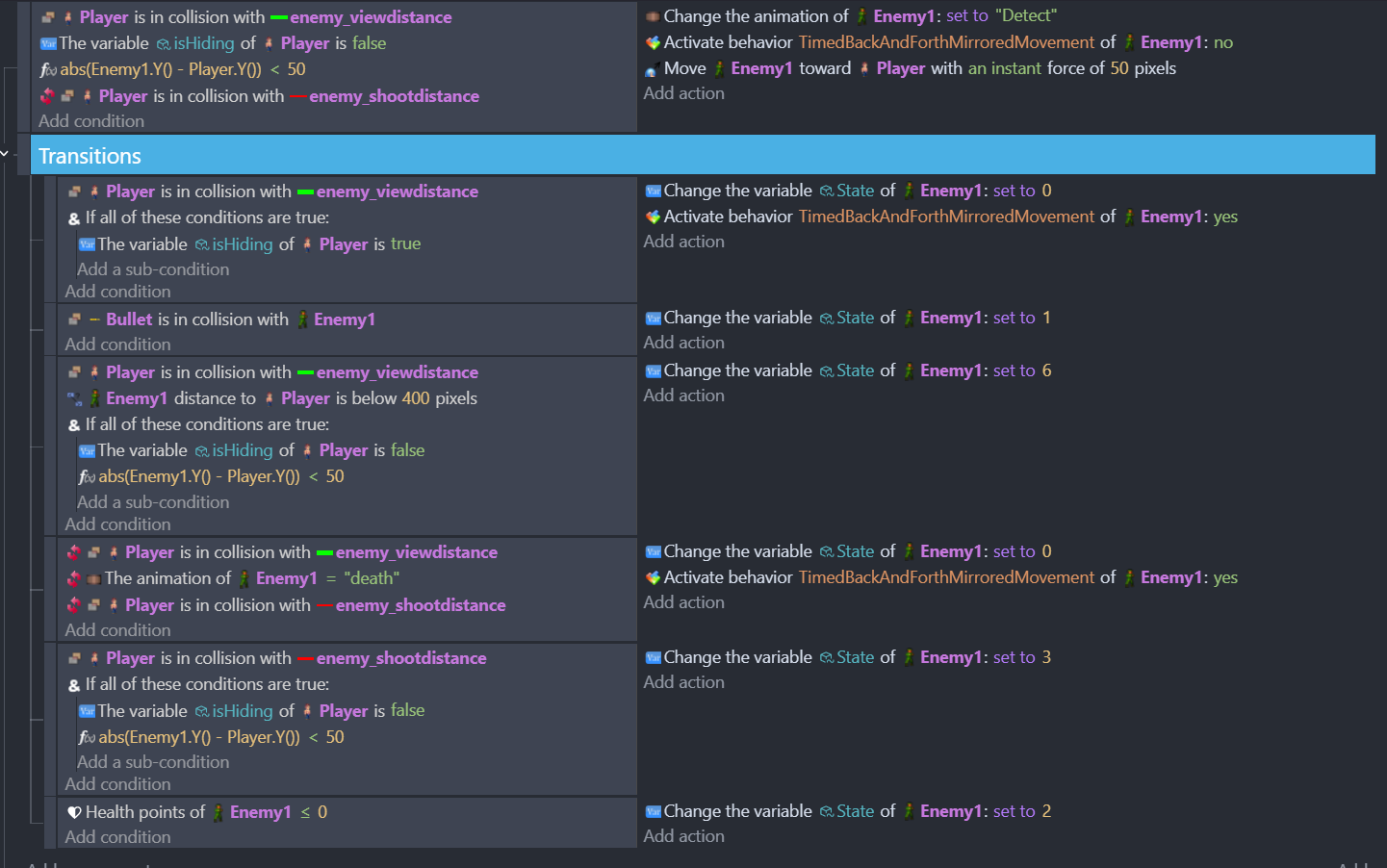
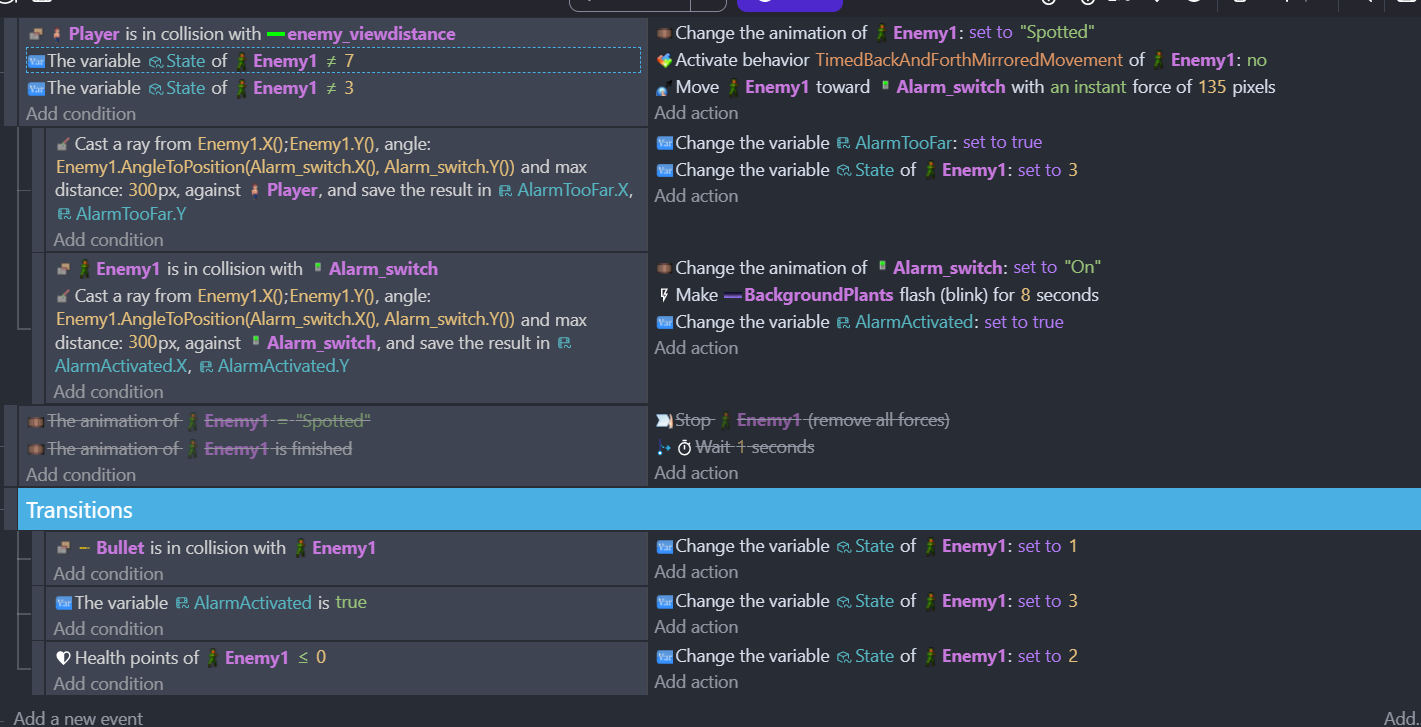
So here’s what I’ve changed and now for the Enemy states:
Enemy Idle - 0
I’m sure the detection and movements aren’t right, but I couldn’t figure out a better condition to use for it. I’m going to try and change all the AND statements to just be part of the condition and see what happens. Previously it hasn’t always worked when I’ve done that, but to your point it’s likely many other things are wrong and I need an easy way to walk through each state.
Thank you for all the insight and any further guidance or suggestions you have.