how do i make a timer run for exactly half of a second? i was testing loops with precise timing, but the 0.5 second timers beep goes off sync from the 1 second timers honk after a bit of time. does anyone know why 0.5 seconds isnt actually half of a second?
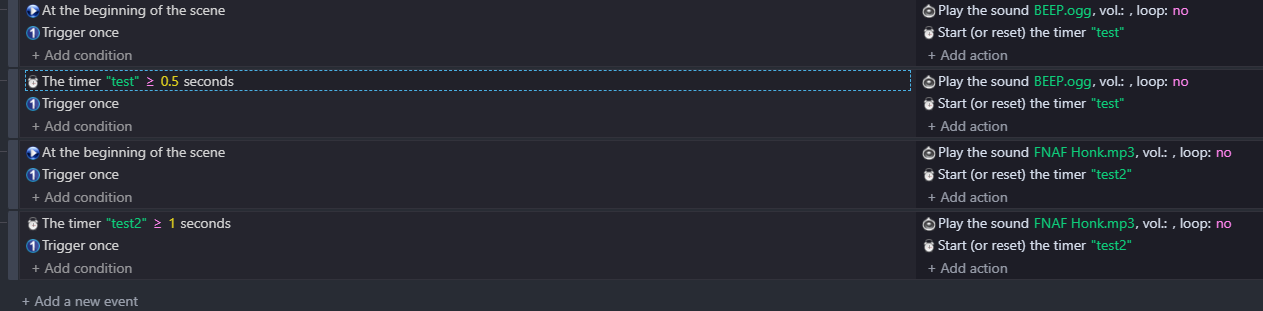
At beginning of scene is already being triggered once so you can remove trigger once from these events
You can try this
Add condition Compare two numbers
Put there mod(TimeFromStart(),1) Greater than 0.5
Trigger once
Check if that will loop properly
hello!
timers are not frame perfect nor are consistent for some reason (trust me i did tests). this is probably due to the fact that we cannot input frame in timers. we have to go with seconds. devide 1 by 60 and you get 0.0166666666666666666666666666666…
to fix this. simply have one timer for both sound effects:

this should get rid of unsync problem
if you want to alternate the sounds. only put one sound per action (instead of two like i did)
yeah thanks. also theres one thing when i put this timer so that an effect would play on the exact beat of a song. i checked the exact timestamps for when the effect should play in seconds. i put the exact same time but the effect happens a couple miliseconds earlier than the songs beat.

here i put the effect to happen on the exact timestamp, which is 0:05:38 in the program i checked (last number is goes from 0-100)
hello! Audio - GDevelop documentation
go into your resource tab. go to your music file and select: preload as sound
this makes your audio files preloaded and decoded into the cache. meaning that it will play with zero delay. alternatively, you can use the “preload sound in cache” action.
this doesnt follow best practices, as loading a large audio file into cache is not performance/memory friendly.
if you want to add a sound effect synced to a music. it is better to open the music in a music software (ex: cakewalk is free). and add the sfx there. then use the “play offset of a sound in channel” to switch between the two musics.