How do I make 3d enemy stealth ai? Because I can use raycasts but its harder to do a cone of them. Is there an extension or template for it?
could you use a 2d triangular object and point inside as its vision cone? …maybe with less than and greater than for a z check and then if true do a raycast to check whether somethings hidden by an obstacle
well, the problem is that if I do that, they will be able to spot you through walls. Which I guess isn’t that bad but still kinda annoying. Do you think using a raycast to detect if theres a wall first and then detecting with the 2d cone would work?
I was thinking do the raycast last with a NOT —and have all the obstacles in a group. So you do point inside first and then check if theres obstacles in the way…but not every frame
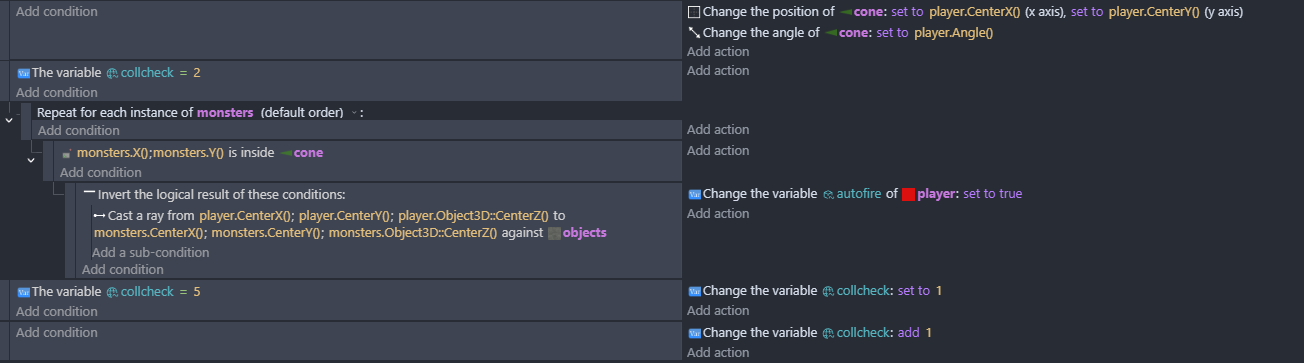
this sort of thing …i just did it as an auto fire for the player. But I thought having the raycast as a final thing just to check there’s a clear shot would be better than firing off loads of raycasts all the time. the origin and center of the cone are in the corner.
Okay, thx for the help
um…i personally wouldve just used a cone object lmao
or a conical rectangle? - I thought an xy check on a triangle would be efficient and there’s not normally a lot of terrain in games. I think (i might be wrong as i don’t do a lot of 3d) that the collision area for a cone shape is still a box. In the game that i tested it in there’s no up down at all and so i didn’t do a z check, but i was thinking of just doing z>objectZ()-200 and less than objectZ()+200. It would be good to test out various systems and see which are most efficient and effective
hi, for almost every game i make i use raycasts, (big stealth game fan) and one handy-dandy thing i found out, is that for top down games, if you put Enemy.angle() +/- one of the angles you wanna use for the cone, it just works. So if you want a 45 degree cone, we can do that by starting with
Enemy.angle() + 45
Enemy.angle() - 45 (since we als need the opposite angle for the cone)
Enemy.angle() + 40
Enemy.angle() - 40
Enemy.angle() + 35
Enemy.angle() - 35
and so on, keep substracting 5 until you reach zero and you will have a great cone for your stealth game.
oh thx. how did i not think of that lol
1 Like