how to make 3D objects set to grid when creating. just as an example to make it easier to understand what I mean - placing blocks like in minecraft. I already have objects set up to create with 3d ray cast and I understand how to do it in 2d but 3d is new and confusing to me.
Hi There’s a snap to grid extension - i think its just x and y but you could use something like round(object.Z()/gridsize)*gridsize for the z
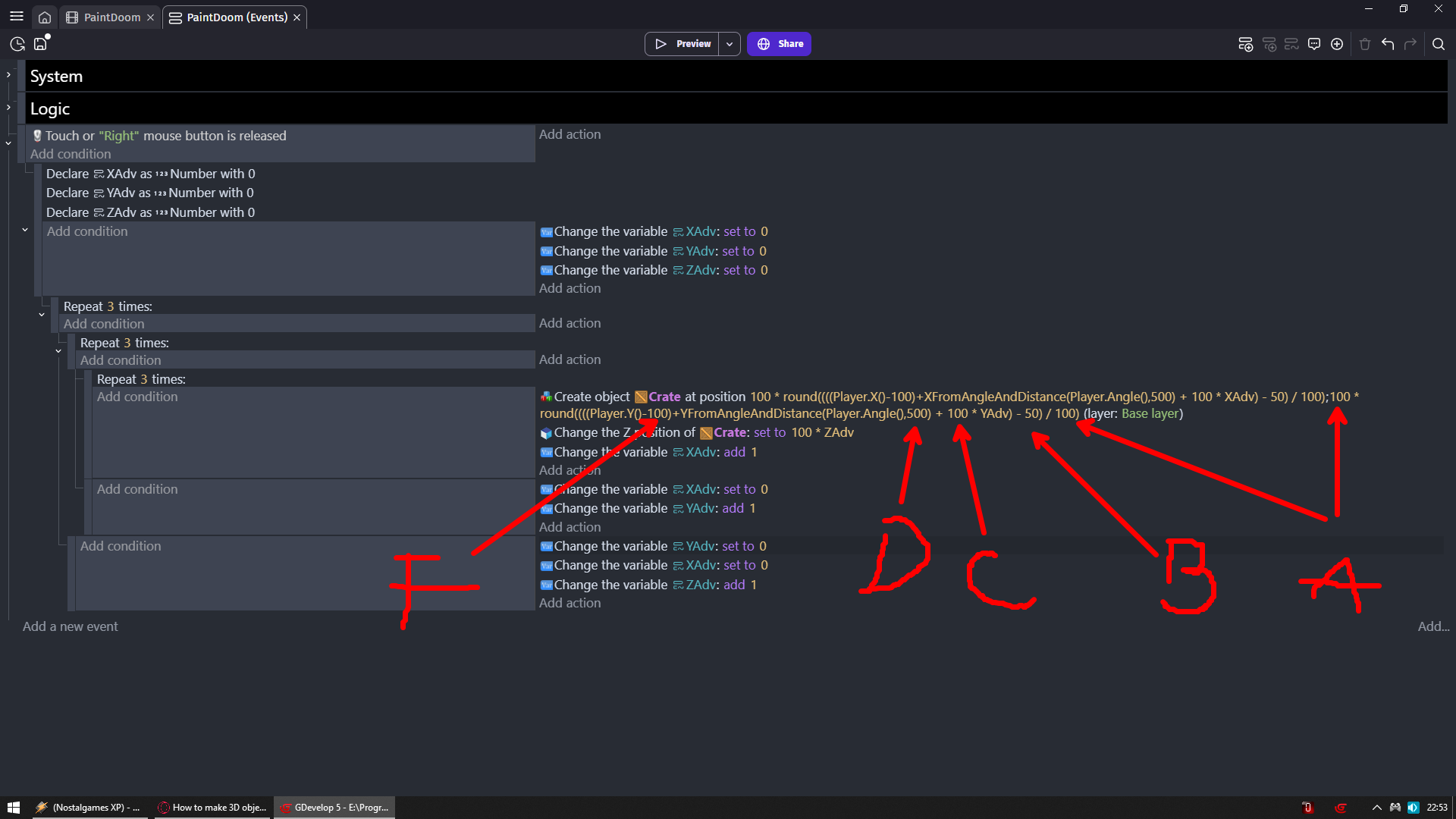
I am explaining only values for Y position since its easier to do it without messing image
But it is exactly the same for X and Y
A - BOTH need to be the same and that is size of your grid cell like its width/height
B - ALWAYS needs to be half of A
C - Spaces between your objects most likely will always be same as A
D - Distance from origin position in this case player
E - I forgot E but let’s say 2nd action that change elevation under create object action is E
Anyway there is NO starting value so it starts from 0
You could go for example
100 * round((Player.Object3D::Z() + 100 * ZAdv) / 100)
And preview link include that
F - Offset so whatever you create is in center
100 is width of my cubes
So if instead of repeat 3 times i would repeat 4 then i would need to put there 150
If 5 times then 200
And so go on
Press tilde to reset scene
RMB to place 3 x 3 cube