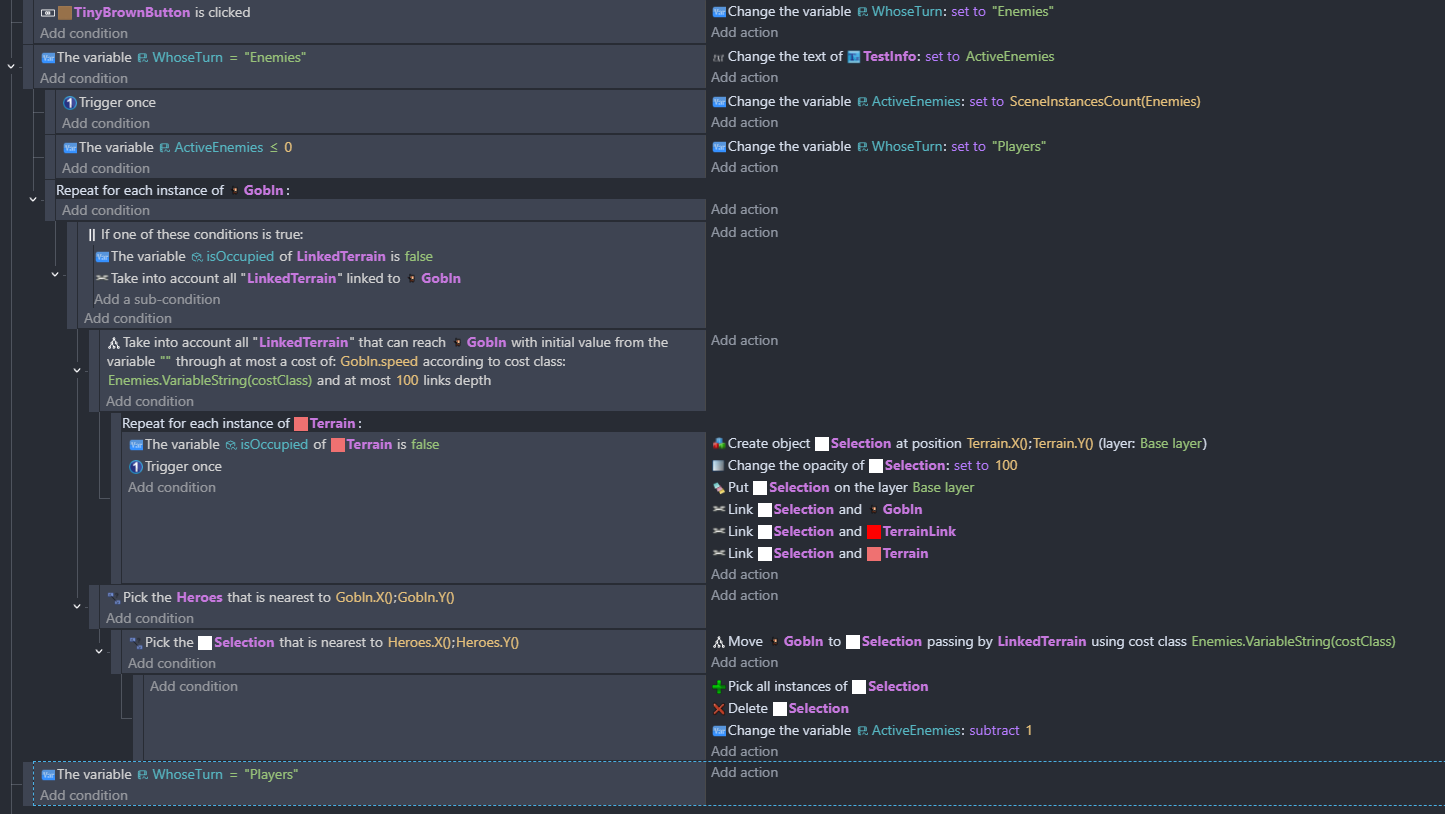
I am building off of the Tactical game grid movement example and trying to add enemy AI movement. This example game plus the wiki are the only resources I’ve been able to find for the Linked Objects Tools extension so I’m sort of trying to reverse engineer it…
How do I…
How do I make enemy AI move using the Linked Objects Tool Extension.
What is the expected result
Enemies should find the nearest Hero, use the linked objects tool extension to find the best path towards the hero based on cost, and then move to that location.
I’ve attempted to create something that follows the logic below:
For each goblin, find all linked terrain that is not occupied that can reach the goblin’s position based on it’s speed value (3).
For each terrain, create an object “Selection”.
Pick the Heroes closest to the goblin.
Pick the Selection that is nearest to Heroes.
Move Goblin to Selection passing by LinkedTerrain
What is the actual result
Enemies are not moving in the correct direction or the correct number of spaces. Especially if I “skip” my turn and have the enemies go again, the enemies just retrace their steps to where they currently are when they should be moving closer.