Hi there,
I have a Group of Objects that are my Tutorial Frame, Text object, Next button etc… they all should move around the screen together when a player presses “next” without having to specify the next XY coordinates for each of them separately. The trick for me is how to do it so they maintain their position against each other.
What’s the easiest way to do it?
Thanks!
Hi - So they’re all in the same object group?
perhaps there’s a behaviour for this…(there often is for things that I come up with!!..so wait for that to come along first before reading any further!..have a cup of tea or something…it’s coming! either zero or mr men…one of them will suggest something easier than this)
In the off-chance that there isn’t…You could number them with a variable that counts up ‘count’ at the beginning of the scene inside a repeat for each ‘object group name’ event and at the same to save their positions relative to a new object (that you hide ‘move’) in an array (positions[count].x=object.X()-move.X(), positions[count].y=object.Y()-move.Y())
when moving them by moving the hidden object ‘move’, again use ‘repeat for each’ and the variable that counts up to refer to each in tern and change their position to the corresponding x y stored in positions
object id=count then change pos to …move.X()+positions[object.id].x, move.Y()+positions[object.id].y
2 Likes
@petlimpet writing it in chinese would have made it only slight more complicated to implement  but definitely great creativity, appreciate the response!
Any chance there are other more straightforward solutions?
3 Likes
If you put the objects on their own layer you could move the layers camera.
You could use the sticker behavior to stick all the objects to say the frame or a background object. Then just move the frame or background object. The other objects will follow it.
You could create it as a custom (prefab) object and just move the prefab. That would require more work.
3 Likes
您好 - 所以它们都在同一个对象组中吗?
或许有现成的行为可以实现这个功能……(我想到的很多东西都有现成的行为!!所以请耐心等待,直到我找到答案再继续阅读!……喝杯茶什么的……答案马上就来!可能是 Zero 或者 Mr. Men……他们中的一个会提出比这更简单的方案。)
万一没有现成的行为……你可以用一个变量“count”给它们编号,在场景开始时,使用“repeat for each”事件循环,同时将它们相对于新对象(你用“move”隐藏的)的位置保存到一个数组中(positions[count].x=object.X()-move.X(),positions[count].y=object.Y()-move.Y())。
当通过移动隐藏对象“move”来移动它们时,再次使用“repeat for each”循环,并使用计数变量依次引用每个对象,将它们的位置更改为存储在 positions 中的相应 x 和 y 值。
对象 id=count,然后将 pos 更改为……move.X()+positions[object.id].x, move.Y()+positions[object.id
Ps …if there’s an easier way than Keith’s … putting them on the same layer and moving said layer…then I’ll eat my shorts.
But why do things that are easy…where’s the fun in that!
2 Likes
Hey @sunbathingecko!
To be honest, someone should really make an extension for this, or some easier way to do it. I’ve struggled with this a lot in games, and end up just having to simplify it with offsets and tweens and all sorts of workarounds.
(P.S: The solutions I used probably won’t be helpful since I mainly just have the things move from one spot to another)
2 Likes
Offsets are another option. I was curious about how simple I could make it with offsets.
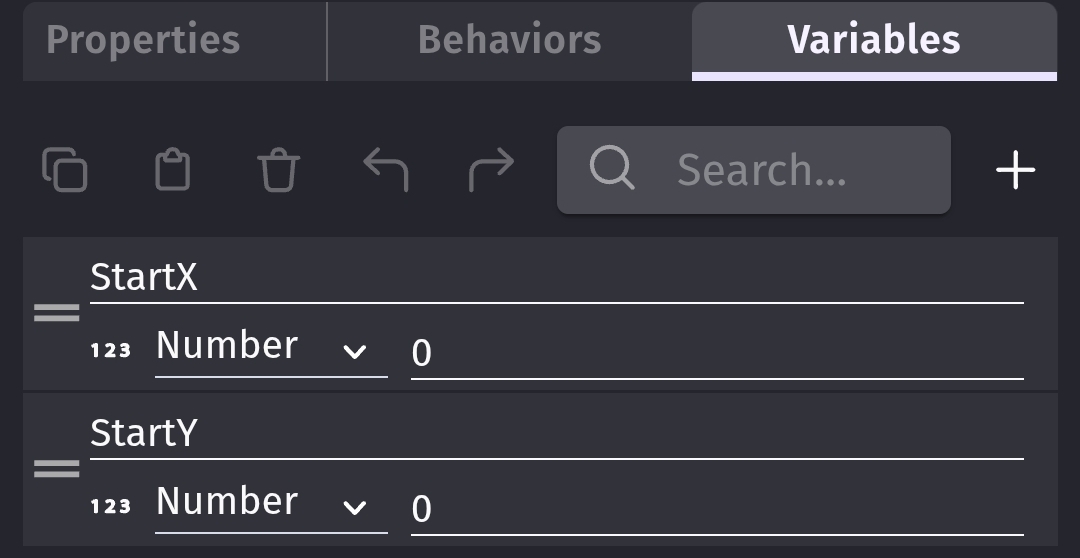
I created several objects and added them to a group named Group1. I added an object named drag and for testing I gave it the drag behavior. I gave all of the objects the object variables of StartX and StartY.
It was much simpler than expected.
The object variables.
Dragging or positioning the drag object causes all of the Group1 objects to follow it.
The sticker technique is even easier. Add the sticker behavior to all of the objects except the object that they’re being stuck to. Put all the objects except the target object into a group. Then, just stick the group.
Moving the drag object moves all of the other objects.
3 Likes
The sticker technique is even easier. Add the sticker behavior to all of the objects except the object that they’re being stuck to. Put all the objects except the target object into a group. Then, just stick the group.
This worked like magic, thanks @Keith_1357 , very much appreciated!!
@petlimpet and @SnowyRawrGamer also thanks for your contributions
2 Likes