I am trying to make a shooter game by having a raycast from the camera to the enemies, and vice versa with the enemies firing back, but with no objects.
What is the expected result
The raycasts should not go through 3D objects
What is the actual result
The raycasts are going through 3D walls
Related screenshots
Please include a screenshot of the full related events including both conditions and actions.
And screenshots to help showing us the issue.
Project files (optional)
Insert a minimal game showing your issue in a .zip or .rar.
A very simple explanation on how raycast works - GDevelop sends out a ray from source to destination, and checks if it hits the target object. Any other objects it hits along the way are ignored.
In your screen shot:
the first raycast will check if the ray hits a New3DBox object, and will delete it if so,
regardless of what other objects are in the way.
the second raycast checks whether the ray hits a Character_Enemy_Gun object and will reduce that objects health. It ignores any objects it crosses along the way, because you are only testing for Character_Enemy_Gun objects.
Ideally you’d raycast to the enemy’s position and check for collision with the wall object. However, you want to raycast into the screen, so raycasting to an object won’t work.
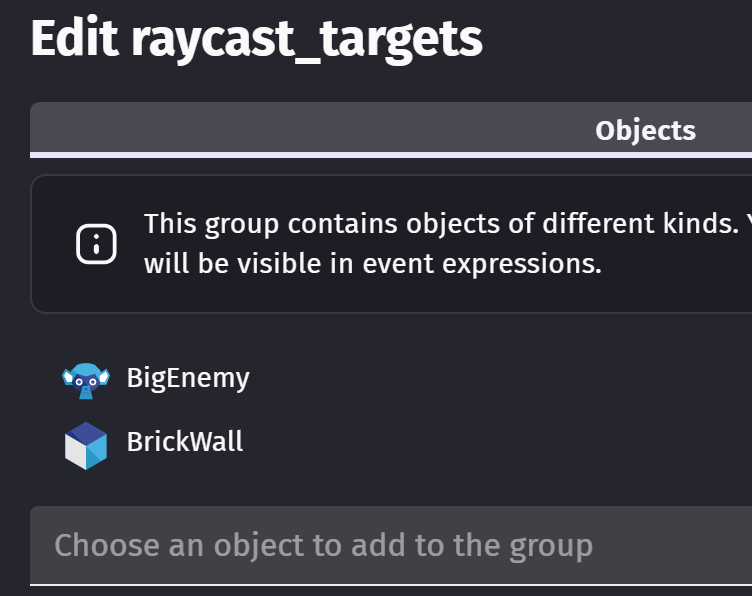
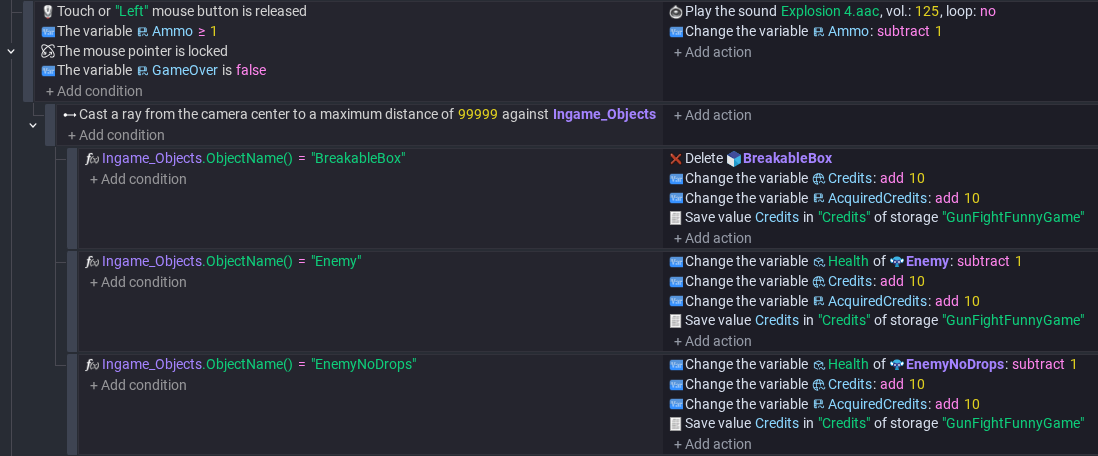
A possible solution is to put the enemies and walls into an Object Group, and raycast as before but against the object group. This will select the first object in the group that the ray collides with.
As subevents, you check the object type. If it’s a wall, destroy it (or do nothing). If it’s an enemy, inflict damage.
Hey it seems that this doesn’t want to work raycasting from object instances any ideas? I don’t really care because it doesn’t really matter but if there was a solution then awesome
hi - re the above events is the raycast detecting enemy here? …if enemy is in that group. might need another group minus enemy. or raycast from a point outside enemy